69
MEDIA CENTER
Using Movies
Movies allows you to rent movies that can be played on your
phone.
1. Tap > Movies.
x You must allow installation of non-Market applications
from Settings. Tap
> Settings > Security, and then
check Unknown sources.
2. Read the Terms of Service, enter the required information,
and then tap OK.
3. Follow the on-screen instructions to rent movies.
Using Play Movies
Play Movies allows you to rent movies from Google Play and
watch them on your phone.
1. Tap > Play Movies.
2. Log in with your Google account.
3. Follow the on-screen instructions to rent movies.
Enjoying YouTube
Watching Videos
1. Tap > YouTube.
2. Select and tap a video.
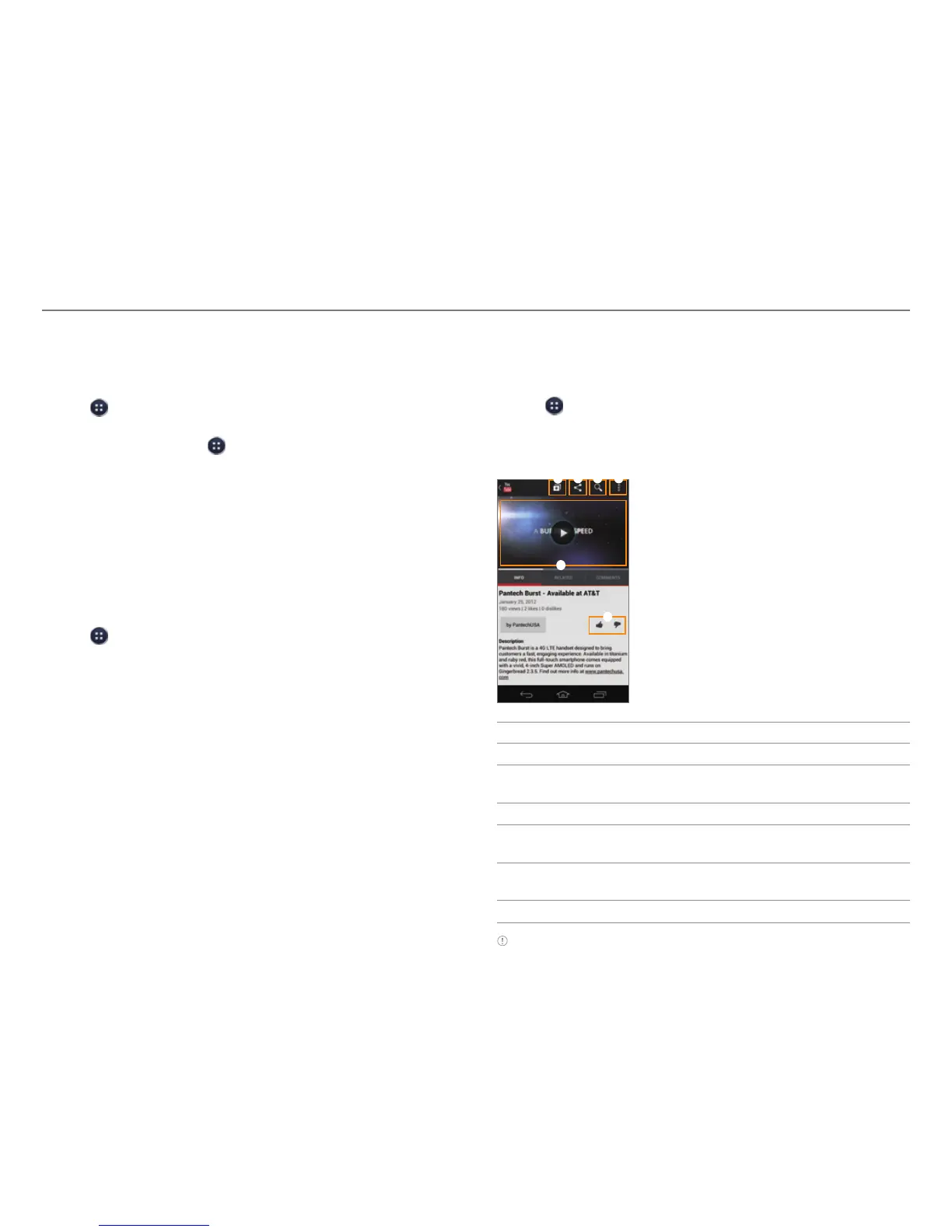
3. View the video.
5
3 4
1
2
6
No. Description
1
Log in with your Google account, Add accounts.
2
Share via Gmail, Messages, Bluetooth, or other
method.
3
Search for videos.
4
Copy the URL, flag the video, send feedback, access
settings, or view the help
.
5
Playback screen
x T
ap to pause or resume a video.
6
Rate the video.
Note Rotate the phone to landscape mode to switch to full screen
view.



 To Next Page