74
MENU FUNCTIONS
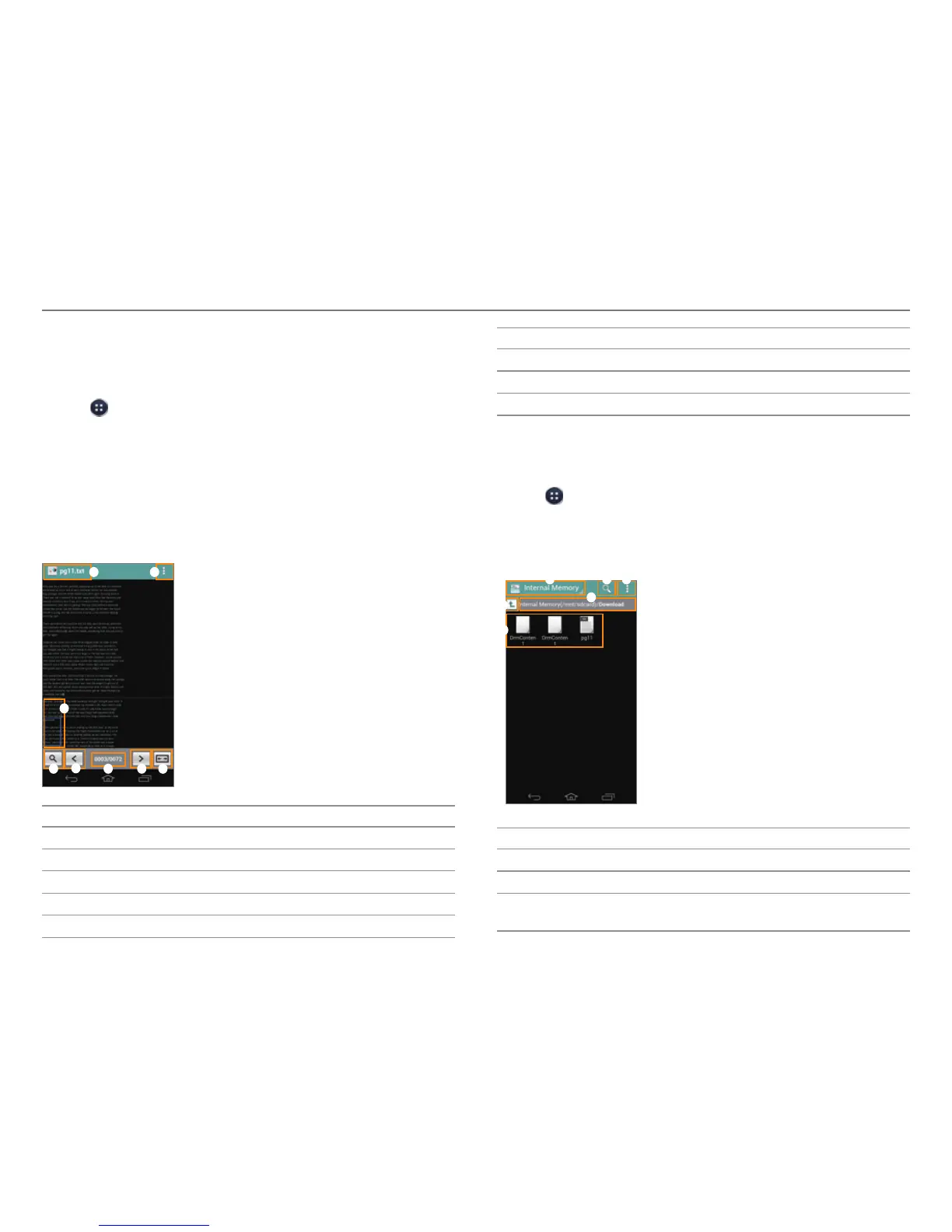
Document Viewer
Read documents in a variety of formats (.pdf, .xls, .ppt, .doc,
and more) on the phone.
1. Tap > Document Viewer.
2. Select and tap a document.
x Tap and hold a document to share it, delete it, or view
the document information.
3. Tap anywhere on the screen while a document is open to
use the following options:
x To zoom in or out, squeeze two fingers together or
spread them apart.
1
2
3
5
6 7 84
No. Description
1
Document name
2
Go to page, Word search, Share. Delete, Color setting
3
Highlighted portion of the screen
4
Zoom in or out.
5
Move to the previous page.
No. Description
6
Current page number/total number of pages.
7
Move to the next page.
8
Reset the screen height or width.
File Manager
Manage files that are stored in the phone or on a memory card.
1. Tap
> File Manager.
2. Select and tap a folder > a file.
x Tap and hold a folder or file to cut, copy, delete, rename,
share, zip, or view information.
1 2 3
5
6
4
No. Description
1
Switch between internal memory and a memory card.
2
Search for files.
3
Favorites, New folder, View options, Sorting options,
St
orage capacity, Refresh, Settings



 To Next Page