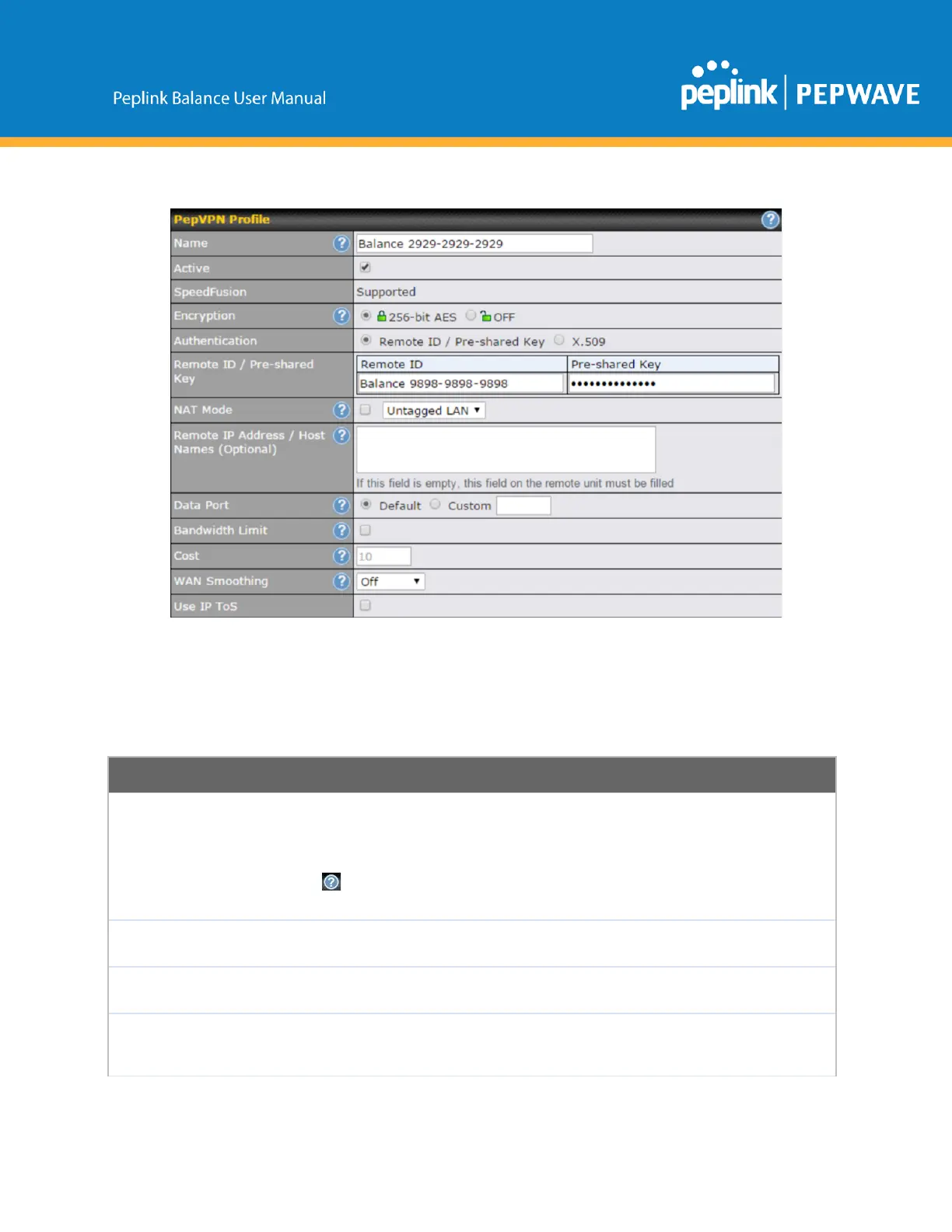
AlistofdefinedSpeedFusion
connectionprofilesandaLinkFailureDetectionTimeoptionwillbe
shown.ClicktheNewProfilebuttontocreateanewVPNconnectionprofileformakingaVPN
connectiontoaremotePeplinkBalanceviatheavailableWANconnections.Eachprofileisformakinga
VPNconnectionwithoneremotePeplinkBalance.
Thisfieldisforspecifyinganametorepresentthisprofile.Thenamecanbeany
combinationofalphanumericcharacters(09,AZ,az),underscores(_),dashes(),
and/ornonleading/trailingspaces().
Clickthe iconnexttothePepVPNProfiletitlebartousetheIPToSfieldofyourdata
packetonPepVPNWANtraffic.
Whenthisboxischecked,thisVPNconnectionprofilewillbeenabled.Otherwise,itwillbe
disabled.
Bydefault,VPNtrafficisencryptedwith256bitAES.IfOffisselectedonbothsidesofa
VPNconnection,noencryptionwillbeapplied.
SelectfromByRemoteIDOnly,PresharedKey,orX.509tospecifythemethodthe
PeplinkBalancewillusetoauthenticatepeers.WhenselectingByRemoteIDOnly,be
suretoenterauniquepeerIDnumberintheRemoteIDfield.
Copyright@2019Peplink



 To Next Page