OPC / OPD / OPE
Vision Configurator Software
2015-07
43
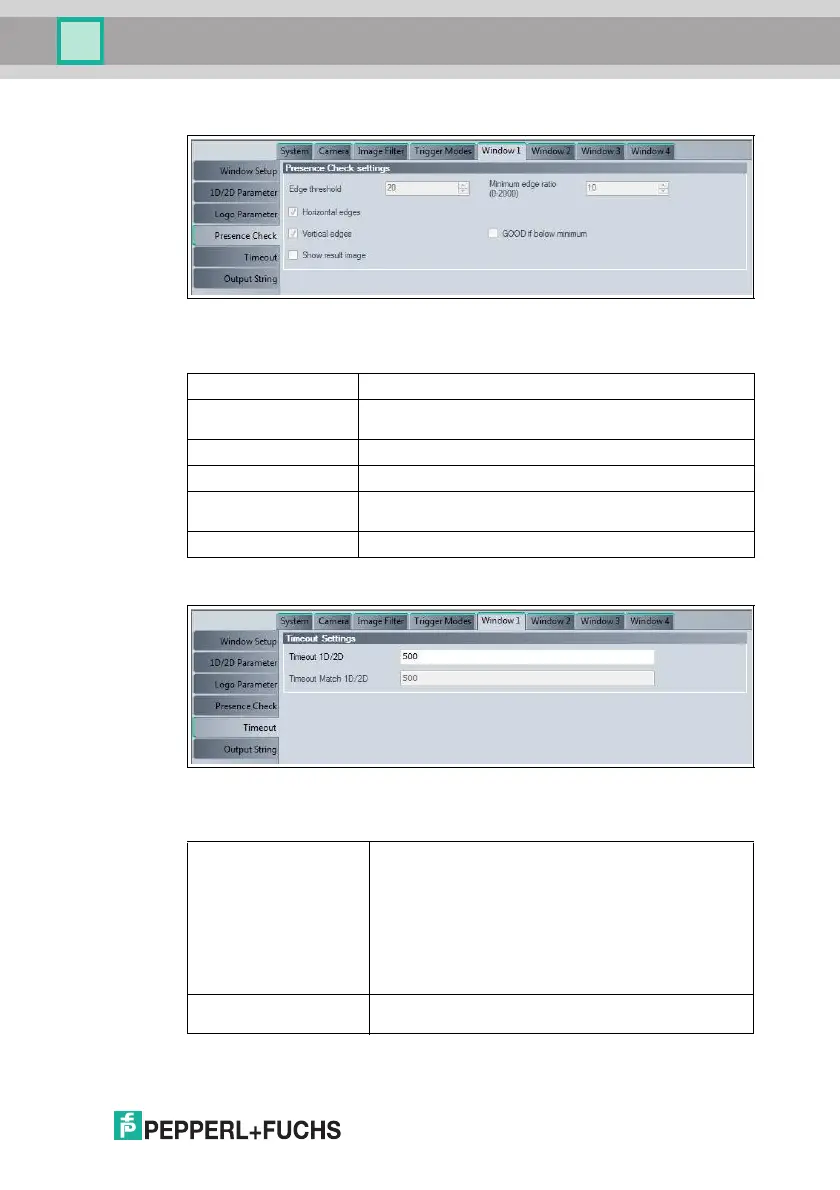
Figure 7.17 Window tab, Presence Check menu item
Presence Check Settings
Figure 7.18 Window tab, Timeout menu item
Timeout Settings
Window Tab, Presence Check Menu Item
Edge threshold Measurement for the shape of the edge
Minimum edge ratio
(0 - 2000)
Measurement for the number of edges in the image area, up
to a maximum of 2000
Horizontal edges Activates counting of horizontal edges
Vertical edges Activates counting of vertical edges
GOOD if below
minimum
The result is "good" if the number of edges in the image area
is below the Minimum edge ratio value
Show result image The edge image is plotted in the input image
Window Tab, Timeout Menu Item
Timeout 1-D/2-D Maximum duration for the image capture and decoding of
the code in milliseconds. If the read times out, it is
considered to have failed.
The image capture time is the time required to transfer the
image to the memory. This time depends on the Image
format image size that you have set under System >
Image > Format.
The decoding time depends on the symbology and code
quality. The decoding time is displayed on the Vision
Configurator image display under Time. See chapter 7.7
Timeout Match 1-D/2-D Maximum duration for inspection type Match 1D/2D in
milliseconds.



 To Next Page