PHYLINK Covert Network Camera User Manual
DO
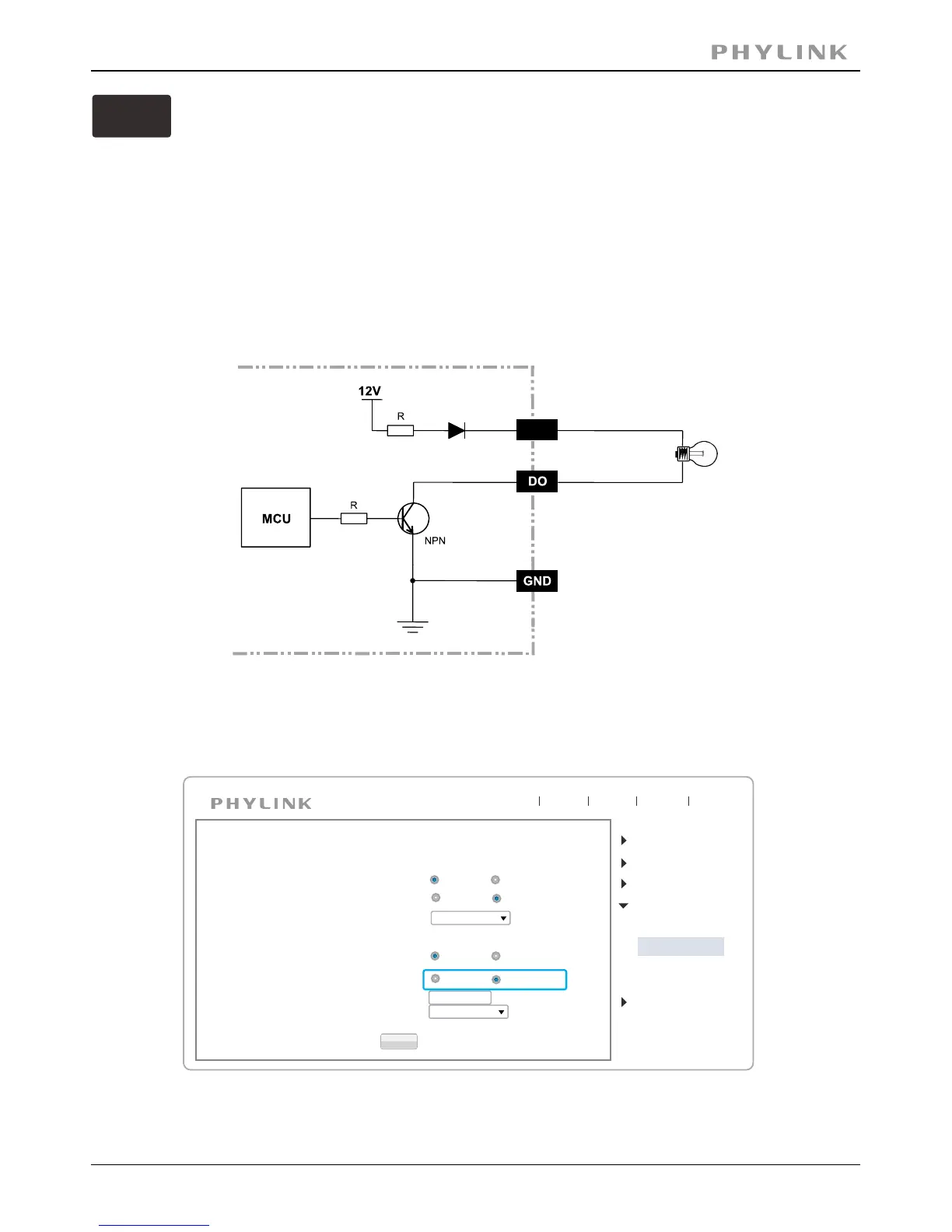
With a maximum load of 400mA and a maximum voltage of 40V DC, This terminal
has an open-collector NPN Darlington transistor with the emitter connected to the
GND terminal.
If used with an external relay, a diode must be connected parallel with the load,
for protecting against voltage transients.
Please refer to the following diagram for the connection method.
Be careful about choosing Open or Grounded when connecting to a alarm or
other device, you need to make the relevant settings to the camera
as the picture below:
The Grounded means that DO short to GND inside the camera.
The Open means that DO is floating inside the camera.
PWR
Apply
Digital I/O Setup
Digital input:
Active state is:
Camera
Network
Storage
Task
Tools
Live View
Wizard
System
Support
Reboot
Digital output:
Active state is:
Enable
Disable
Open
Grounded
Enable
Disable
Open
Grounded
Motion Detection
Digital I/O Setup
Schedule Setup
Task Management
Schedule:
Always
Post alarm:
5
Schedule:
Always
seconds (1-99)



 To Next Page