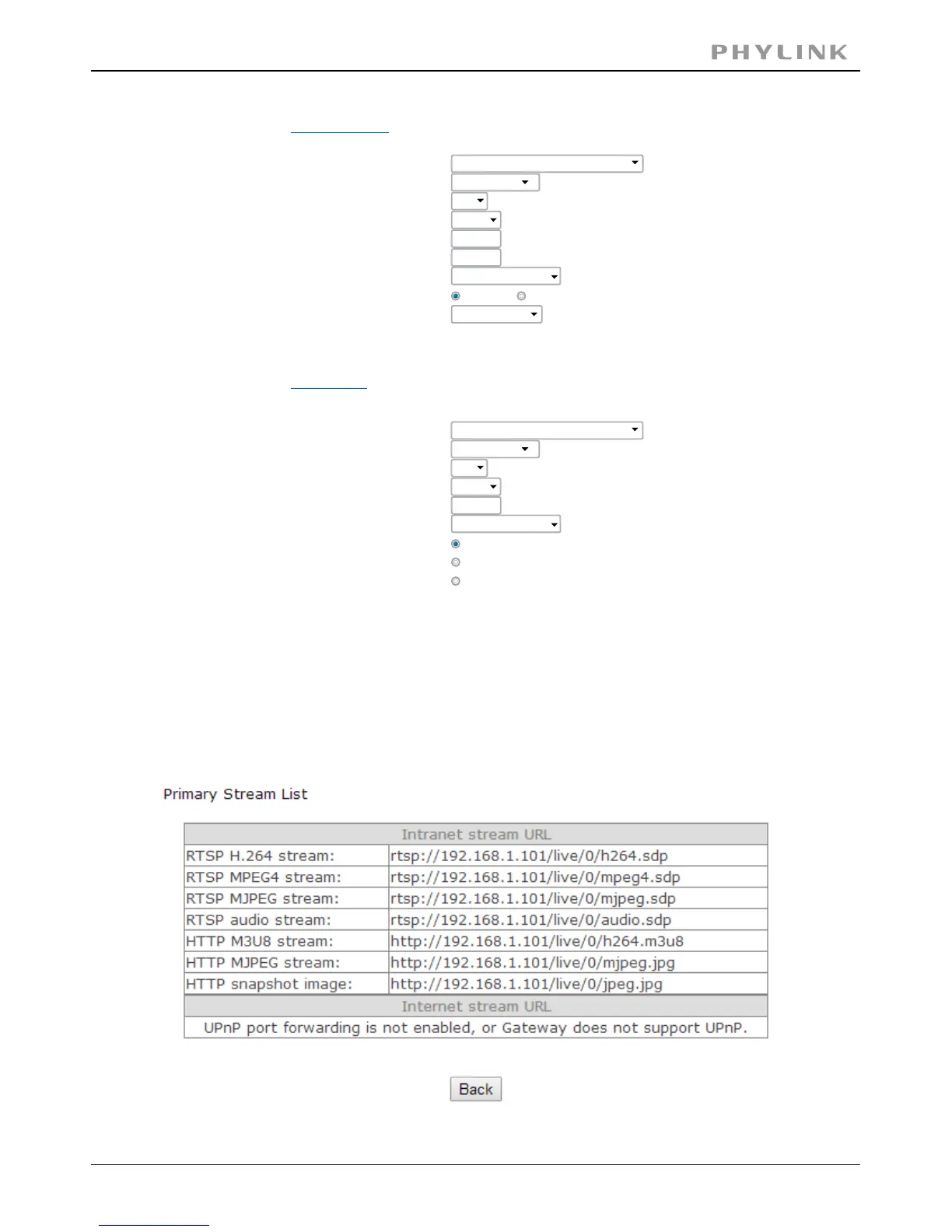
A sample of list as below:primary stream
Secondary stream:
Preset:
Image size:
Please choose bandwidth status...
512x228
10
fpsFrame rate:
H.264/MPEG4 bitrate:
256
kbps
50
(20-100)
90
(20-100)
MJPEG quality:
JPEG snapshot quality:
AAC-LC 16kbps
Audio:
Authentication:
Prerecord:
Enable Disable
Disable
Mobile stream:
Preset:
Image size:
Please choose bandwidth status...
176x114
6
fpsFrame rate:
H.264/MPEG4 bitrate:
30
kbps
70
(20-100)JPEG snapshot quality:
AAC-LC 16kbps
Audio:
Authentication:
Enable (For PC)
Alternate (For Windows Mobile)
Disable (For other mobiles)
For access to specific types of audio or video encoding, you bypass the main login
screen and go directly to a link for the camera with the desired protocol and
encoding type. The full list is accessible by clicking on the blue underlined“Primary
Stream Secondary Stream Mobile Stream”,“ ”, or“ ”links in the Stream Setup page.
PHYLINK Covert Network Camera User Manual



 To Next Page