9 CONTROL PANEL
User’s Manual Planmeca ProOne 19
9.2.1 Selecting exposure area for panoramic exposures (optional)
Segmenting is an optional feature. Refer to section 14.2.1
“Program licences (P2100)” on page 82 for more
information.
This optional segmenting function allows you to take
panoramic exposures of different jaw segments. It will
reduce the radiation dose as only diagnostically
interesting areas need to be X-rayed.
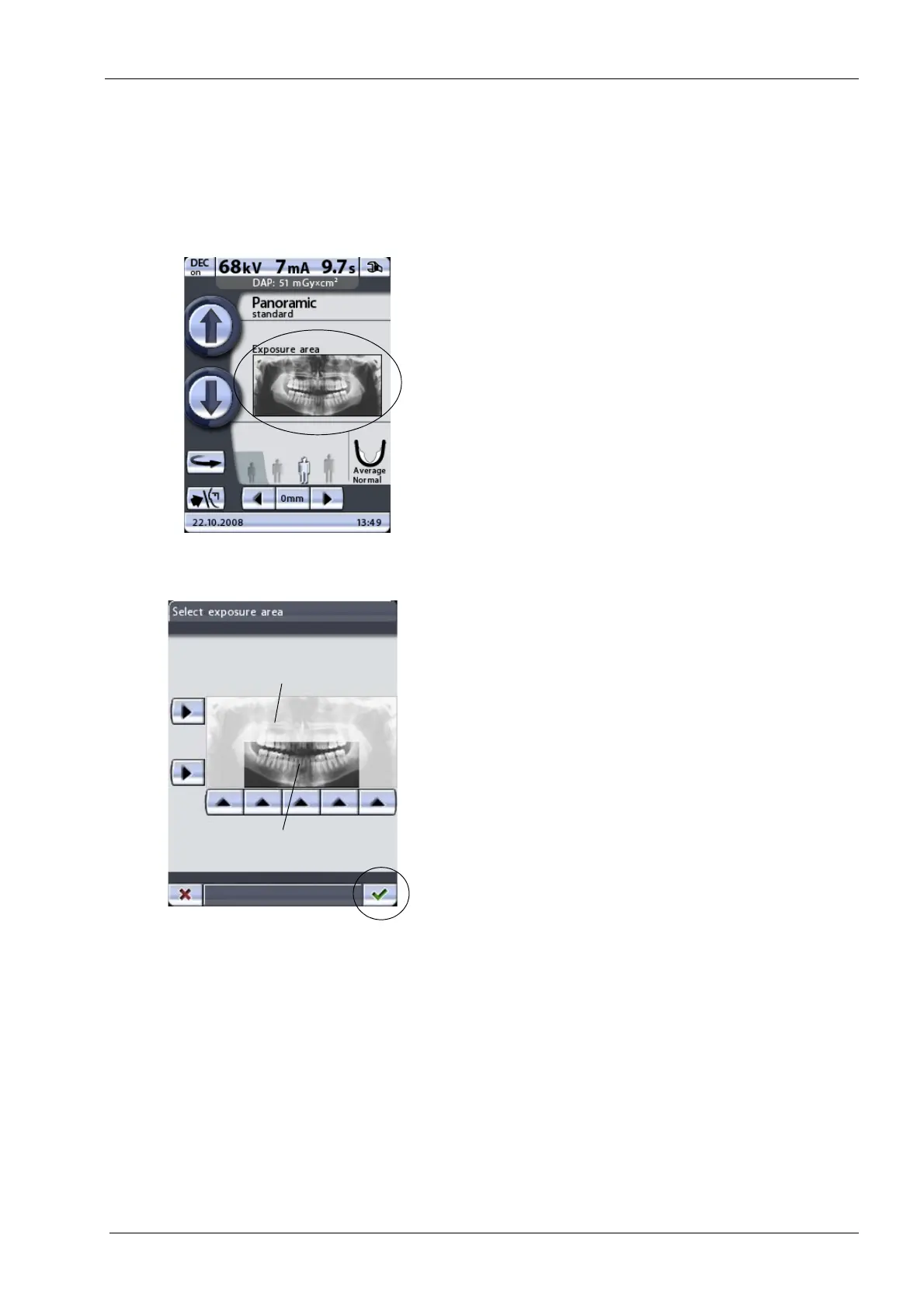
Touch the exposure area field on the main display.
The
Select exposure area
display appears. The display
shows an image which is divided into two horizontal and
five vertical segments.
Touch the corresponding arrow button(s) to deselect the
segment(s) that should not be exposed. The segments
which will not be exposed are shown faded. The
segments which will be exposed are shown in full colour.
Touching the arrow of a deselected segment again will
change the colour of the segment back to normal.
The image shown on the display is only an example. The
exposed image will not equal the example image.
Accept the selections you have made, and return to the
main display by touching the green check mark button in
the bottom right corner of the display.
Deselected segments -
Segments to be exposed
no exposure














 To Next Page