14 SETTINGS
User’s Manual Planmeca ProOne 91
• Beam check (P2520)
If required, you can take a beam check image to check
the position of the X-ray beam on the sensor.
The X-ray beam must be aligned and the sensor must be
calibrated by a qualified service technician before a beam
check is started.
On the
Testing programs (P2500)
display, select the
option
Beam check
. The
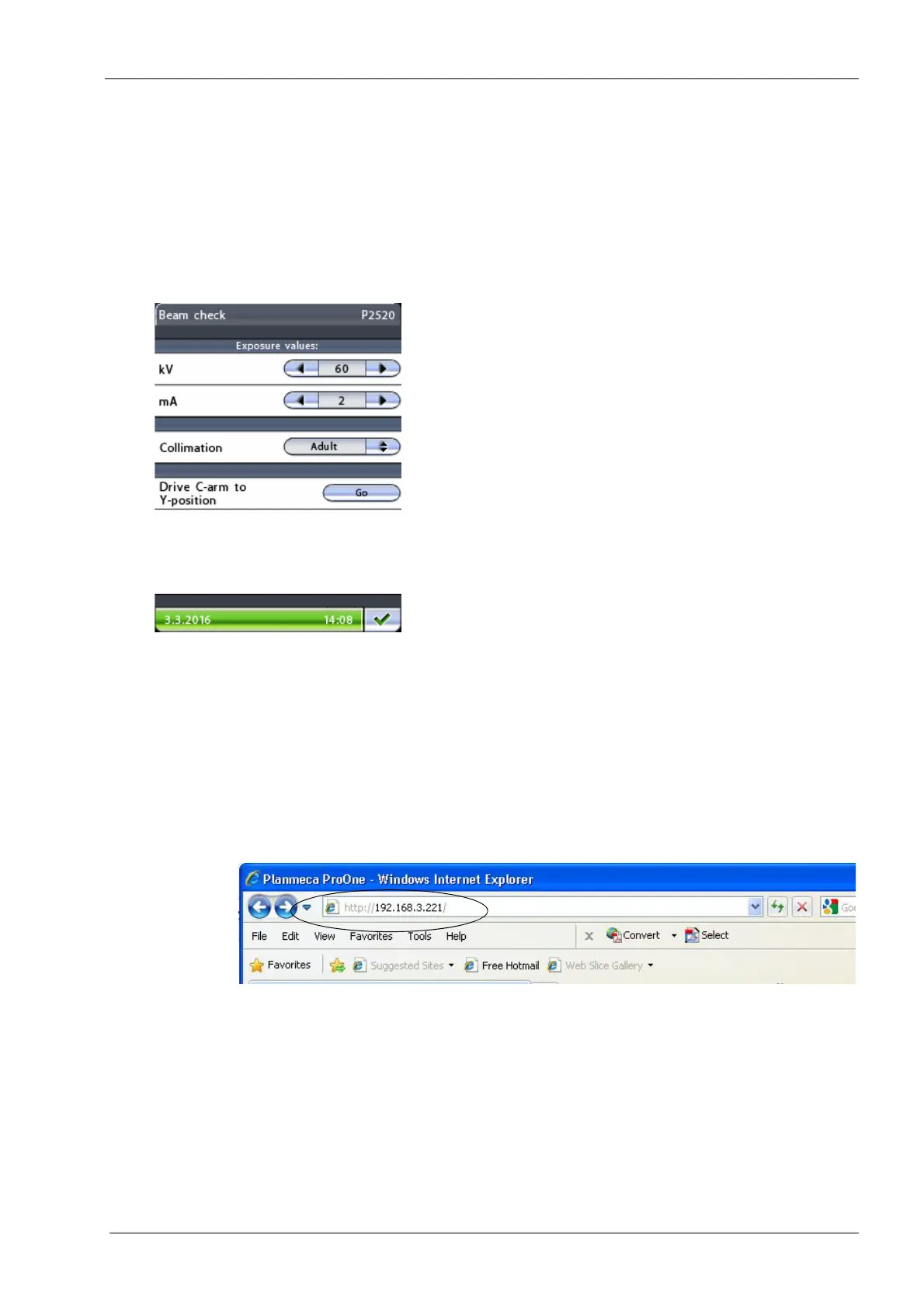
Beam check (P2520)
display will
be shown.
The default exposure values (60 kV/2 mA) for a beam
check exposure will be shown on the
Beam check
display.
If you wish to improve image contrast, select a higher kV
value by touching the corresponding arrow in the kV field.
The beam position can be checked for both adult and
child collimation. When you touch the button in the
Collimation
field a display will appear where you can
select
Adult
or
Child
. Select
Adult
for the first beam check
exposure.
The beam check image will be shown on the web browser
screen (e.g. Internet Explorer) of the computer that is
connected to your X-ray unit.
Open the web browser. Enter your X-ray unit’s IP address
in the address bar.
You can find the IP address on the control panel
Network
settings (U1400)
display
(
Spanner icon
>User
tab
>Network settings>IP address).














 To Next Page