11
Customer Support 1-855-IMI-POGO (464-7646) • www.presspogo.com
*Not actual size
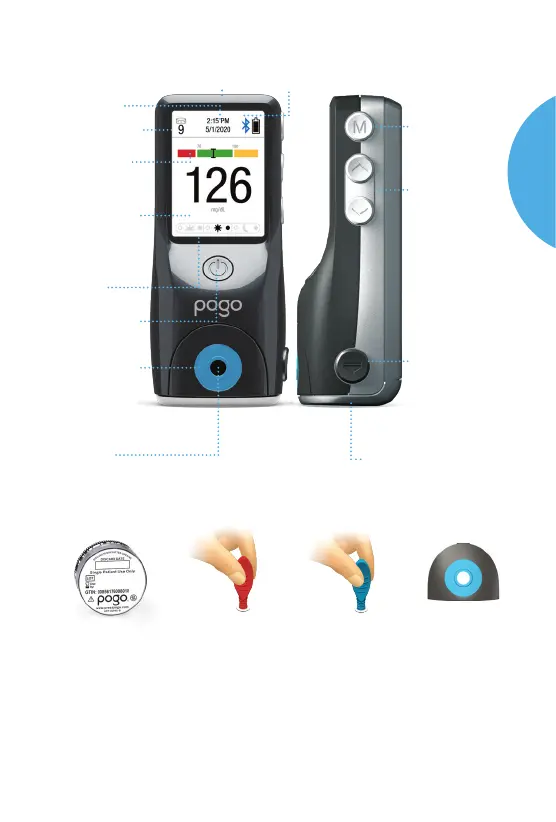
The POGO Automatic
®
Meter
Time/Date
USB Data Port
Bluetooth Connectivity (see page 52)
Tests Remaining
in cartridge
Display Screen
Review test
results and
other information
Quick Graph
Know if you are in
range instantly
Power Button
Turn meter
on/o
Test Platform
Removable
for cleaning
(see Cleaning
on page 64)
Test Port
Press nger
here for testing
Scroll Buttons
Mark test results,
scroll through
memory and
averages, and
change meter
settings. Press
to see tests
remaining
Cartridge
Door Button
Opens door
Cartridge Door
Opens to insert
and remove cartridge
M Button
Access memory
and menu mode
POGO Automatic
Test Cartridge
For availability of Control Solution, ask for it where you purchase your test
cartridges, or contact your healthcare provider or Intuity Medical Customer
Support to nd out where to obtain supplies and replacement parts.
Supplies and Replacement Parts
POGO Automatic
Test Platform
POGO Automatic
Control Solution
Applicator Level 2
POGO Automatic
Control Solution
Applicator Level 1
Pre-/Post-Meal
Markers
Note: 15-day discard date is an example only. Check label on cartridge top for accurate
open expiration date.
POGO
AUTOMATIC
SYSTEM



 To Next Page