Vacuum On
58
Customer Support 1-855-IMI-POGO (464-7646) • www.presspogo.com
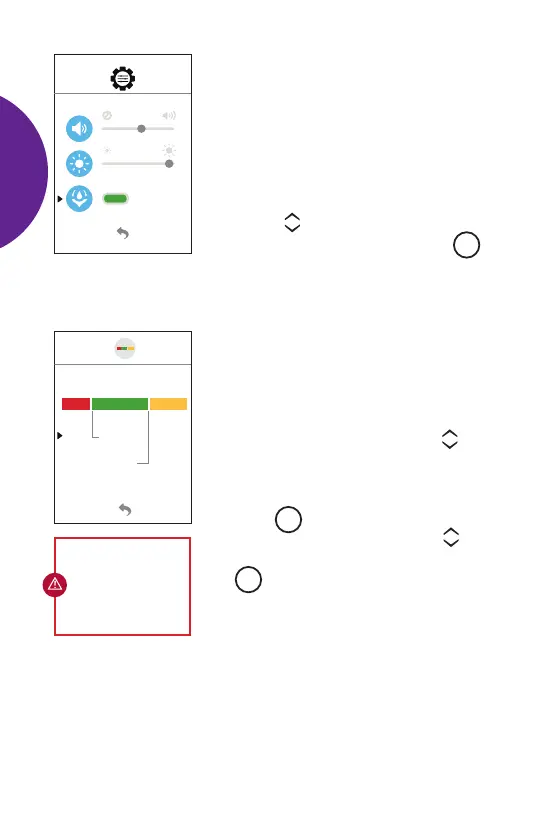
Vacuum
The vacuum helps the meter obtain the
blood sample during testing. The meter
vacuum will be factory set to ON. To ensure
optimal blood sample collection, it is best
to leave the vacuum setting ON. However,
you may turn o the vacuum if you prefer.
• Use the scroll buttons to either turn
the vacuum ON
or OFF. Press the
M
button to conrm setting. Use the "back”
arrow at bottom of screen to return to the
Main Set-Up Menu.
70
mg/dL
180
70
180
Quick Graph Settings
The preset range is 70 – 180 mg/dL. You
can change the preset target range to your
desired target range.
To adjust the target range, use the scroll
buttons to move the blinking arrow to the
low or high target.
Press the
M
button to select and the
number will begin to blink. Use the scroll
buttons to change the number. Press
the
M
button to conrm setting.
The low target can be set from
60 – 110 mg/dL. The high target
can be set from 120 – 300 mg/dL.
Use the “back” arrow at bottom of screen
to return to the Main Set-Up Menu.
IMPORTANT:
Discuss your
target ranges with
your healthcare
professional.
SETTING
UP
METER



 To Next Page