26
Customer Support 1-855-IMI-POGO (464-7646) • www.presspogo.com
Performing a Control Solution Test
Ensure that a test cartridge is installed
and that there are tests remaining. Control
Solution testing will not work without the
vacuum feature turned on in the Set-Up
Menu (see Vacuum on page 58).
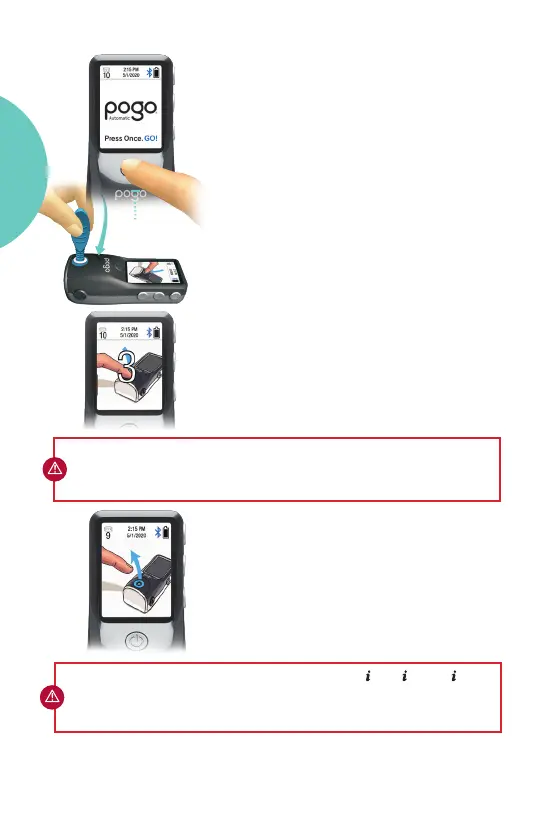
• TURN
ON
METER.
• Aer a screen check, the meter will
prompt you when ready for testing.
• Open foil pouch and remove a new
Control Solution applicator for use.
• Place the POGO Automatic Control
Solution applicator tip (with foil-end
facing downward) over the test port.
Press down and hold.
• Aer a 3-2-1 countdown, the applicator
tip will be lanced.
• The meter beeps and an arrow signals
that you can remove the applicator. A
pass or fail result will be displayed aer a
4-second countdown.
• Discard the applicator aer use.
IMPORTANT: If your control result appears as an
redo the control test with a new applicator. If this continues to happen, call
Intuity Medical Customer Support at 1-855-IMI-POGO (464-7646).
E-4 , E-2 , or NO
Power
Button
IMPORTANT: DO NOT LIFT APPLICATOR AFTER LANCE. Hold in place while
meter collects Control Solution.
GETTING
STARTED



 To Next Page