27
Customer Support 1-855-IMI-POGO (464-7646) • www.presspogo.com
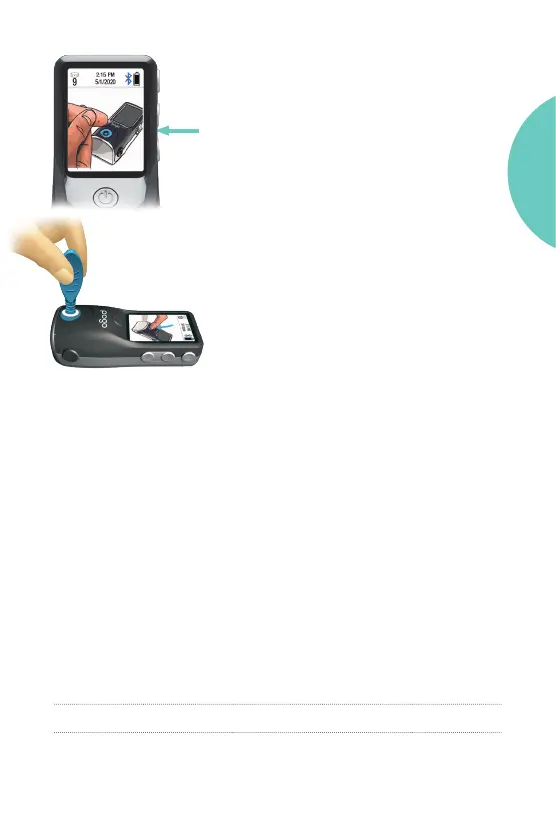
Unexpected Meter Display
If this screen appears, the meter did not
receive enough control solution from
the applicator. You have 90 seconds to
complete the control test. When there are
60 seconds le, the meter will count down
to 0.
Pick up the control solution applicator.
Press back down into test port.
• Wiggle the tip back and forth or side to
side to transfer solution to the cartridge.
REPEAT until you get a result or meter
times out. If meter times out, repeat test
with a new applicator.
Control Solution Results
Expected Results
The meter reads the Pass Range for both Level 1 and Level 2 Control
Solutions automatically from the cartridge barcode and compares
the result to the range for the level of control used.
The range is assigned as the mean value +/- 15%. The table below
gives an example of the expected value for each Control level and
resulting calculated Pass Range.
Control Level
Avg.
Response
(mg/dL)
Expected
Value -15%
(mg/dL)
Expected
Value +15%
(mg/dL)
Pass Range
(mg/dL)
Level 1 75 64 86 64 - 86
Level 2 150 127 173 127-173
GETTING
STARTED



 To Next Page