126
mg/dL
70
180
2:15 PM
5/1/2020
9
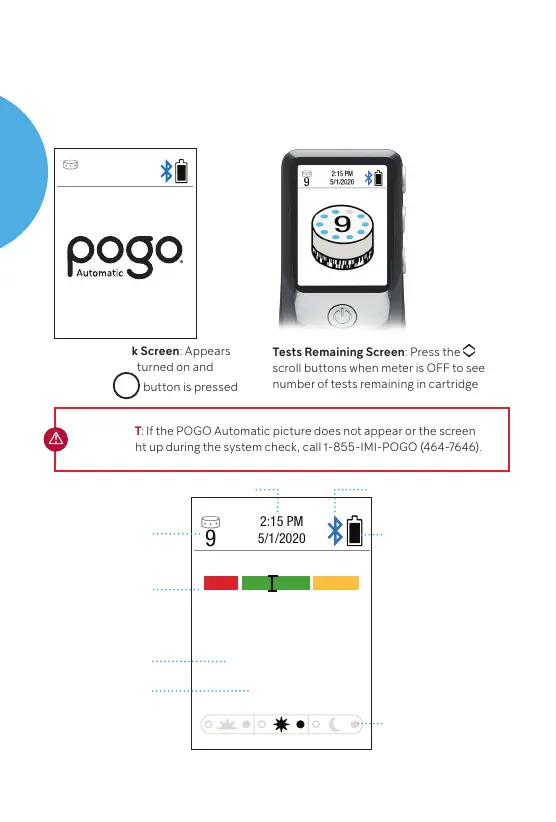
System Check Screen: Appears
when meter is turned on and
when
the
M
button
is pressed
Tests Remaining Screen: Press the
scroll buttons when meter is OFF to see
number of tests remaining in cartridge
IMPORTANT: If the POGO Automatic picture does not appear or the screen
does not light up during the system check, call 1-855-IMI-POGO (464-7646).
12
Customer Support 1-855-IMI-POGO (464-7646) • www.presspogo.com
Meter Display
The meter uses symbols to guide you through testing and to let you
know if there is a problem with the meter or test procedure. When
you press the power button to turn on the meter, a screen showing
POGO Automatic should appear as a system check.
5/1/2020
10
Press Once. GO!
Tests Remaining
in cartridge
Date/Time
Meal Marker
Battery Status
Bluetooth
Quick Graph
Know if you are in
range instantly
Results Number
mg/dL
U.S. standard unit
of measure
(milligrams per
deciliter).
Results Screen
POGO
AUTOMATIC
SYSTEM



 To Next Page