70
180
13
Customer Support 1-855-IMI-POGO (464-7646) • www.presspogo.com
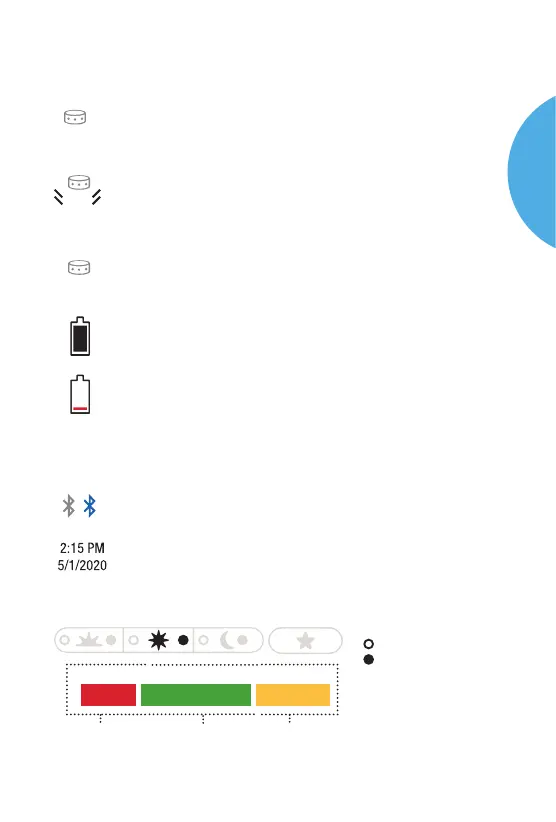
Status Bar Symbols
Symbol Description
The number of tests remaining in the current
cartridge. Decreases to 0 as you test.
The number will be blinking in red on the Results Screen
when two or less tests remain in the cartridge.
When no tests remain in the cartridge a “0” will appear.
If “X” appears under cartridge symbol, there is no
cartridge.
Solid black indicates enough battery power.
Indicates low battery. When red battery symbol appears,
meter has enough power for about 50 tests. Accuracy will
not be aected. However, change the battery as soon as
possible. Large low battery symbol displayed indicates
battery is dead.
Bluetooth
Date/Time
Results Markers
10
2
X
O On
Meter Display
The meter uses symbols to guide you through testing and to let you
know if there is a problem with the meter or test procedure. When
you press the power button to turn on the meter, a screen showing
POGO Automatic should appear as a system check.
2:15 PM
5/1/2020
10
Press Once. GO!
Breakfast Lunch
Black = Time Recorded
Before
Aer
Dinner Fasting
In Range
Out of Range
(Low)
Out of Range
(High)
POGO
AUTOMATIC
SYSTEM



 To Next Page