© 2017 PoolPak LLC. All rights reserved. MPK Series - Installation, Operation and Maintenance | 35
PoolPak
®
MPK Series IOM
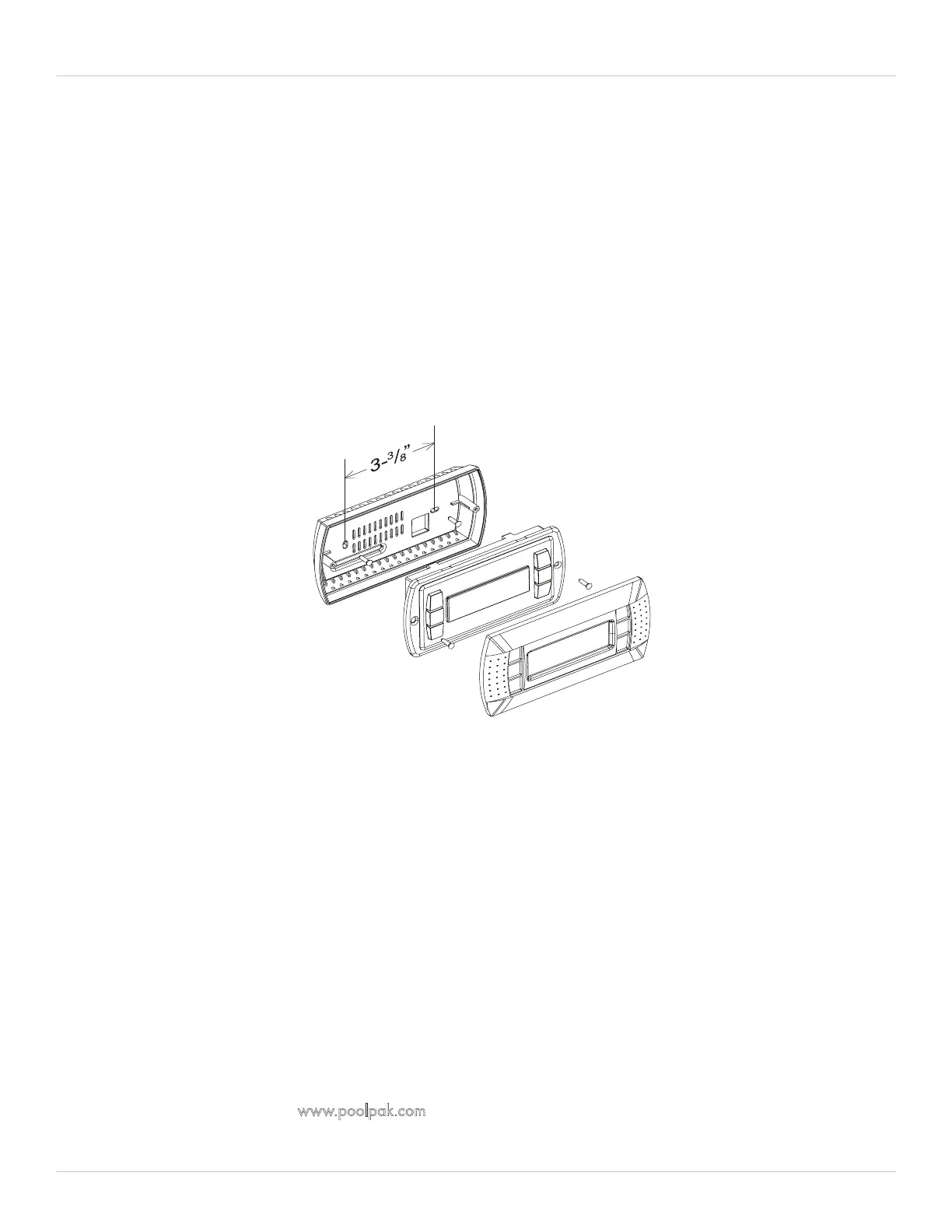
The wall mounting of the terminal first requires the back piece (A) of the RIU assembly. The RIU is designed to fit
a single gang, extra-deep electrical box mounted horizontally in the wall. The RJ25 jack and most of the black
cable should be placed inside the box before installing the mounting bracket. A ¾” hole must be drilled for the
6-conductor cable which connects the remote interface unit to the PoolPak® unit. The below is specific mounting
instructions that correspond to Figure 4-4.
1. Fasten the back piece (A) to the gang box using the rounded-head screws supplied in the packaging. Use the
screws that come with the box to secure the bracket.
2. Thread the 6-conductor cable through the back piece (A) and connect to the back of front panel (B).
3. Rest the front panel (B) on the back piece A and fasten the parts together using the flush-head screws supplied
in the packaging.
4. Finally, fit the click-on frame (C).
Multi-Unit Network Connection (2)
The CPCS utilizes a proprietary, private network to coordinate with other PoolPak units operating in the same space.
This allows up to five PoolPak units to coordinate operation using a master/slave scheme. The PoolPak units are
connected to each other by daisy-chaining the three terminals of T15. The network is RS485-based. The connections
should be made with 24 AWG minimum, category 5 cable. Use wires from the same pair for the connection of
terminals 1 and 2. The total network length should not exceed 500 feet. For total network lengths of more than
500 feet, contact the factory.
Building Automation System Connection (3)
The CPCS is capable of direct connection to LonWorks, Modbus, or BACnet BAS systems. This interface allows a
BAS to monitor detailed dehumidifier status information. It also allows the BAS to make set point changes, to control
occupancy modes and to control purge mode. These connections should be made with 24 AWG minimum, CAT5
cable or better. Use wires from the same pair for the connection of terminals 1 and 2.
When equipped with the LonWorks interface, the CPCS utilizes an Echelon FTT10 transceiver for connection to a
TP/FT-10 network channel. The Modbus RTU interface is RS485-based, with user selectable baud rates of 1,200,
2,400, 4,800, 9,600, and 19,200. When the CPCS is equipped with the BACnet/IP interface, RJ45 connection is
to the serial card port on control module CM1.
A user’s guide for installation and operation for each BAS interface option is available in the Engineering Literature
section of PoolPak website, www.poolpak.com.
Figure 4-4. Remote Interface Mounting Plate


 To Next Page