955725_4
35
Magnitude Failure Limit - This will set the point at which the Magnitude metric turns red.
Particles per Pound - Metric used to calibrate the monitoring system according to seed size.
Default is 10,000.
Deviation Alert Limit - This will set the point at which the Deviation metric will turn yellow.
Particles to Average -Defines the number of particles used in the rolling average of seed data to
calculate Magnitude, Deviation and Uniformity.
Particles per Pound Calibration - required whenever changing to a new Granular Product
(seed, fertilizer, insecticide, etc.)
Magnitude is a relative measurement comparing the amount of a product being applied in a given
area. Because magnitude is a unitless measurement, we must define Particles per Pound based on
the type of product being applied. Once this process is done, when application rates (lbs/AC) are
changed the system can continue to monitor the Magnitude and provide feedback when the target
rate is too far outside the limits.
How to calculate Particles per Pound
The calibration process begins with the Particles per Pound (Setup>Alerts>”Product Name”) on
the default setting of 10,000. Begin by going to the field and seeding until the Magnitude metric
stabilizes. Once a Magnitude reading has been obtained, that number should be entered into the
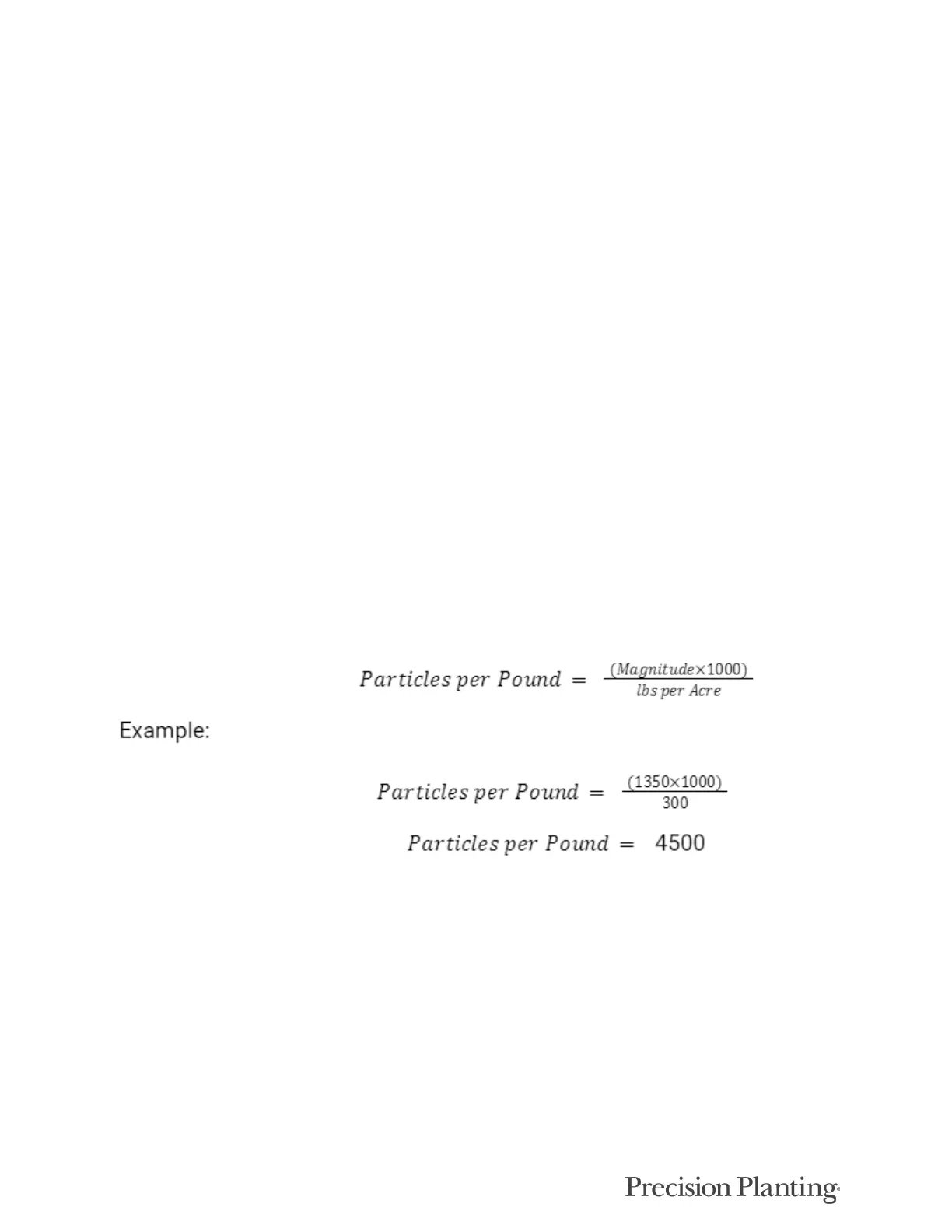
following equation:
In the above example the Magnitude reading taken during the infield test was 1350, the
application rate was 300 lb/acre, and the resulting Particles per Pound is 4500. The resultant
Particles per Pound should be entered on the Setup>Alerts>”Product Name” screen.



 To Next Page