EasyManua.ls Logo

Pro-Tech BE-0986 - Socket 0 CPU Information

Default Icon
122 pages
Print Icon
To Next Page IconTo Next Page
To Previous Page IconTo Previous Page
Loading...
Chapter 5 BIOS Setup
BE-0986 SERIES USER MANUAL
Page: 5-20
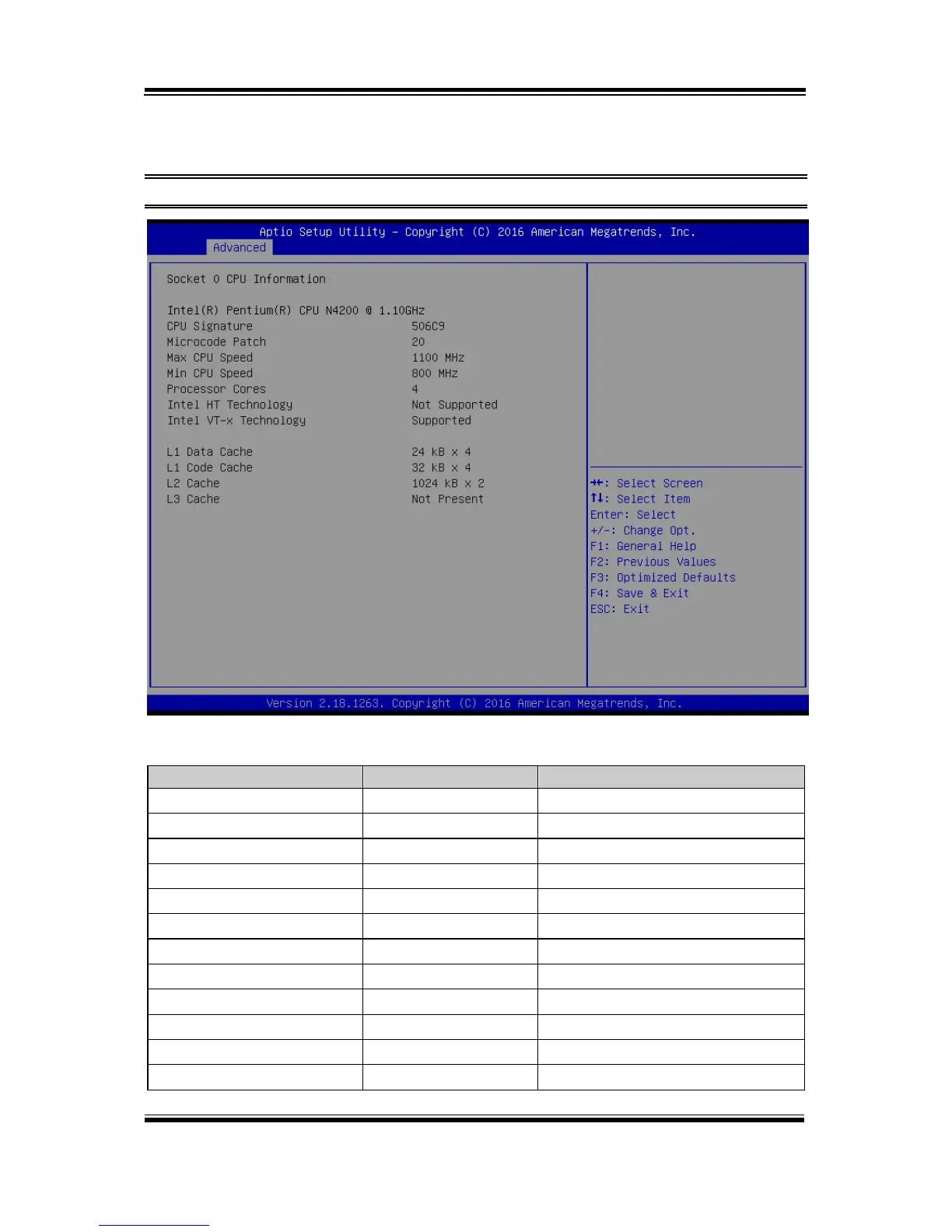
Socket 0 CPU Information
Menu Path Advanced > CPU Configuration > Socket 0 CPU Information
Socket 0 CPU Information Screen
BIOS Setting
Options
Description/Purpose
CPU Branding String
No changeable options
Displays CPU Branding String.
CPU Signature
No changeable options
Displays CPU Signature.
Microcode Patch
No changeable options
CPU Microcode Patch Revision.
Max CPU Speed
No changeable options
Displays the Max CPU Speed.
Min CPU Speed
No changeable options
Displays the Min CPU Speed.
Processor Cores
No changeable options
Displays number of cores.
Intel HT Technology
No changeable options
Displays Hyper Threading support.
Intel VT-x Technology
No changeable options
Displays VT-x support.
L1 Data Cache
No changeable options
L1 Data Cache Size.
L1 Code Cache
No changeable options
L1 Code Cache Size.
L2 Cache
No changeable options
L2 Cache Size.
L3 Cache
No changeable options
L3 Cache Size.

Table of Contents