PROLiNK® PRC3801 Wireless AC1200 MU-MIMO Dual-Band Gigabit Router
(2) How to enable band steering on Firmware version 16 and below?
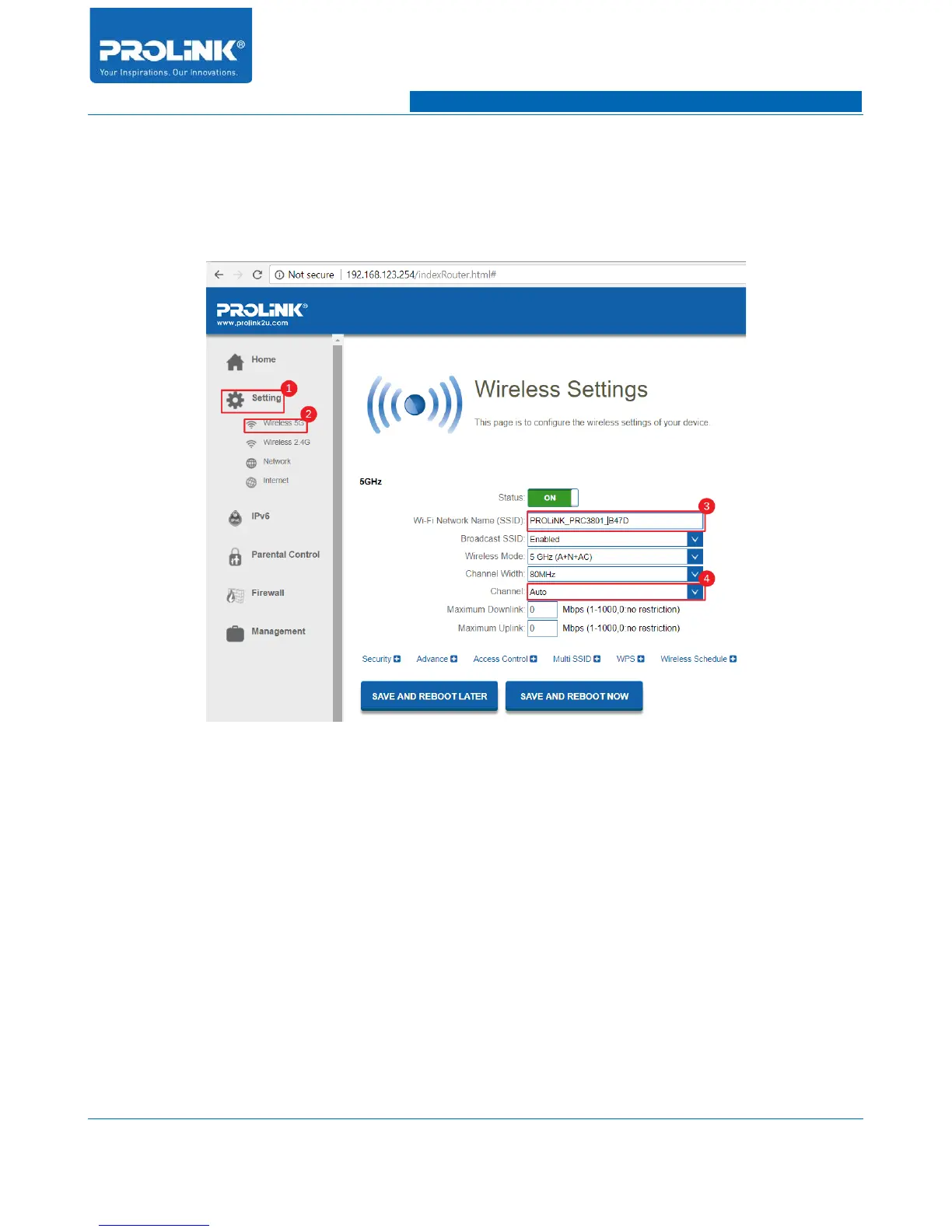
1. Band Steering is required to have same SSID for 2.4GHz and 5GHz band. Before begin
enabling the Band Steering feature you must go to Wireless Setting to change both SSID to
identical SSID. To change the SSID navigate to Setting → Wireless 5GHz.
2. After enter the Wireless 5GHz Setting change the SSID and make sure Channel is set to
auto.
3. Next click on “SAVE AND REBOOT LATER” to save the setting without reboot. Next
repeat the same method to change SSID for 2.4GHz. After finish change for 2.4GHz then
click “SAVE AND REBOOT NOW”.
75



 To Next Page