Simply disconnect the pump from the mains/power
supply for repair or maintenance work, among other
things.
–
With cables with plug: Provide adequate room
around the socket provided.
–
With cables without plug: Provide an appropriate,
easily accessible On/Off switching option in your
building installation.
Highlight the disconnection option as such and inform
staff about the electrical isolation option.
Connect the pump to the mains voltage using the mains cable.
9.2 Description of the terminals
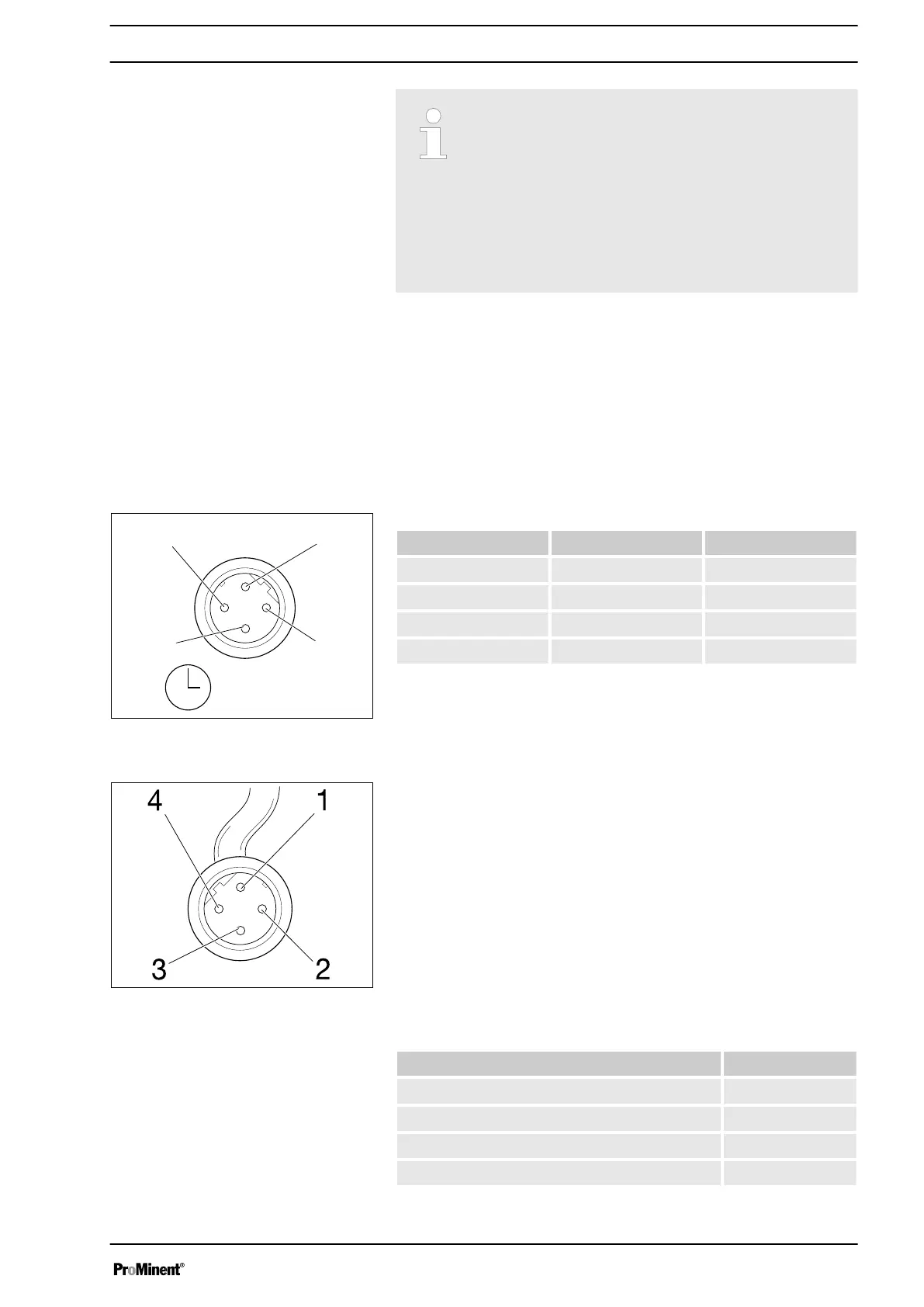
9.2.1 "Config I/O” terminal
There is an option to transmit the signals of 3 potential-free contacts as
inputs I: to the pump via the “Config I/O” terminal or issue contact signals
as Outputs O:.
Tab. 2: Assignment of pins
Pin Assignment 4-wire cable
1 Config I/O 1 brown
2 Config I/O 2 white
3 Config I/O 3 blue
4 GND black
Parameter Value
Voltage with open contacts 5 V
Input resistance 10 kΩ
Max. pulse frequency 50 pulses/s
Min. pulse duration 10 ms
Fig. 10: "Config I/O” terminal, pin assign‐
ment
Fig. 11: Plug to "Config I/O” terminal, pin
assignment
Configured as an input
Installation, electrical
31







 To Next Page