Configuration MP.11-R Installation and Management
RIP Parameters (Routing Mode Only)
141
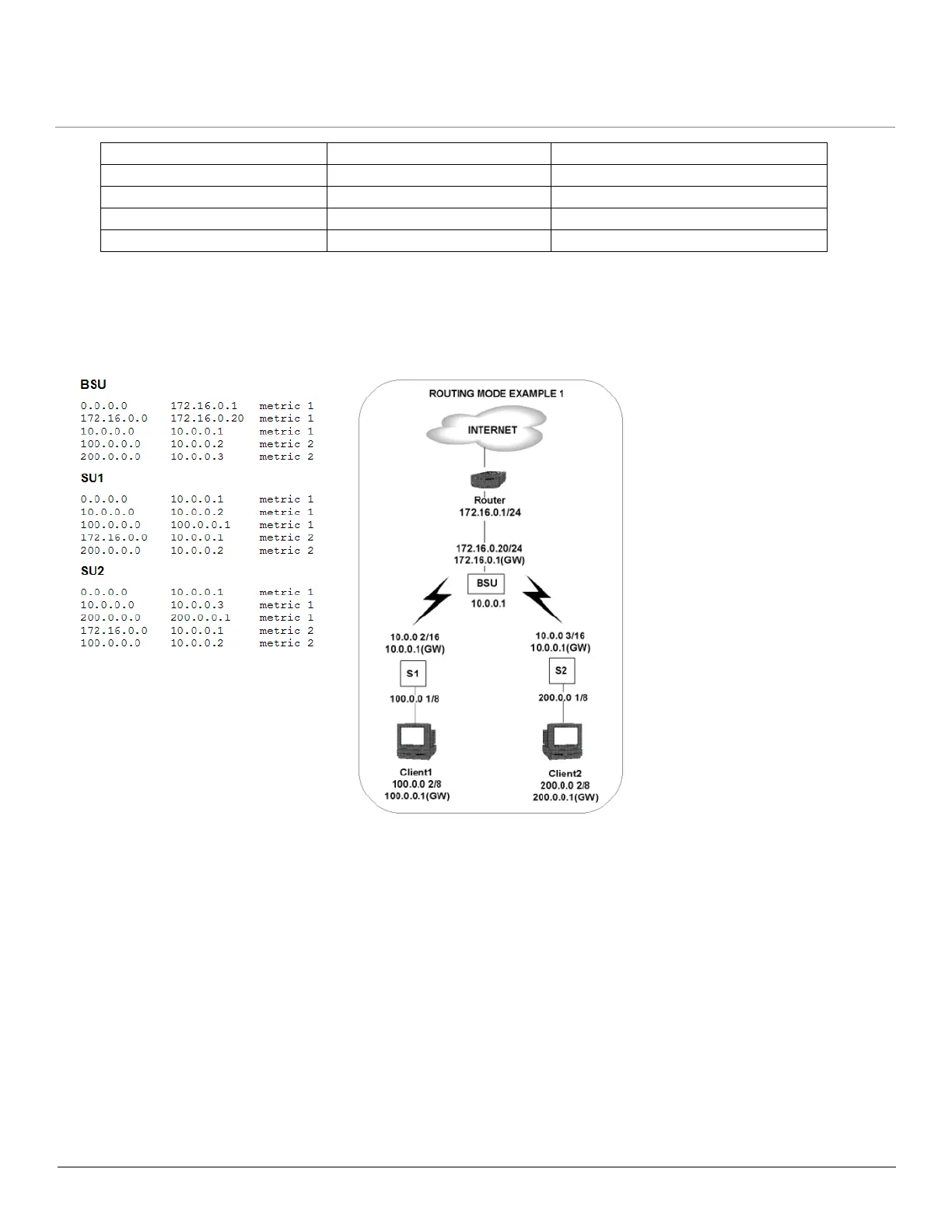
RIP Example
In the following example, assume that both the BSU and the SUs all are configured in Routing mode with RIP enabled to
send and receive on both the Ethernet and Wireless interfaces. The network converges through updates until each unit
has the following routing table:
RIP Notes
• Ensure that routers on the same physical network are configured to use the same version of RIP.
• Routing updates occur every 30 seconds. It may take up to 3 minutes for a route that has gone down to timeout in a
routing table.
• RIP is limited to networks with 15 or fewer hops.
Distance-vector protocol Distance-vector protocol Distance-vector protocol
Metric-Hops Metric-Hops Metric-Hops
Maximum Distance 15 Maximum Distance 15 Maximum Distance 15
IGP IGP IGP
RIPv1 RIPv2 RIPv1 Compatible



 To Next Page
 Loading...