Q24/Q48 Tape Library Installation and Operations Manual
3. Before installing the power supply, inspect its connectors. Ensure that the connectors are
intact, free of any foreign objects, and have no cracks or deformed or bent contacts.
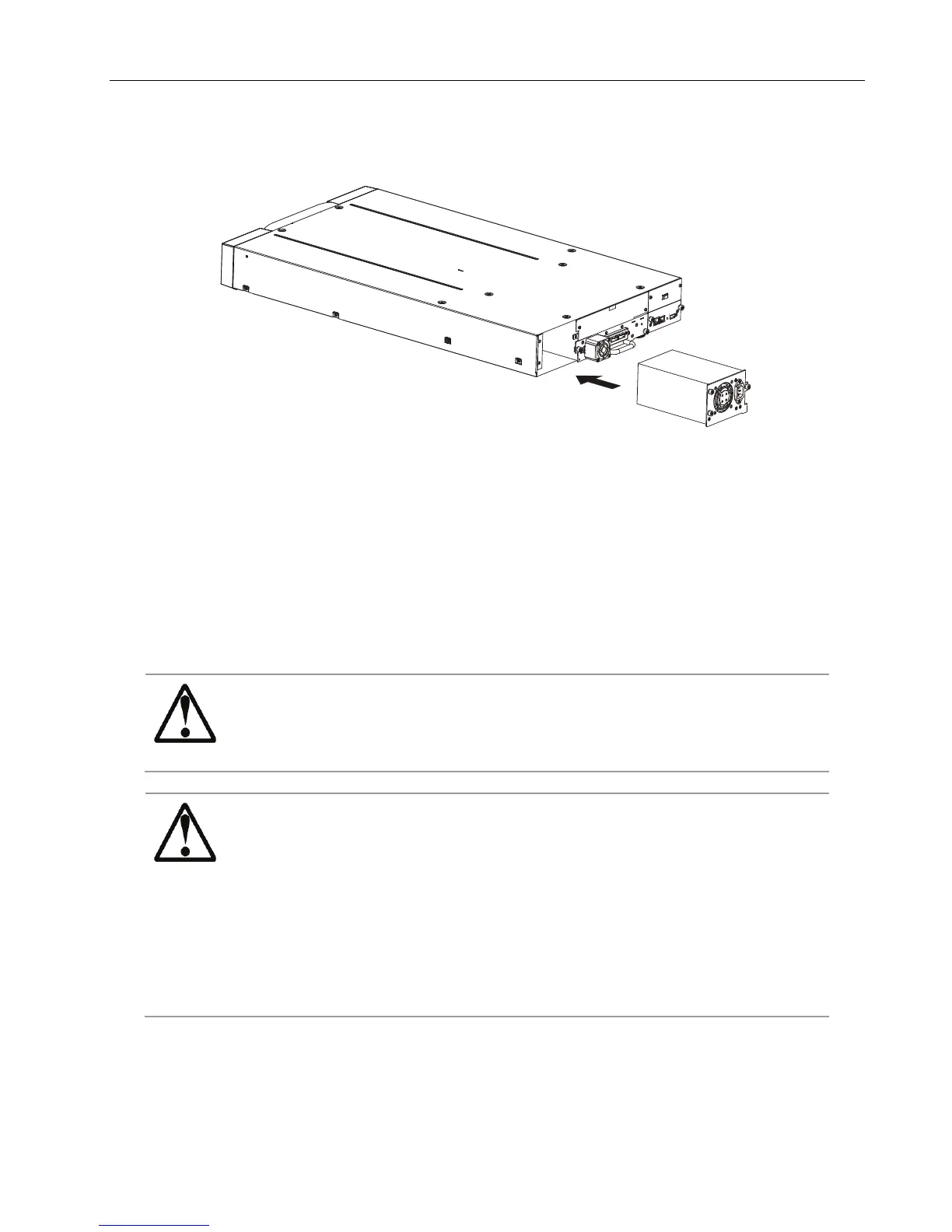
Figure 19 Install a power supply
4. Insert the power supply on the alignment rails and push it into the bay until it seats itself
against the back of the library.
5. Tighten the blue captive screws with your fingers to secure the power supply to the library.
2.12 Connecting the cables
2.12.1 Connecting the power cord
High voltage - Risk of electric shock
Use only approved power cords.
Observe local health and safety requirements and guidelines for
manual material handling.
Usage of non-approved power cords
- Risk of personal injury
- Risk of damage to devices
Before connecting a power cord to the library:
Ensure that the power cord meets individual country specific
safety standards.
Use a sufficient conductor current capacity (amps) to avoid
overheating the cord.
The manufacturer disclaims all liability in the event a
non-manufacturer approved power cord is used.
To connect the power cord to the library:
1. Plug the female connector of the power cord into the power connector (AC connector) on the
rear panel of the power supply. For the Q24, refer to section 1.3.1 Q24 Power supply. For the
Q48, refer to section 1.3.2 Q48 Power supply.
© Copyright QUALSTAR 2015 18



 To Next Page