Q24/Q48 Tape Library Installation and Operations Manual
• If the data cartridge has been exposed to temperatures outside the ranges specified above, stabilize
the cartridge at room temperature for the same amount of time it was exposed to extreme
temperatures or 24 hours, whichever is less.
• Place identification labels only in the designated area on the tape cartridge. Labels placed in other
areas can cause operational problems and the tape to become stuck in the drive.
2.15.3 Labeling tape cartridges
Attaching a barcode label to each tape cartridge enables the library and application software to
identify the tape cartridge quickly, thereby speeding up inventory search time. Make it a practice to
use bar code labels on your tape cartridges.
Your host software may need to keep track of the following information via the associated barcode:
• Date of format or initialization
• Tape’s media pool
• Data residing on the tape
• Age of the backup
• Errors encountered while using the tape cartridge (to determine if the tape cartridge is faulty).
The misuse and misunderstanding of bar code technology can
result in backup and restore failures. To ensure that your bar
codes meet Qualstar’s quality standards, always purchase them
from an approved supplier and never print bar code labels
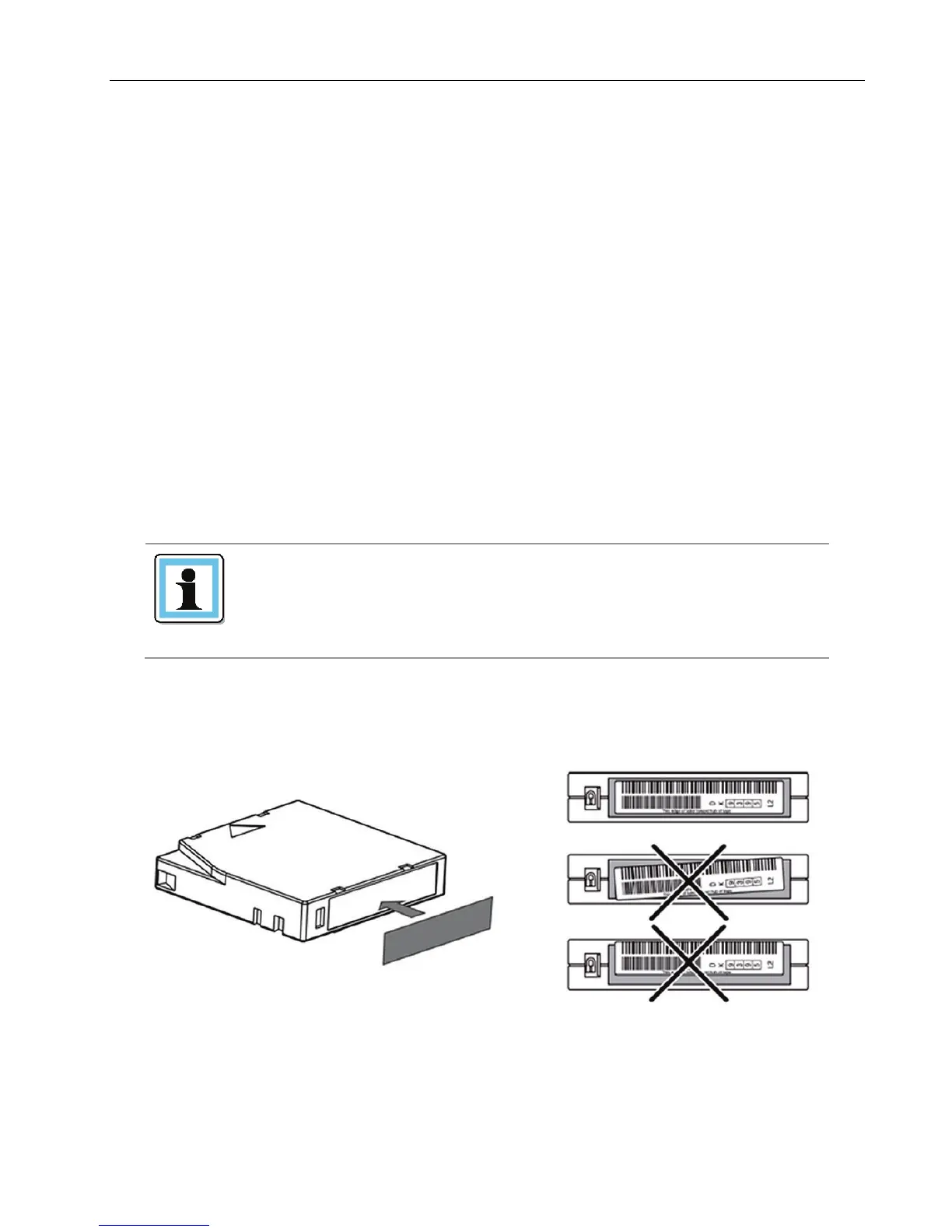
Ultrium tape cartridges have a recessed area located on the front of the cartridge next to the write-
protect switch. Use this area for attaching the adhesive-backed bar code label. Only apply labels as
shown in Figure 20.
Figure 21 Proper barcode label placement
© Copyright QUALSTAR 2015 22



 To Next Page