Q24/Q48 Tape Library Installation and Operations Manual
4.4 Emergency release
If you cannot remove the magazines via the OCP or RMU, do the following:
1. Press the power button on the front bezel to power down the library.
2. Unplug the power cord from the library.
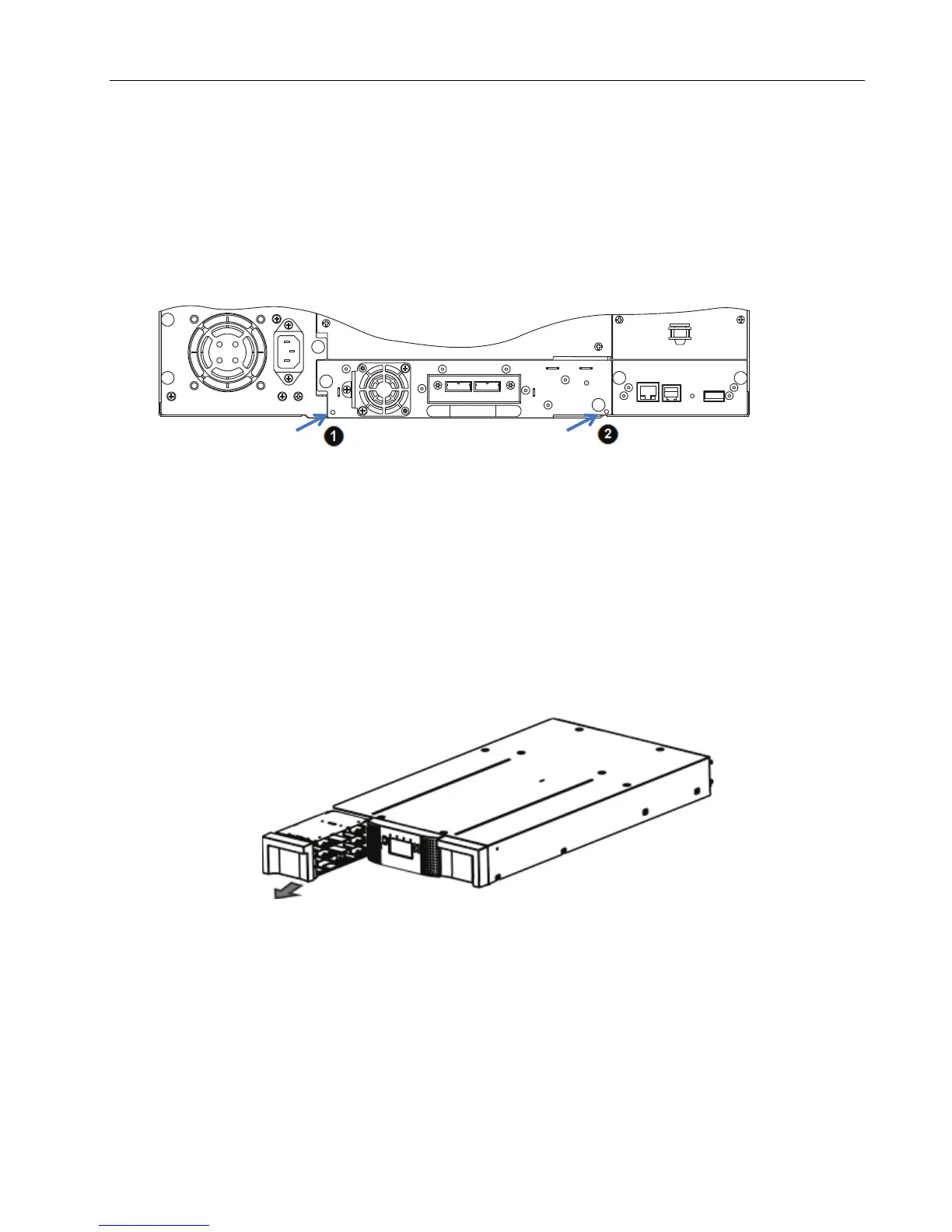
3. From the rear panel of the library, find the access holes for the right and left magazines.
1 - Access hole for the right magazine
2 - Access hole for the left magazine
Figure 62 Rear panel (access holes)
4. Push the end of a small metal pin or straightened paper clip into the magazine access hole at the
back of the device. While holding the pin or clip, have a second person attempt to pull the
magazine out of the front of the unit.
For the Q48, all magazines on a side are release and should be removed at the same time.
Figure 63 Front panel (magazine removal)
5. If necessary, repeat the steps 3 and 4 for the other magazine.
6. If you are unable to remove any tape cartridges or to release the magazines by any of the foregoing
methods, contact your service person.
© Copyright QUALSTAR 2015 70



 To Next Page