Quantum DXi-Series Command Line Interface (CLI) Guide
6-67081-09 Rev B
February 2014
Network CLI Commands 115
Then configure Eth5 for IPADDR3 and, if applicable, configure GATEWAY3:
syscli --add netcfg --devname eth5:1 --ipaddr IPADDR3 --netmask
NETMASK3 --gateway GATEWAY3 --segments MGMT
When configuring replication segmentation for an interface (device) in addition
to other segments on the same subnet, make sure to add a route to force the
replication segment to be used exclusively for replication between a source and
a target DXi.
examples:
syscli --add netcfg --devname eth1:1 --ipaddr IPADDR1 --netmask NETMASK1 --
gateway GATEWAY1 --segments DATA,MGMT
syscli --add netcfg --devname eth2:1 --ipaddr IPADDR2 --netmask NETMASK1 --
gateway GATEWAY1 --segments REP
syscli --add route --devname eth2:1 --network DEST_IP_ADDRESS --netmask
255.255.255.255 --gateway IPADDR2
DXI 6540/6550 With All Customer Interfaces Used Independently
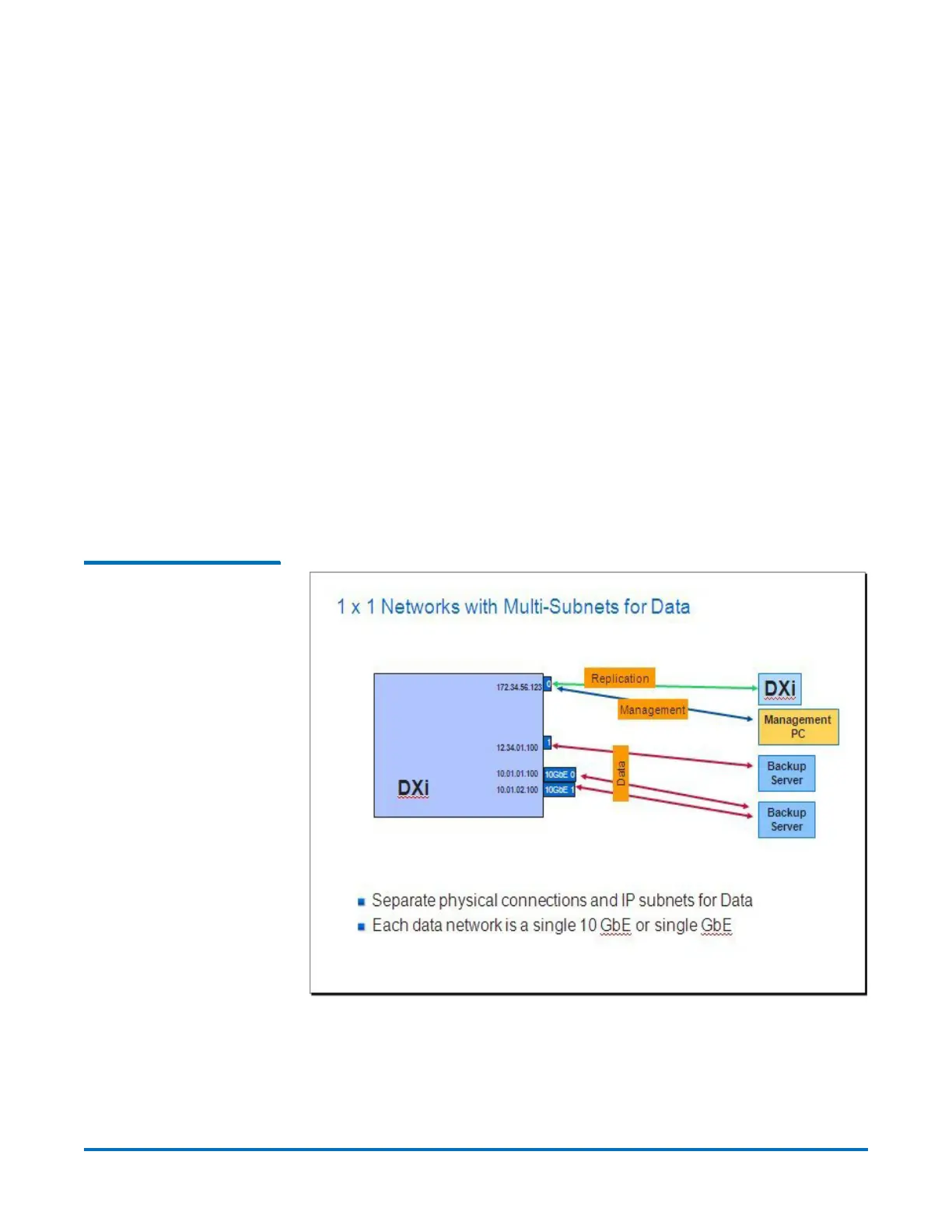
Data traffic comes from two media servers going thru GbE port #1 and the two
10 GbE ports. Replication and management traffic are routed to GbE port #0.
Figure 5 Netcfg Example –
1 x 1 Networks with Multi-
Subnets for Data
The following syscli sequences can be used to configure a similar setup.
To display the existing configuration:
syscli --list interface









 To Next Page