PICKUP BOX
The pickup box has many features designed for utility
and convenience.
NOTE:
If you are installing a toolbox, ladder rack or headache
rack at the front of the pickup box, you must use
Mopar® Box Reinforcement Brackets that are available
from an authorized dealer.
You can carry wide building materials (sheets of ply-
wood, etc.) by building a raised load floor. Place lumber
across the box in the indentations provided above the
wheel housings and in the bulkhead dividers to form
the floor.
WARNING!
•
The pickup box is intended for load carrying pur-
poses only, not for passengers, who should sit in
seats and use seat belts.
•
Care should always be exercised when operating a
vehicle with unrestrained cargo. Vehicle speeds
may need to be reduced. Severe turns or rough
roads may cause shifting or bouncing of the cargo
that may result in vehicle damage. If wide building
materials are to be frequently carried, the installa-
tion of a support is recommended. This will
restrain the cargo and transfer the load to the
pickup box floor.
•
If you wish to carry more than 600 lb (272 kg) of
material suspended above the wheelhouse, sup-
ports must be installed to transfer the weight of
the load to the pickup box floor or vehicle damage
may result. The use of proper supports will permit
loading up to the rated payload.
•
Unrestrained cargo may be thrown forward in an
accident causing serious or fatal injury.
There are stampings in the sheet metal on the inner
side bulkheads of the box in front of and behind both
wheel housings. Place wooden boards across the box
from side to side to create separate load compartments
in the pickup box.
There are four tie-down cleats bolted to the lower sides
of the pickup box that can sustain loads up to 1,000 lb
(450 kg) total.
CARGO CAMERA — IF EQUIPPED
Your vehicle may be equipped with the Cargo Camera
that allows you to see an image of the inside of the
pickup box. The image will be displayed in the Uconnect
screen.
The Cargo Camera is located in the bottom center area
of the Center High Mounted Stop Lamp (CHMSL).
A touchscreen button to indicate the current
active camera image being displayed is
made available whenever the Cargo Camera
image is displayed.
A touchscreen button to switch the display to
rear view camera image is made available
whenever the Cargo Camera image is
displayed.
A touchscreen X button to disable display of the camera
image is made available when the vehicle is not in
REVERSE gear.
A display timer is initiated when the Cargo Camera
image is displayed. The image will continue to be dis-
played until the display timer exceeds 10 seconds and
the vehicle speed is above 8 mph (13 km/h) or the
touchscreen X button to disable display of the Cargo
Camera image is pressed.
Cargo Camera With Dynamic Centerline (Available
With Surround View Camera Only) — If Equipped
The Dynamic Centerline feature provides an overlay on
the Cargo Camera display screen that aligns to the cen-
ter of the pickup box to aid in hooking up a fifth wheel
camper or gooseneck trailer. The centerline auto aligns
to the center of the pickup box, and can also be manu-
ally adjusted. The centerline will adjust in response to
steering angle inputs, and will not obstruct the goose-
neck receiver or an approaching trailer gooseneck in
the camera feed.
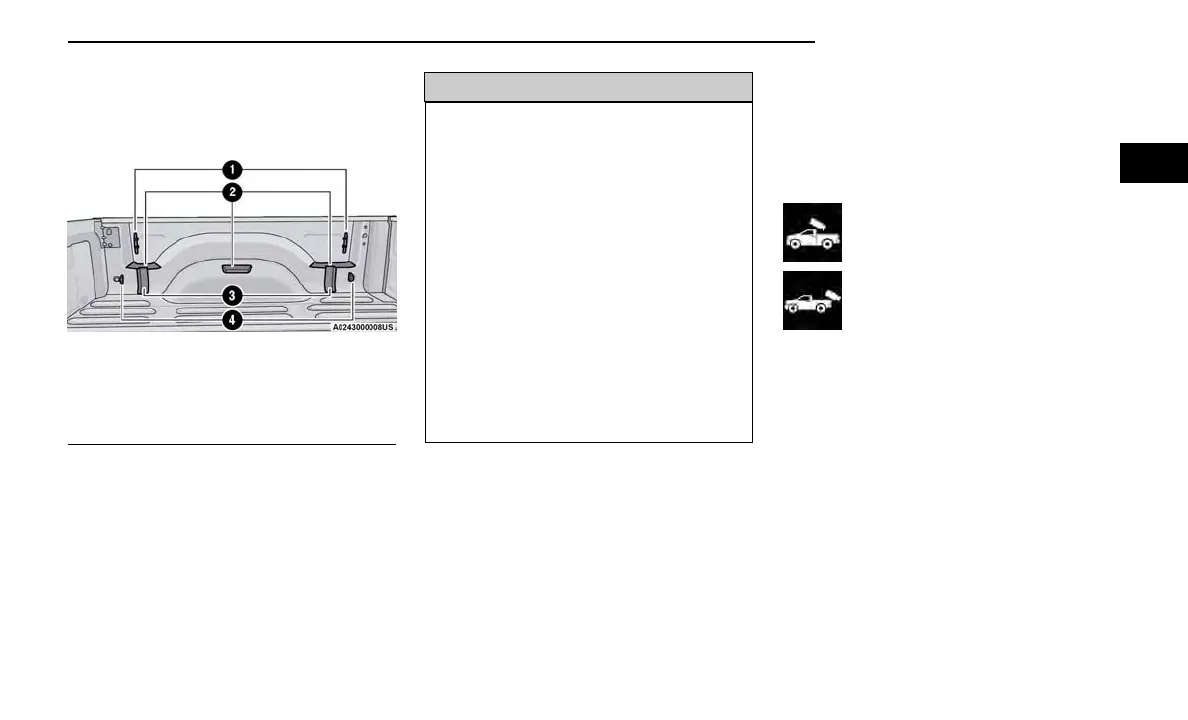
Pickup Box Features
1 — Cleats
2 — Upper Load Floor Indents
3 — Bulk Head Dividers
4 — Anchors
GETTING TO KNOW YOUR VEHICLE 69
2



 To Next Page