RAUMED NeuroSmart Instruction Manual
Manufacturer: RAUMEDIC AG, Hermann-Staudinger-Strasse 2, 95233 Helmbrechts, Germany
zwo-541EN Rev 3 / 2022-05-03
Page 12 of 61
3.3 Operating concept
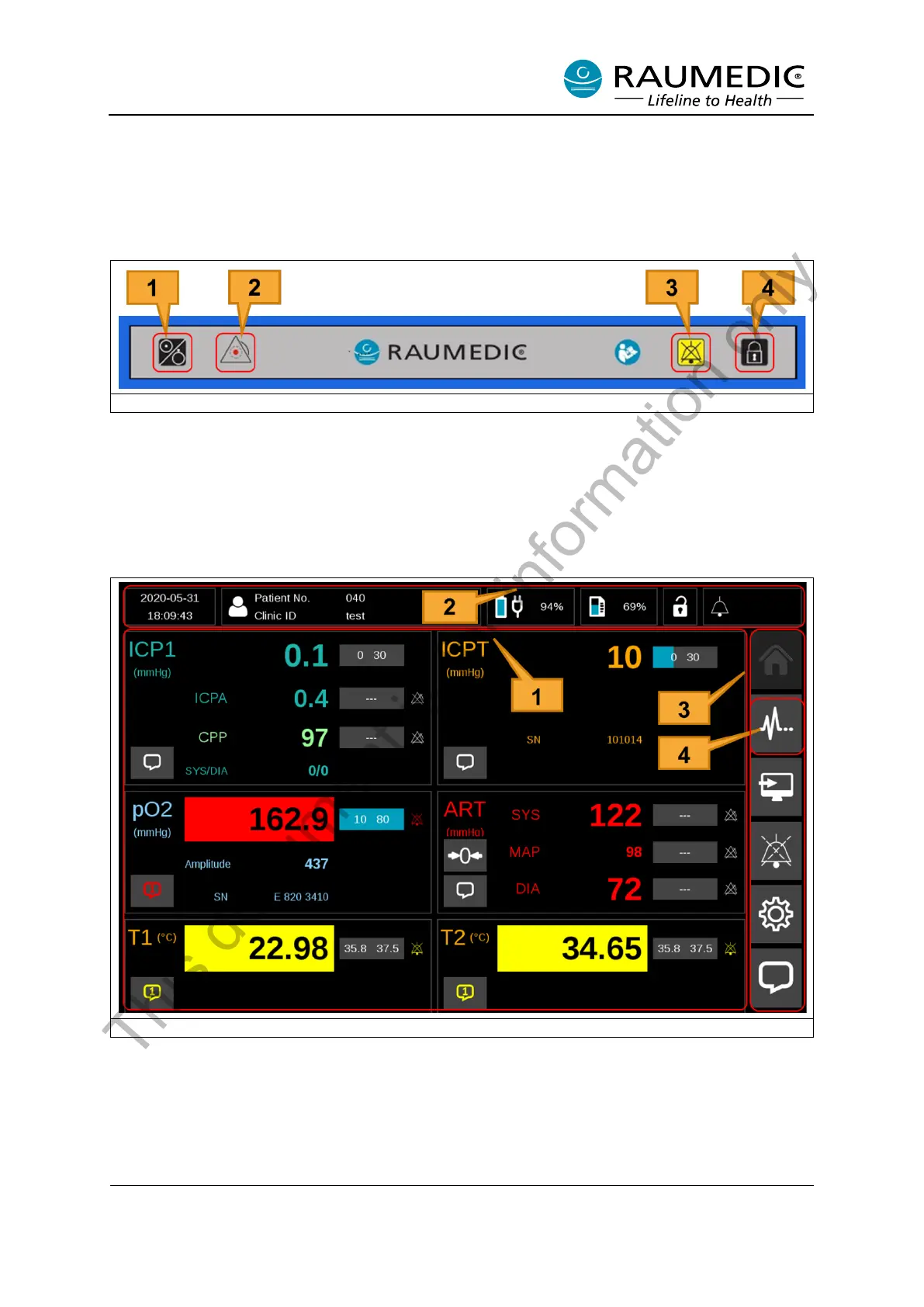
The NeuroSmart can be operated with hard keys (buttons) and soft keys. The hard keys are located
beneath the display and are shown in Figure 2. Most functions can be handled with the soft keys on the
touch display. Only a few functions are handled with hard keys.
Figure 2: NeuroSmart hard keys
[1] On/Off button
[2] Light-emitting diodes (LED)
[3] Alarm button
[4] Keylock
The touch display is divided into three areas. See Figure 3
Figure 3: Operating concept/screen layout
[1] Main display area
[2] Status area (the device cannot be operated in this area)
[3] Menu area
[4] View button; Selectable: Reading View, Live Graph View, Trend View, CPPopt View
This document is for information only



 To Next Page