RAUMED NeuroSmart Instruction Manual
Manufacturer: RAUMEDIC AG, Hermann-Staudinger-Strasse 2, 95233 Helmbrechts, Germany
zwo-541EN Rev 3 / 2022-05-03
Page 19 of 61
3.4.1 Prepare invasive pressure measurement
• Invasive pressure measurement with neurosurgical pressure catheter by RAUMEDIC
o Connect the ICP-TEMP-Cable or Cable PTO to the catheter, insert plug with yellow mark into
the P1/T1 or P2/T2 socket of the NeuroSmart. See Figure 1.
• Invasive pressure measurement with external blood pressure transducer
o Prepare monitoring set in accordance with the manufacturer's specifications. Connect the
Transducercable DATALOGGER to the blood pressure transducer, insert the plug with yellow
marking into the P1/T1 or P2/T2 socket of the NeuroSmart. See Figure 1.
3.4.2 Measuring position selection
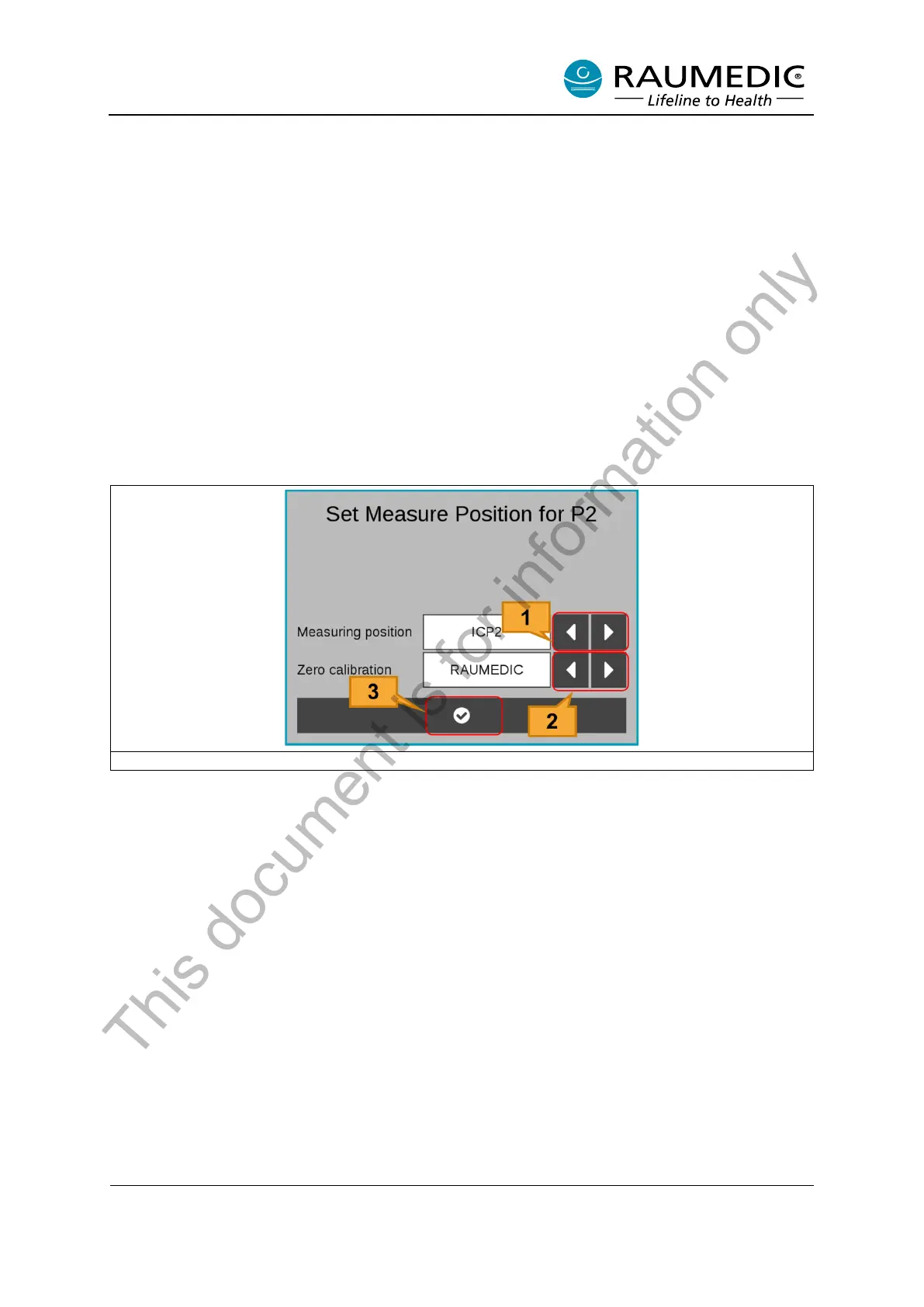
It is not necessary to assign a measuring position for catheters with an internal storage. The measuring
positions are automatically detected and assigned by the NeuroSmart. Measuring positions do need to
be assigned for catheters (without an internal storage) and blood pressure transducers.
Figure 7: Select measuring position
[1] Measuring position select keys. Selectable: ICP1/ICP2, ART, CVP
[2] Zero calibration select keys. Selectable: RAUMEDIC, conventional, Keep
[3] Confirm measuring position and zero calibration option.
After the measuring position and zero calibration option have been confirmed, the measurement is
started.
3.4.3 Conventional zeroing
You can perform conventional zeroing while performing pressure measurement using a blood pressure
transducer if the ART or CVP pressure channel is set.
To perform conventional zeroing: <1> Press the zeroing button, then open the blood pressure transducer
to atmosphere, then <2> press the confirmation button in the “Conventional zeroing” dialog box, see
Figure 8.
The “Conventional zeroing” dialog box closes and a pressure of 0 mmHg is displayed. To continue the
measurement, close the valve on the blood pressure transducer.
This document is for information only



 To Next Page