RAUMED NeuroSmart Instruction Manual
Manufacturer: RAUMEDIC AG, Hermann-Staudinger-Strasse 2, 95233 Helmbrechts, Germany
zwo-541EN Rev 3 / 2022-05-03
Page 16 of 61
3.3.2 Status area
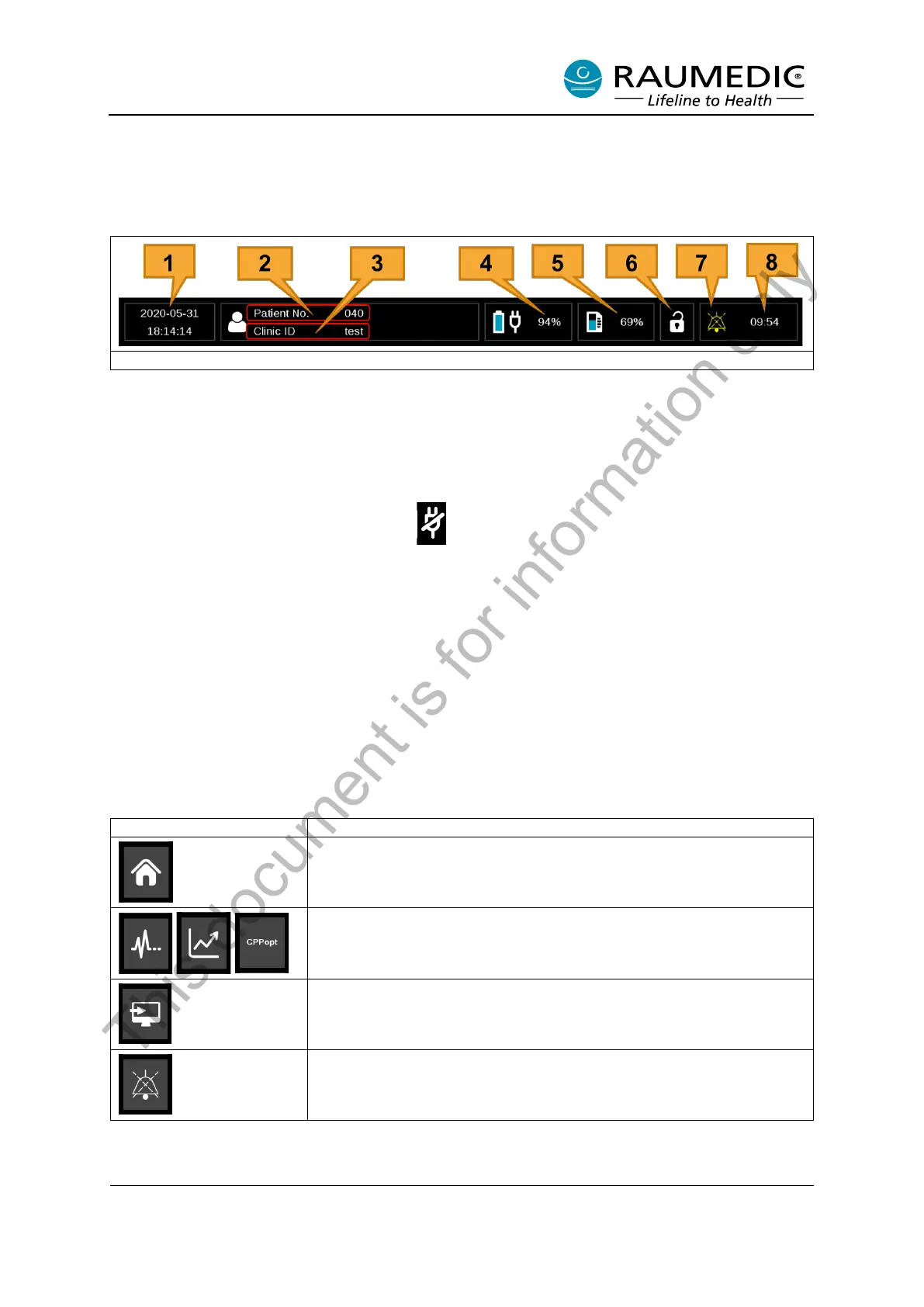
The device status is displayed in the status area. This is only used to display information. The device
cannot be operated in the status area.
[1] Date and time
[2] Patient No.: Patient No. is a number assigned internally by the NeuroSmart. The Patient No. in-
creases continuously when a new patient is created.
[3] Clinic ID: The Clinic ID is user-assigned when a new patient is created. Alphanumeric characters can
be entered for the Clinic ID.
[4] Battery charging capacity and charging status: The battery’s remaining charging capacity is displayed
as a percentage. A crossed-out plug symbol appears if the Power adapter is not plugged in.
[5] Storage capacity: The remaining storage capacity is displayed as a percentage.
[6] Keylock symbol: A closed blue padlock appears if the keylock is activated.
[7] Alarm status: The device’s alarm status is displayed in this area. If there are two alarms with different
priorities, the alarm with the higher priority is always displayed. (See Section 3.6)
[8] Remaining time for audible alarm pausing: Indicates the time when audible alarm pausing expires.
3.3.3 Menu area
The soft keys in the menu area are dynamically arranged depending on the views (see Section 3.3.1).
The menu pane may include the following symbols.
Table 8: Symbols in the menu pane
Reading View: See Section 3.3.1
Live Graph View, Trend View, CPPopt View. See Section 3.3.1
Forward button. See Section 3.7
Global AUDIO PAUSED: Pressing this button disables audible alarms
for the selected interval.
This document is for information only



 To Next Page