RAUMED NeuroSmart Instruction Manual
Manufacturer: RAUMEDIC AG, Hermann-Staudinger-Strasse 2, 95233 Helmbrechts, Germany
zwo-541EN Rev 3 / 2022-05-03
Page 29 of 61
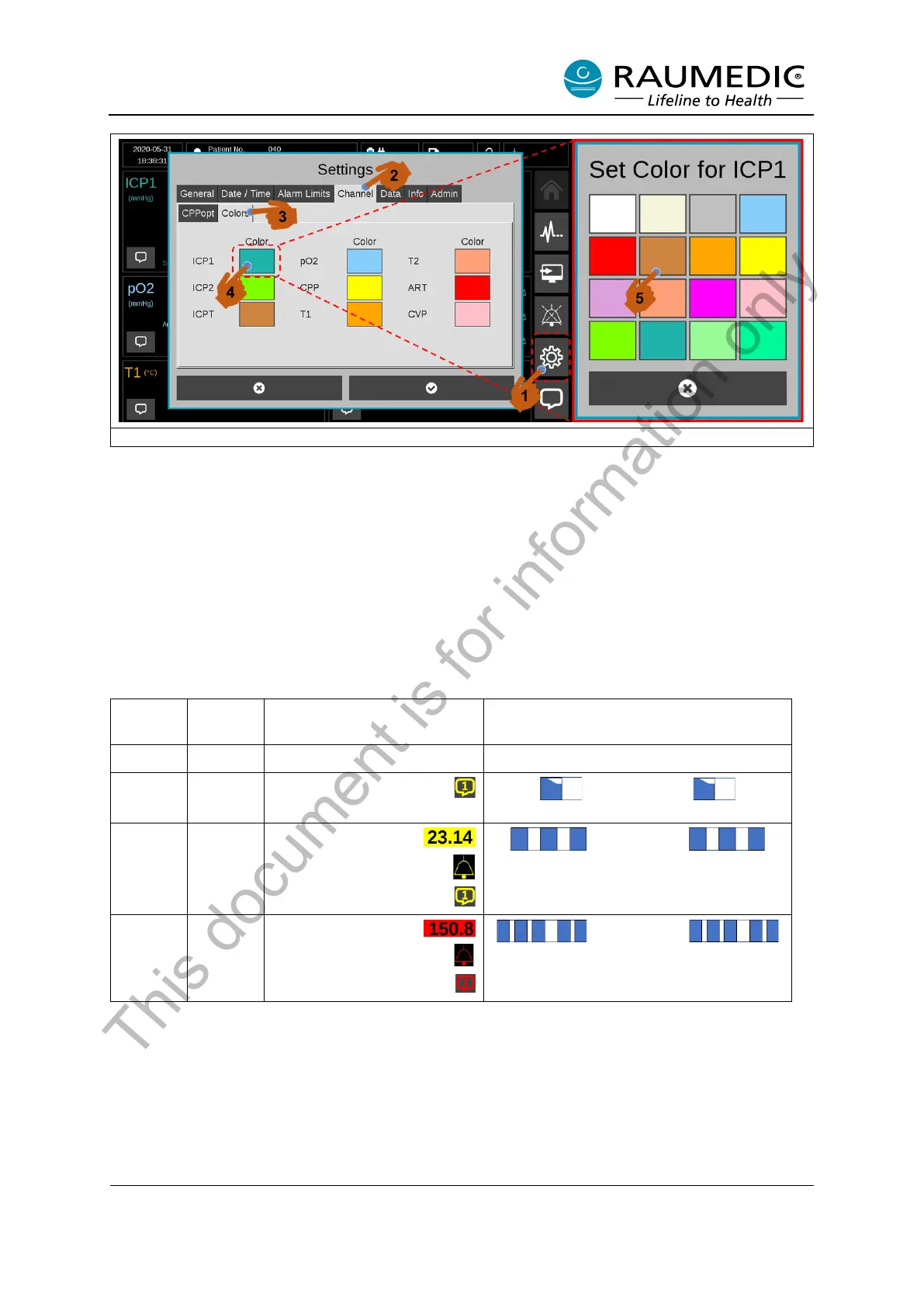
Figure 17: Assign colours to measuring positions
3.6 Alarm system
The alarm system in the NeuroSmart is subdivided into two categories, medium and high-priority alarms.
Furthermore, there are low-priority informative messages that alert you to certain device statuses. See
Table 14. At the same time, a distinction is made between physiological and technical alarms.
High-priority alarms are displayed in red with a faster sound sequence. Medium-priority alarms are dis-
played in yellow with a slower sound sequence. See Table 14.
Table 14: Visual and audible alarms
Value flashes yellow
yellow bell symbol
yellow speech bubble
Value flashes red
red bell symbol
red speech bubble
Alarms are differentiated according to their priority. The NeuroSmart has high and medium priority
alarms.
High-priority alarms:
• all pressure alarms with the exception of the CPP
• severe technical alarms
This document is for information only



 To Next Page