REMOTE BUTTONS
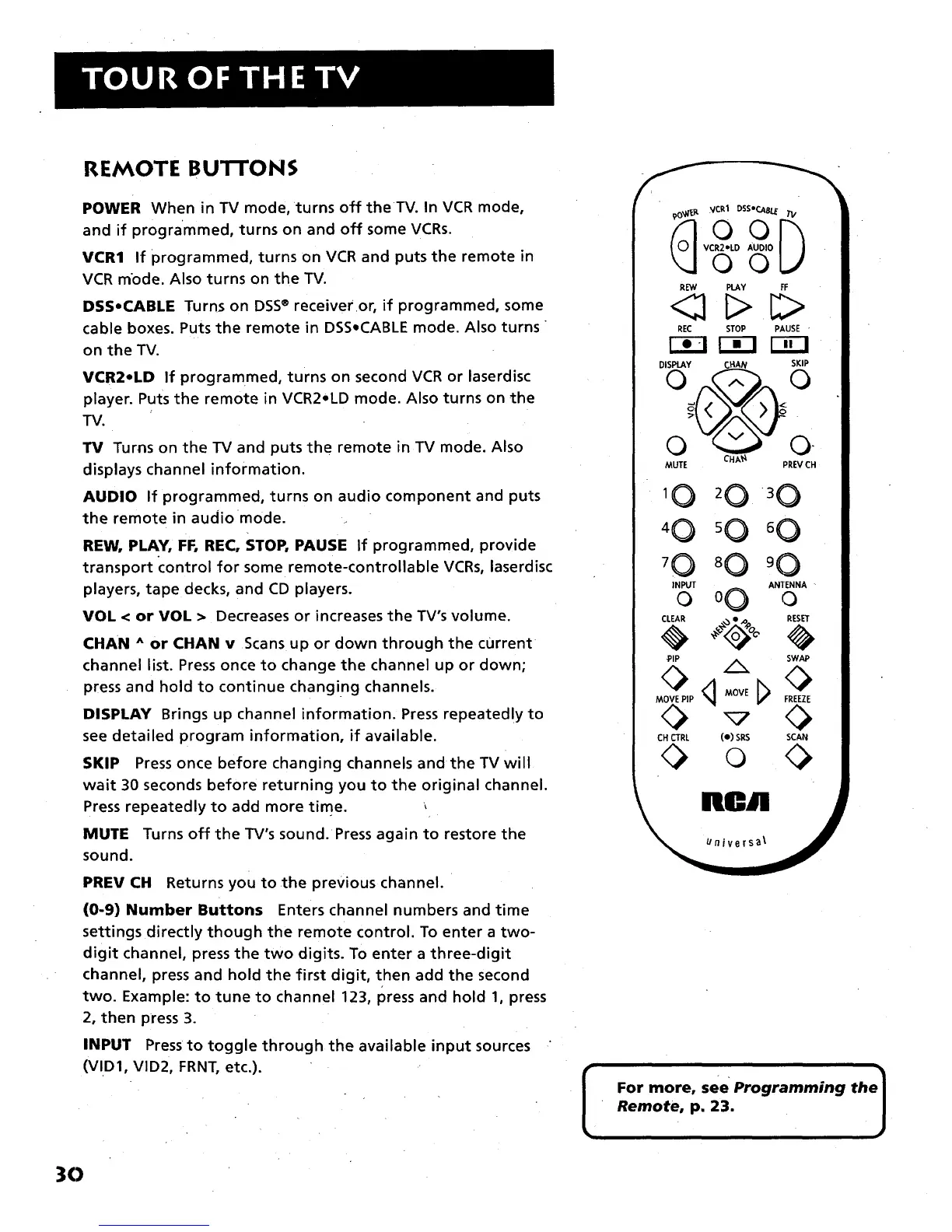
POWER When in TV mode, turns off the TV. In VCR mode,
and if programmed, turns on and off some VCRs.
VCR1 If programmed, turns on VCR and puts the remote in
VCR mode. Also turns on the TV.
DSSoCABLE Turns on DSS® receiver or, if programmed, some
cable boxes. Puts the remote in DSS,CABLE mode. Also turns
on the TV.
VCR2eLD If programmed, turns on second VCR or laserdisc
player. Puts the remote in VCR2oLD mode. Also turns on the
TV.
TV Turns on the TV and puts the remote in TV mode. Also
displays channel information.
AUDIO If programmed, turns on audio component and puts
the remote in audio •mode.
REW, PLAY, FF, REC, STOP, PAUSE If programmed, provide
transport control for some remote-controllable VCRs, laserdisc
players, tape decks, and CD players.
VOL < or VOL > Decreases or increases the TV's volume.
CHAN ^ or CHAN v Scans up or down through the current
channel list. Press once to change the channel up or down;
press and hold to continue changing channels.
DISPLAY Brings up channel information. Press repeatedly to
see detailed program information, if available.
SKIP Press once before changing channels and the TV will
wait 30 seconds before returning you to the original channel.
Press repeatedly to add more time. ,
MUTE Turns off the TV's sound.•Press again to restore the
sound.
PREV CH Returns you to the previous channel.
(0-9) Number Buttons Enters channel numbers and time
settings directly though the remote control. To enter a two-
digit channel, press the two digits. To enter a three-digit
channel, press and hold the first digit, then add the second
two. Example: to tune to channel 123, press and hold 1, press
2, then press 3.
INPUT Press to toggle through the available input sources '
(VID1, VlD2, FRNT, etc.).
Doo
VCR2.LD AUDIO
OO
R_q PLAY FF
REC STOP PAUSE "
Fi-I [2E]
DiSPlAY CHAN SKiP
MUTE PREV CH
10 20 3 0
80
INPUT ANTENNA
0 oC) 0
CLEAR RESET
PIP SWAP
MOVE PIP
CHCTRL (e) SRS SCAN
Iu' " 1
For more, see Programming th
Remote, p. 23.
30



 To Next Page