TV, (2) VCRS, AND DSS® RECEIVER
(CONNECTION I)
This information applies to Connection I in the Connections
Foldout.
Connection I provides:
• stereo sound from broadcast programs
• stereo sound from VCR
• Picture in Picture (PIP)
• "Watch one channel on TV while recording another
channel
To use this connection you must have:
• (5) coaxial cable
• (9) audio/video cables
• (1) S-Video cable (optional)
To connect:
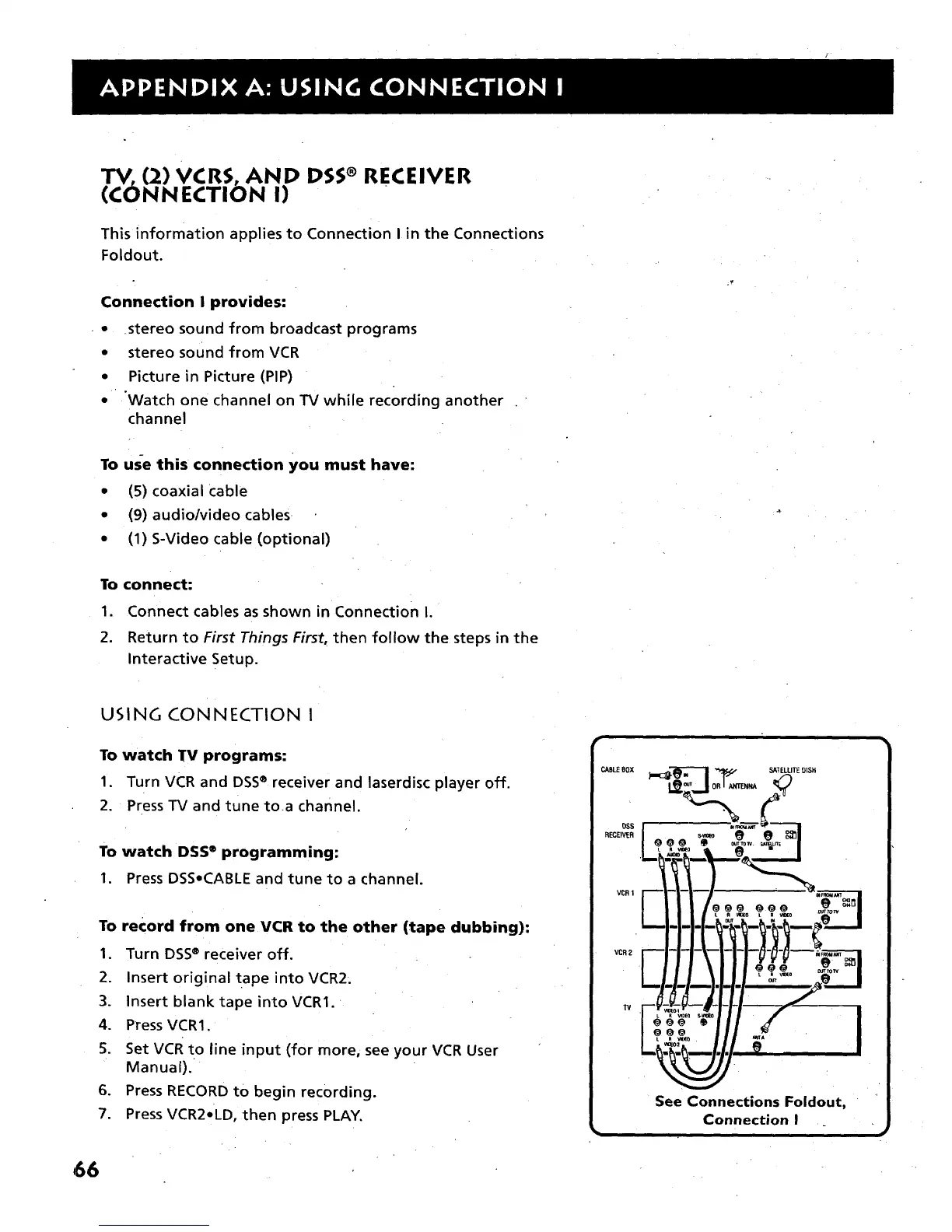
1. Connect cables as shown in Connection I.
2. Return to First Things First, then follow the steps in the
Interactive Setup.
USING CONNECTION I
To watch TV programs:
I. Turn VCR and DSS® receiverand laserdiscplayeroff.
2. PressTV and tune toa channel.
To watch DSS ®programming:
1. Press DSS•CABLE and tune to a channel.
To record from one VCR to the other (tape dubbing):
1. Turn DSS® receiver off.
2. Insert original tape into VCR2.
3. Insert blank tape into VCR1.
4. PressVCR1.
5. Set VCR to line input (for more, see your VCR User
Manual).
6. Press RECORD to begin recording.
7. Press VCR2•LD, then press PLAY.
_BLE 80X
OSS
RECEIVER
VCR1
VCR 2
SATELLITEDISH
See Connections Foldout,
Connection I
i
66



 To Next Page