TV AND STEREO VCR (CONNECTION B)
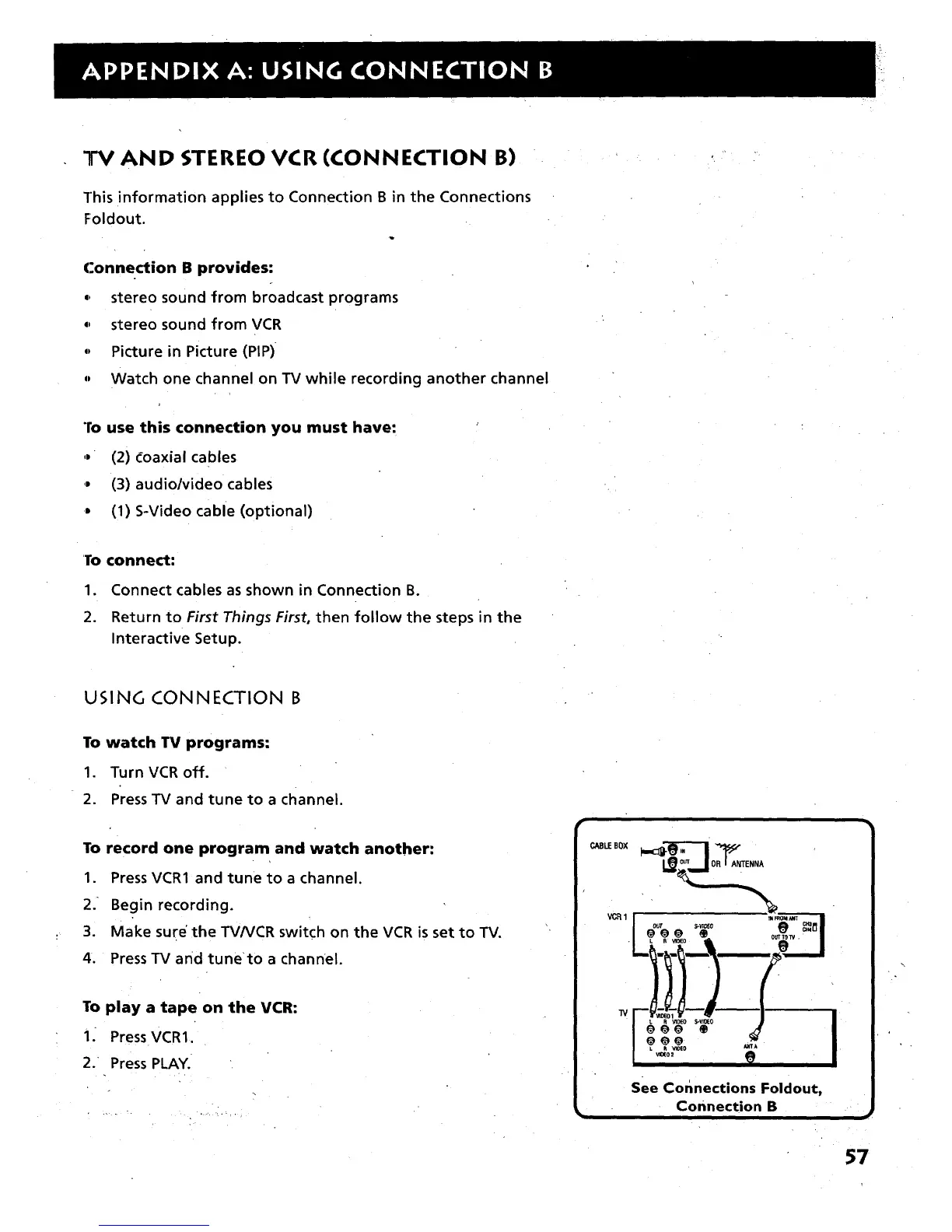
This information applies to Connection B in the Connections
Foldout.
Connection B provides:
0, stereo sound from broadcast programs
0, stereo sound from VCR
0, Picture in Picture (PIP)
,, Watch one channel on TV while recording another channel
To use this connection you must have:
,, (2) Coaxial cables
,, (3) audio/video cables
J (1) S-Video cable (optional)
I_o connect:
1. Connect cables as shown in Connection B.
2. Return to First Things First, then follow the steps in the
Interactive Setup.
USING CONNECTION B
To watch TV programs:
1. Turn VCR off.
2. Press TV and tune to a channel.
To record one program and watch another:
1. Press VCR1 and tune to a channel.
2. Begin recording.
3. Make sure' the TV/VCR switch on the VCR is set to TV.
4. Press TV and runeto a channel.
To play a tape on the VCR:
i. Press VCR1.
2/ Press PLAY.
CAELEBOX
VC_1
TV
OR_ANTENNA
See Corlnections Foldout,
Connection B
57



 To Next Page