EasyManua.ls Logo

Record HA8-SP - Page 5

Record HA8-SP
70 pages
Print Icon
To Next Page IconTo Next Page
To Previous Page IconTo Previous Page
Loading...
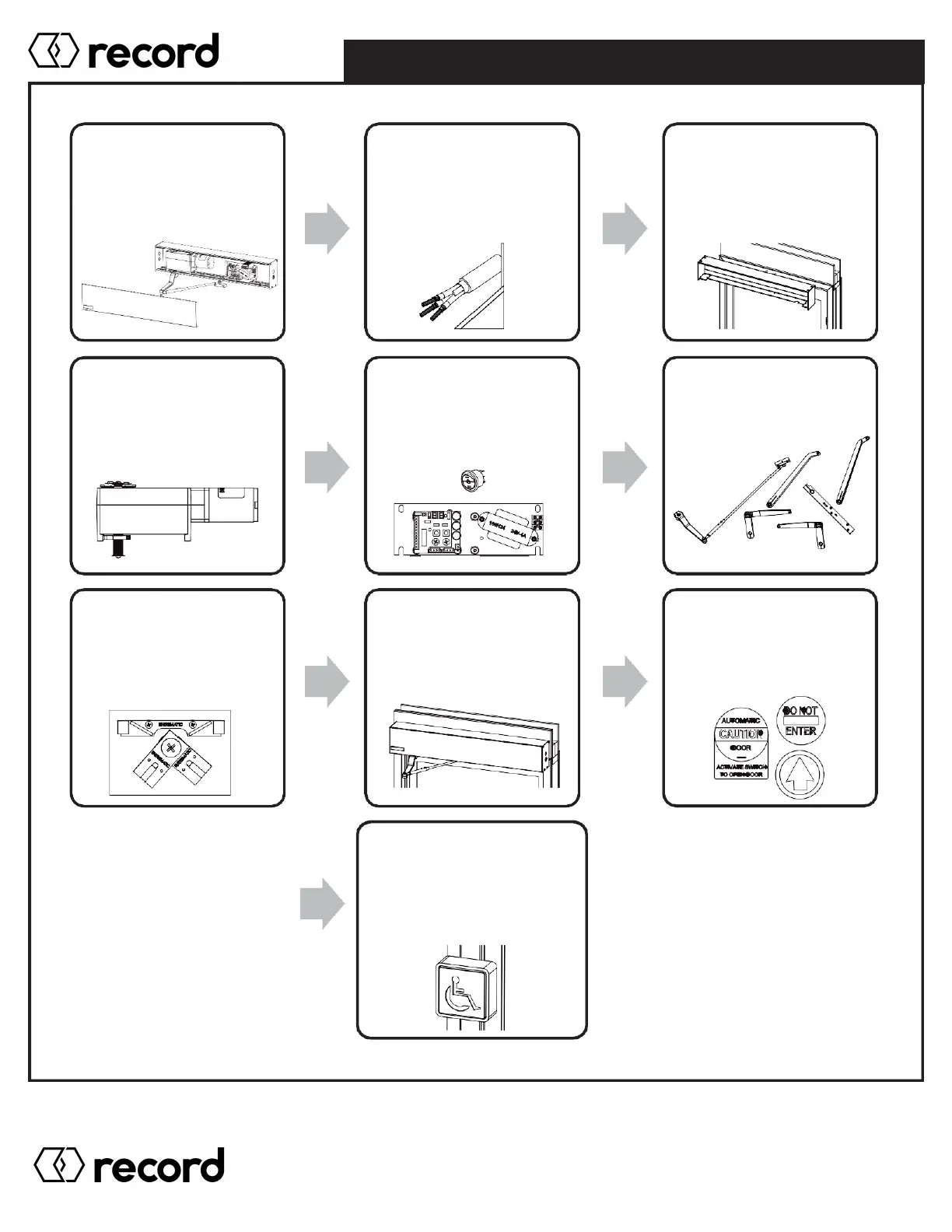
Step 1: Remove
Header Cover
(Section 2.1)
Step 2: Locate
& Drill Power
(Section 2.1)
Step 3: Mount
Header
(Section 2.1 - 2.3)
Step 4: Install
Operator
(Section 2.4)
Step 5: Place
Control Board
(Section 2.5 - 2.6)
Step 6: Install Arm
(Section 3.0)
Step 7: Electronics
Tuning
(Section 4.0 - 8.0)
Step 8: Clean/close
Header
(Section 9.0)
Step 9: Place
ANSI Stickers
(Section 9.0)
Step 10:
Install Sensor(s) /
Knowing Act Devices
(Section 9.0)
INSTALLATION OVERVIEW
Pg. 5
HA8-SP Manual V. 7.0
Record Canada Inc.
Toll Free: 1-877-348-6837
info.ditec.ca@recorddoors.com
www.recorddoors.ca
Record USA Inc.
Toll Free: 1-866-901-4284
info.ditec.us@recorddoors.com
www.recorddoors.com

Related product manuals