SDM – Slurry Density Meter
NOTE: Indicated variables can differ for your analyzer.
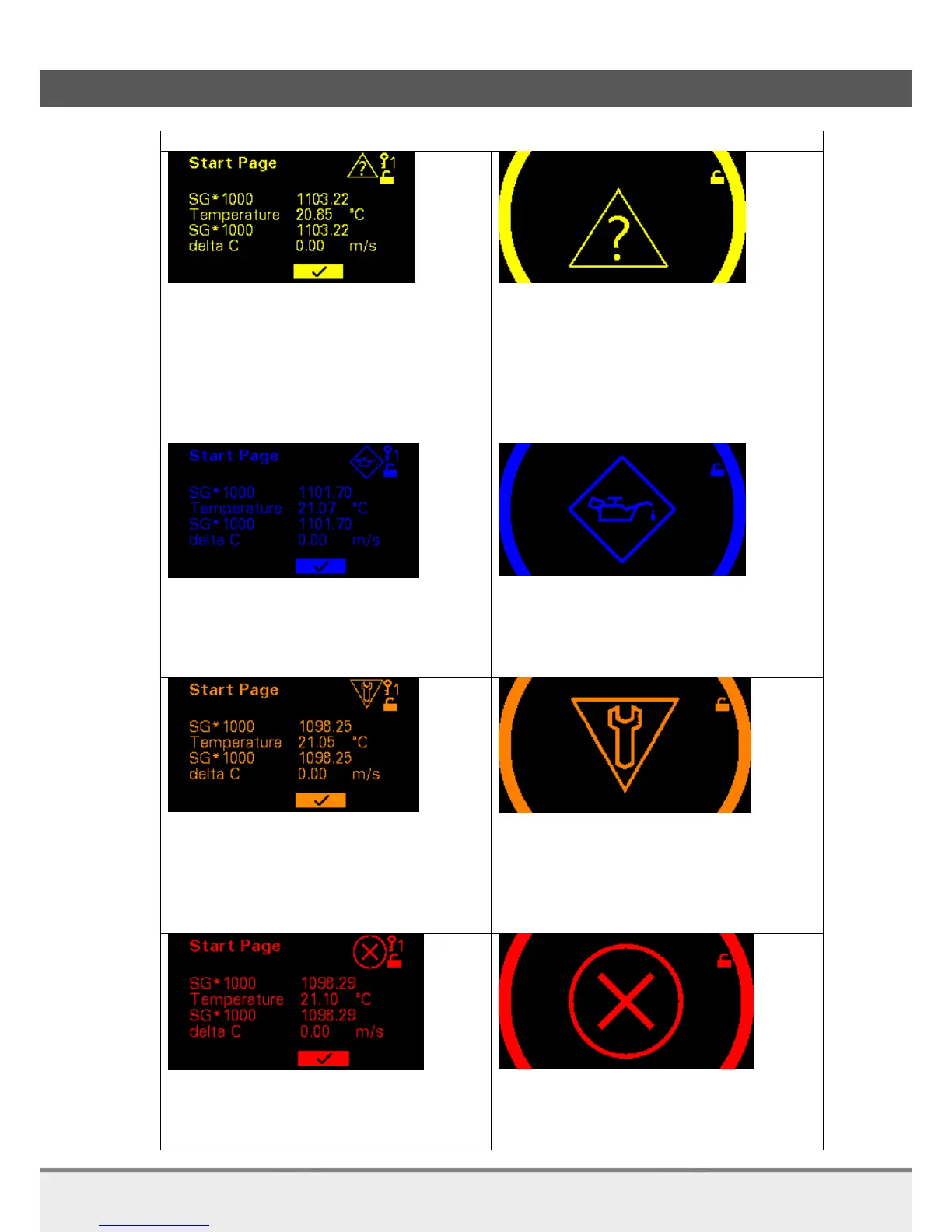
Value Out Of Range
Device is operating outside specified
range
Internal diagnoses indicate deviations
from measured or set values
Output is still valid
Icon in upper right corner and backlight change
into yellow.
Value Out Of Range
Device is operating outside specified
range
Internal diagnoses indicate deviations
from measured or set values
Output is still valid
Backlight in yellow. Icon and measurement
values are alternating.
Maintenance Required
Maintenance on device necessary
Output values still valid
Icon in upper right corner and backlight change
into blue.
Maintenance Required
Maintenance on device necessary
Output values still valid
Backlight in blue. Icon and measurement values
are alternating.
Function check
Device is in maintenance
Check Function is on
Output values temporarily invalid
Icon in upper right corner and backlight change
into orange.
Function check
Device is in maintenance
Check Function is on
Output values temporarily invalid
Backlight in orange. Icon and measurement
values are alternating.
Failure
Replace device
Icon in upper right corner and backlight change
into red.
Failure
Replace device
Backlight in red. Icon and measurement values
are alternating.



 To Next Page