Pay attention before pressing . When accepted, all settings, calibrations and configurations will be
lost and reset to the factory settings.
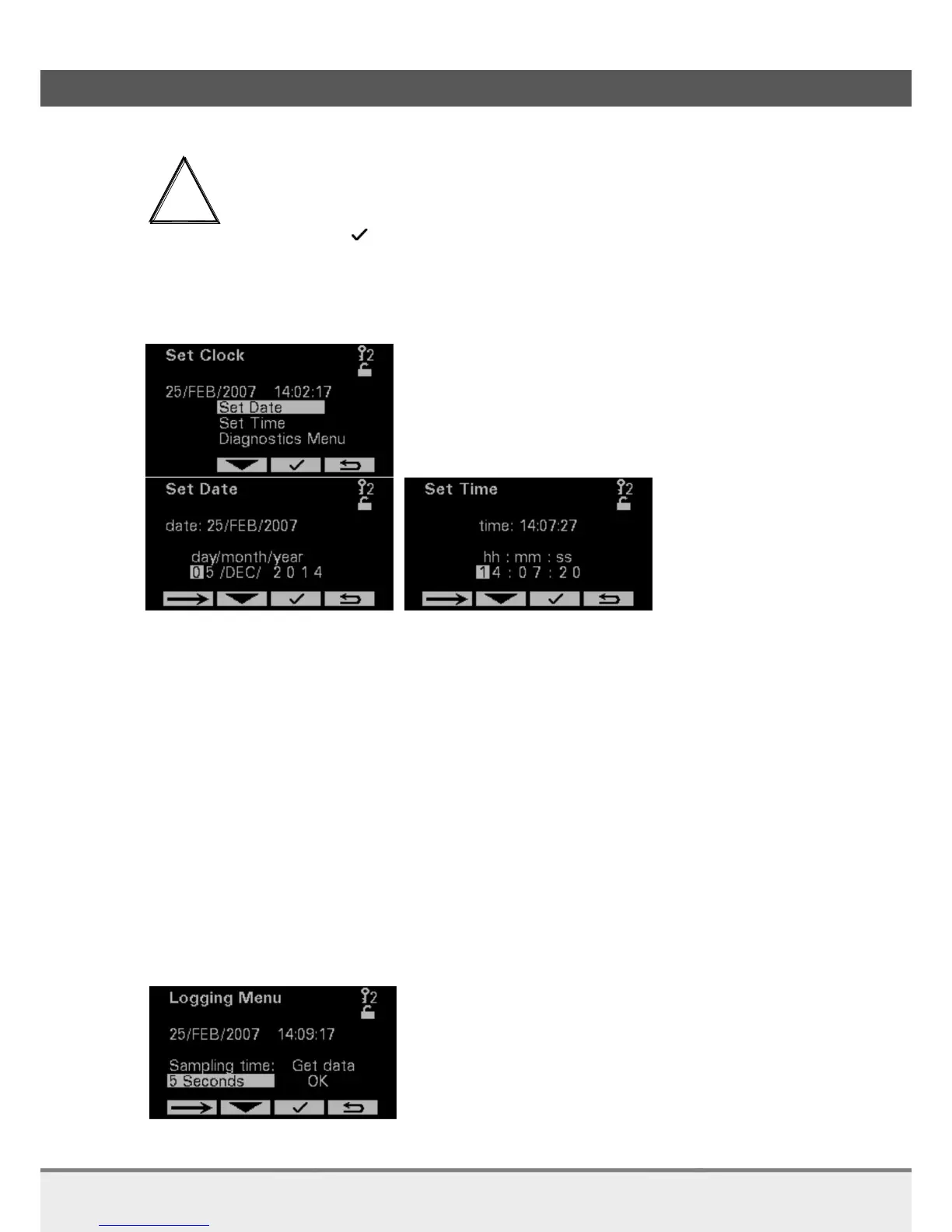
7.1.3 Set clock and Date
On these pages the Time and date can be set.
7.1.4 Logging and Settings for diagnostics & evaluation
For trouble shooting this is the proper way to solve the problem:
1. Check System Status and inform Rhosonics / the Distributor
2. Save a log-file and analyzer settings and send them to Rhosonics / the Distributor
3. Restore factory settings, only when Rhosonics tells you to do so.
*A log file is automatically started when the power is turned on.
For trouble shooting or for your own diagnostics evaluation, you can save a Log-file.
When this Log-file is stored to the USB stick the settings from the analyzer will be stored as well. The
settings from the analyzer can then be interpreted by the factory.
The Logging Menu page has 2 functions:
The Sample time can be set. You can choose from the following Sample times 1, 2, 5, 10 or 30
Seconds, 1, 2, 5 or 10 Minutes. Keep in mind that the log file has room for 65535 entries.
By selecting Get data the log-date will be written to the USB-stick



 To Next Page