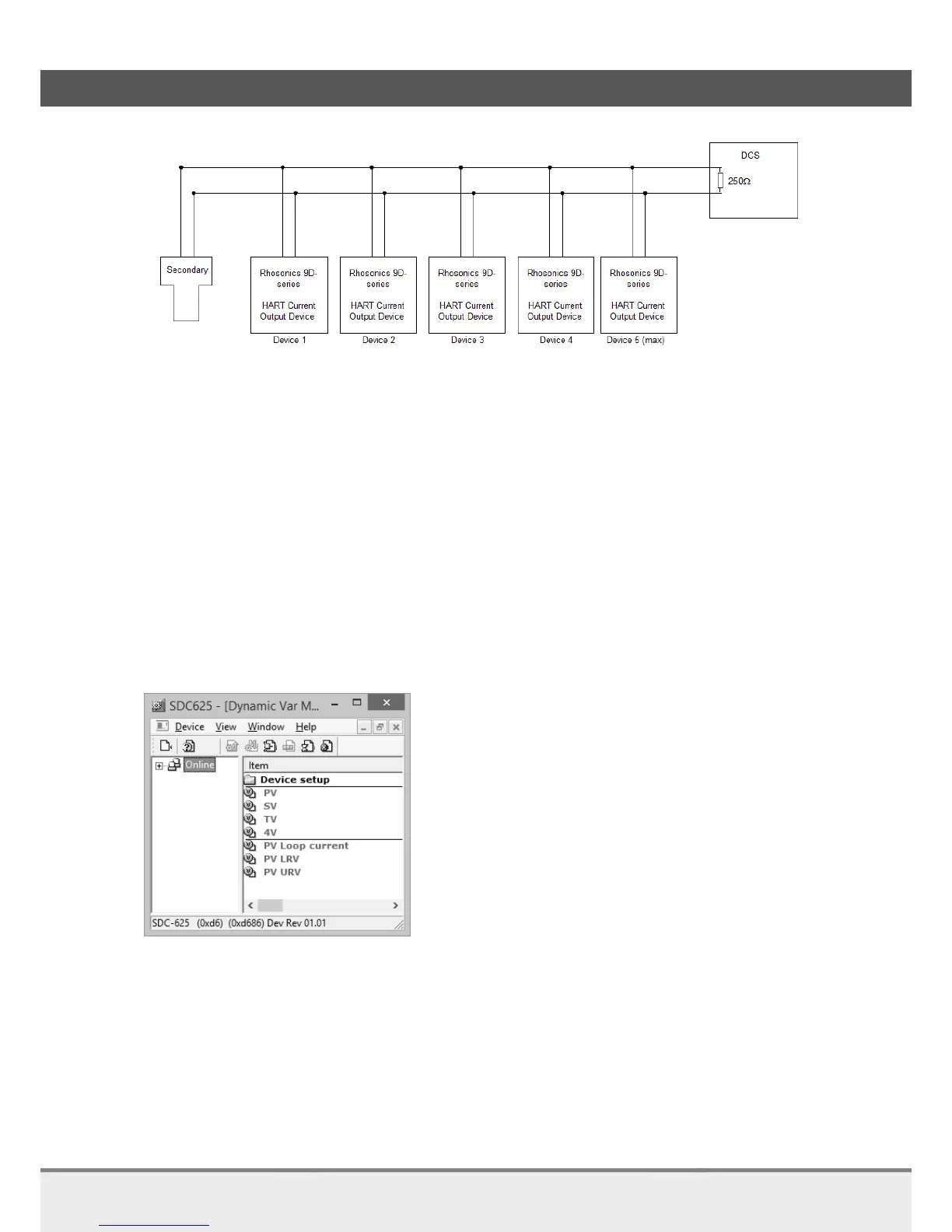
Analyzer connected in multidrop-mode
2.7.4 HART connecting the secondary master to the analyzer
Standard digital communication to DCS is via HART. This is to change settings and monitoring
communication with the DCS.
The secondary master can be a HART communicator or a HART modem connected to a computer.
Procedure for point to point mode:
Make sure the correct DD is in the database of the secondary master
\YOUR_PATH\Library\0060C2\E35D
Manufacturer ID Rhosonics: 0x60C2
Device Type: 0xE35D
Device Type Name: 9D-series Analyzer
Polling address: 0
Open the DD via e.g. SDC625.
SDC625 Map structure (start)
Procedure for multi-drop mode:
The analyzer is configured for point to point mode.
When the device has to be put into multi-drop mode additional action is necessary.
Take the analyzer out of the control loop as is described in the configuration in the previous
paragraph.
Make sure the correct DD is in the database of the secondary master Manufacturer ID
Open the DD via e.g. SDC625.



 To Next Page