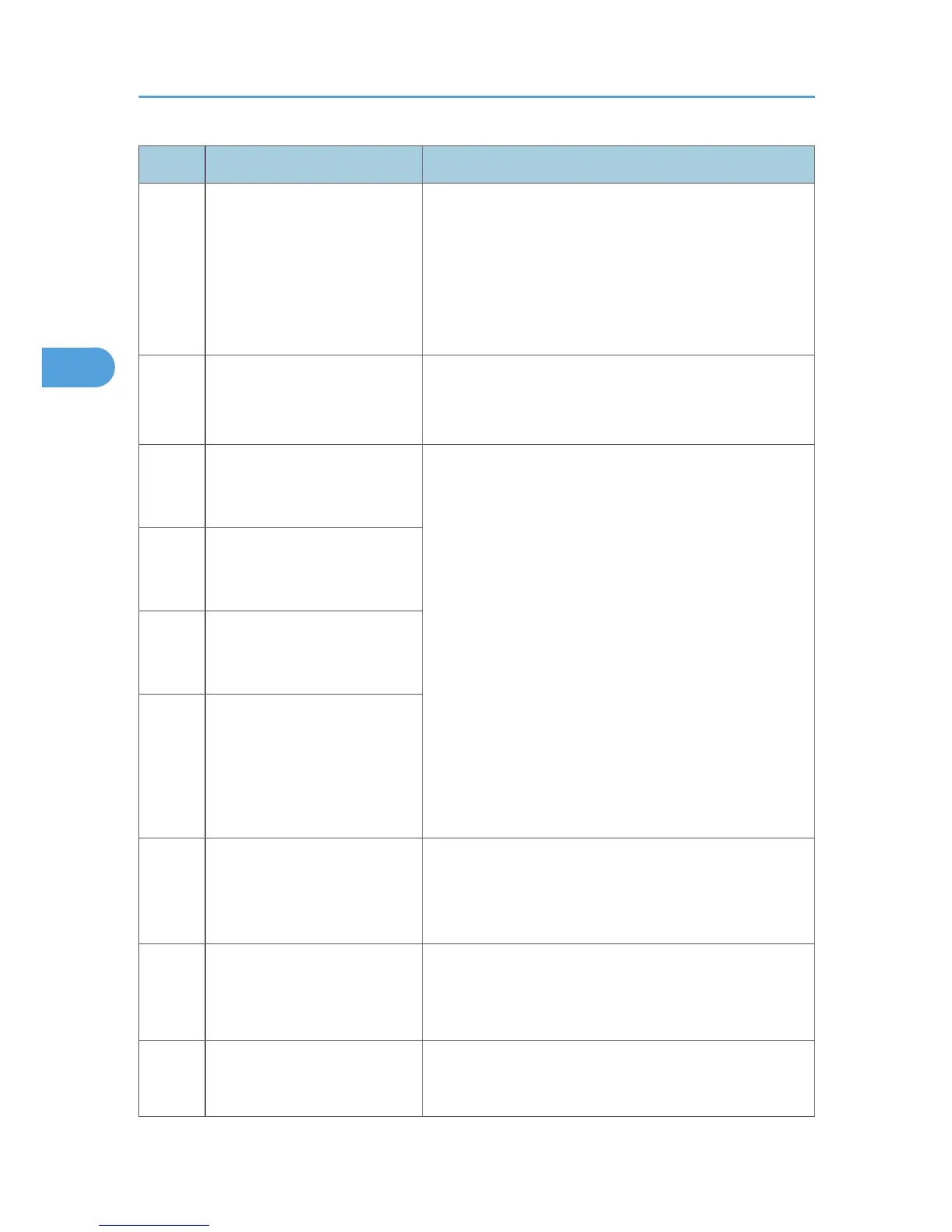
Code Meaning Suggested Cause/Action
0-77
The called terminal fell back to
T.30 mode, because it could not
detect a CJ in response to JM
(JM timeout).
• The calling terminal could not detect a JM due to noise,
etc.
• A network that has narrow bandwidth cannot pass JM
to the other end.
• Check the line connection and condition.
• Try receiving a call from another V.8/V.34 fax.
0-79
The called terminal detected CI
while waiting for a V.21 signal.
• Check for line noise or other line problems.
• If this error occurs, the called terminal falls back to T.
30 mode.
0-80
The line was disconnected due
to a timeout in V.34 phase 2 –
line probing.
• The guard timer expired while starting these phases.
Serious noise, narrow bandwidth, or low signal level
can cause these errors.
If these errors happen at the transmitting terminal:
• Try making a call at a later time.
• Try using V.17 or a slower modem using dedicated tx
parameters.
• Try increasing the tx level.
• Try adjusting the tx cable equalizer setting.
If these errors happen at the receiving terminal:
• Try adjusting the rx cable equalizer setting.
• Try increasing the tx level.
• Try using V.17 or a slower modem if the same error is
frequent when receiving from multiple senders.
0-81
The line was disconnected due
to a timeout in V.34 phase 3 –
equalizer training.
0-82
The line was disconnected due
to a timeout in the V.34 phase 4
– control channel start-up.
0-83
The line was disconnected due
to a timeout in the V.34 control
channel restart sequence.
0-84
The line was disconnected due
to abnormal signaling in V.34
phase 4 – control channel start-
up.
• The signal did not stop within 10 s.
• Turn off the machine, then turn it back on.
• If the same error is frequent, replace the FCU.
0-85
The line was disconnected due
to abnormal signaling in V.34
control channel restart.
• The signal did not stop within 10 s.
• Turn off the machine, then turn it back on.
• If the same error is frequent, replace the FCU.
0-86
The line was disconnected
because the other terminal
requested a data rate using
• The other terminal was incompatible.
• Ask the other party to contact the manufacturer.
3. Troubleshooting
22



 To Next Page