Home
Ricoh
Finishers
SR4110
Page 39 (Shift Tray Exit Sensor)
Ricoh SR4110 - Shift Tray Exit Sensor
60 pages
Manual
Save Page as PDF
To Next Page
To Next Page
To Previous Page
To Previous Page
Loading...
2.
Replacem
ent
and Adjustment
35
Shift
T
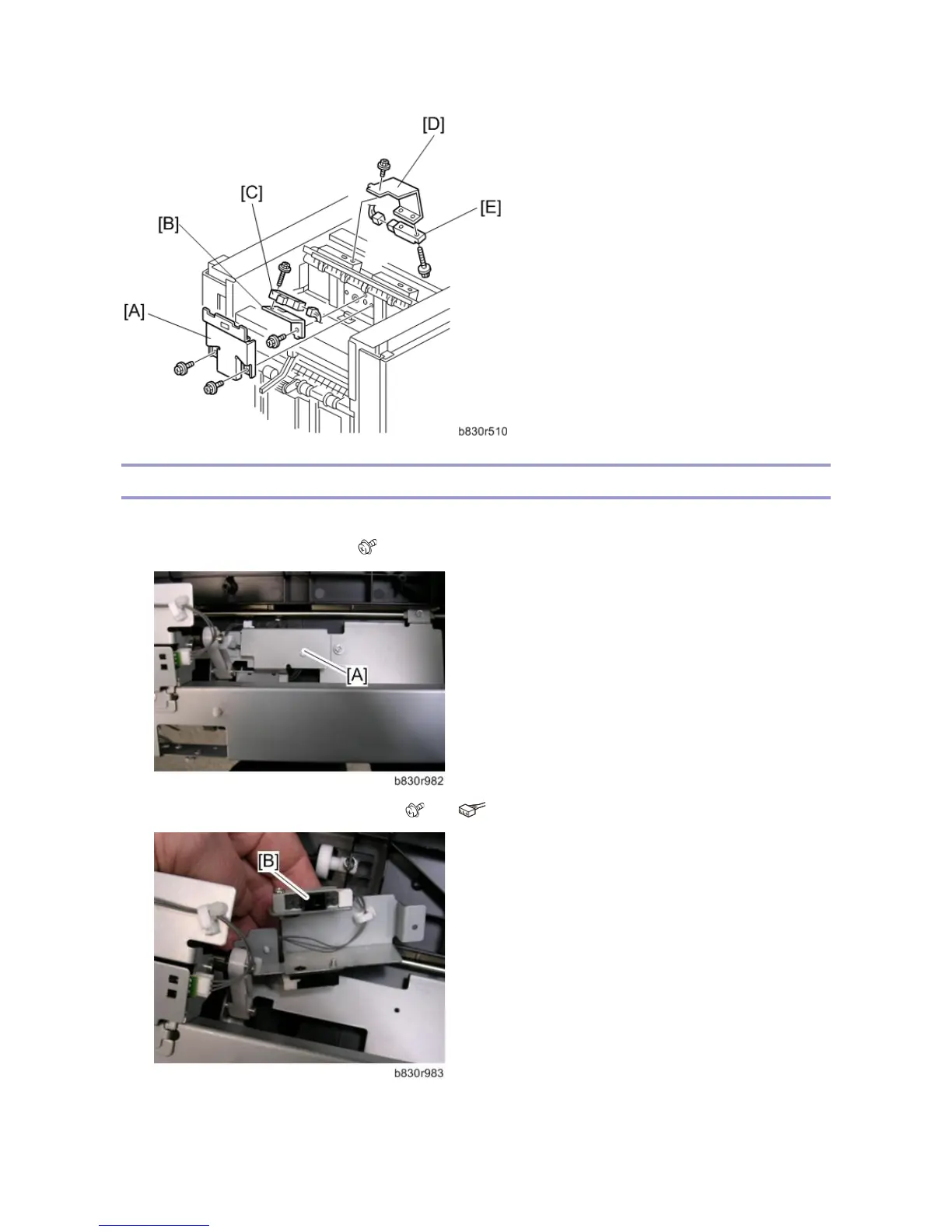
ray Exit Sensor
1.
Remove the t
op cover (
Left Covers, Rear
Cover
, T
op Cover
, Shift Cover
)
2.
Remove the s
ensor bracket [A]. (
x1)
3.
Remove the shift tray exit sensor 1 [B].
(
x1,
x1)
38
40
Table of Contents
Main Page
Default Chapter
5
Table of Contents
5
1 Detailed Descriptions
7
Mechanism Descriptions
7
Fuse List
7
Component Layout
9
Electrical Components
10
Drive Layout
13
Mechanism Details
15
Inverter
15
Shift Tray
16
Pre-Stack
18
Staple Tray Jogger
19
Stapling
21
Punch (2-Hole Punch Unit)
25
Jam Detection
27
Dip Sw
28
2 Replacement and Adjustment
29
Covers
29
Front Door, Left Inner Cover, Inner Cover
29
Inner Cover
30
Side Table and Upper Tray
30
Left Covers, Rear Cover, Top Cover, Shift Cover
31
Jogger Unit Cover
32
Rollers
33
Drag Roller
33
Positioning Roller
33
Alignment Brush Roller
34
Jogger Fence
35
Sensors
37
Paper Height Sensors
37
Exit Guide HP Sensor
37
Upper Tray Full and Exit Sensors
38
Shift Tray Exit Sensor
39
Main Board, Pre-Stack Paper Sensor
40
Staple Trimmings Hopper Full Sensor
41
Stapler Rotation HP and Stapler Return Sensors
42
Stapler
43
Shift Tray
45
Shift Tray Exit, Shift Tray Lift Motor
45
Shift Tray Lift Motor
45
Drag Roller, Drag Drive Motors, Drag Drive HP Sensor
46
Shift Motor and Sensors
48
Jogger Top Fence Motor
49
Jogger Unit
49
Jogger Bottom Fence Motor
50
Punch Unit
51
Punch Position Adjustment
51
Motors
52
Transport Motors, Exit Guide Motor
52
Upper Tray Motors
53
Pre-Stack Motors
54
Punch Motor
56
Staple Motors
57
3 Service Tables
58
Dip Switches
58
Test Points
59
Fuses
60
Related product manuals
Ricoh SR4120
95 pages
Ricoh SR790
25 pages
Ricoh SR3270
128 pages
Ricoh SR3260
128 pages
Ricoh SR3300
44 pages
Ricoh SR5050
185 pages
Ricoh SR3020
82 pages
Ricoh SR5060
185 pages
Ricoh SR5090
107 pages
Ricoh SR3290
108 pages



 To Next Page