PERFORMER Digital Partyline, User Manual, Version 2.30
Page 32
5 PERFORMER C3 DIGITAL BELTPACK
5.1 Get Started
Connect an appropriate headset to the headset connector (Æ User Elements Bottom). Select
the headset microphone type with the DIP switch 5.
Now connect the C3 into the partyline by connecting the C3 upstream port (Æ User Elements
Bottom) with the downstream port of the previous device with a 3-pole XLR cable. Once the
power LED lights up the C3 is powered correctly, is synchronized with the previous unit and
ready to use.
Note: The C3 needs to be connected to a power supply. This could be a C31+PSU or a master
station or the system Interface. This power supply must be at the head of the digital partyline
chain with C3s connected to the downstream port (
Æ
System Layouts),
5.2 User Elements Top
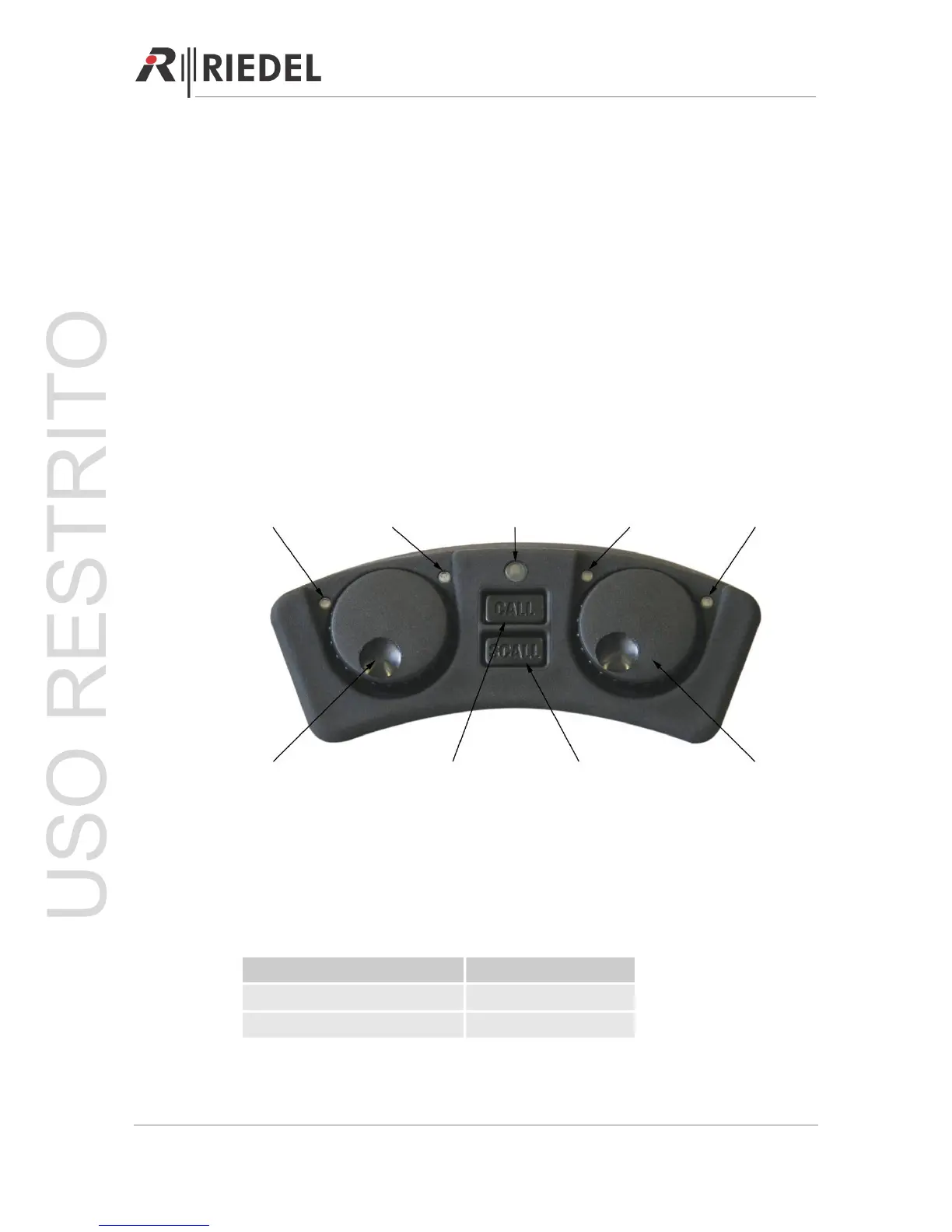
5.2.1 Error LED (red)
The error LED indicates that the bit error rate has exceeded the range tolerated. This is
usually caused by a defective cable or a cable run that is too long. The partyline cannot be
used in this case.
Status Error LED
Partyline error occurred Red 100%
Partyline works fine Red 0%
Error LED Channel A LED CALL Light Channel B LED Power LED
V
A A
olume A /
LK T
CALL Key GPI Key
(SCALL Key)
Volume B /
TALK B




 To Next Page