− 44 −
ME12058B
Maintenance Section
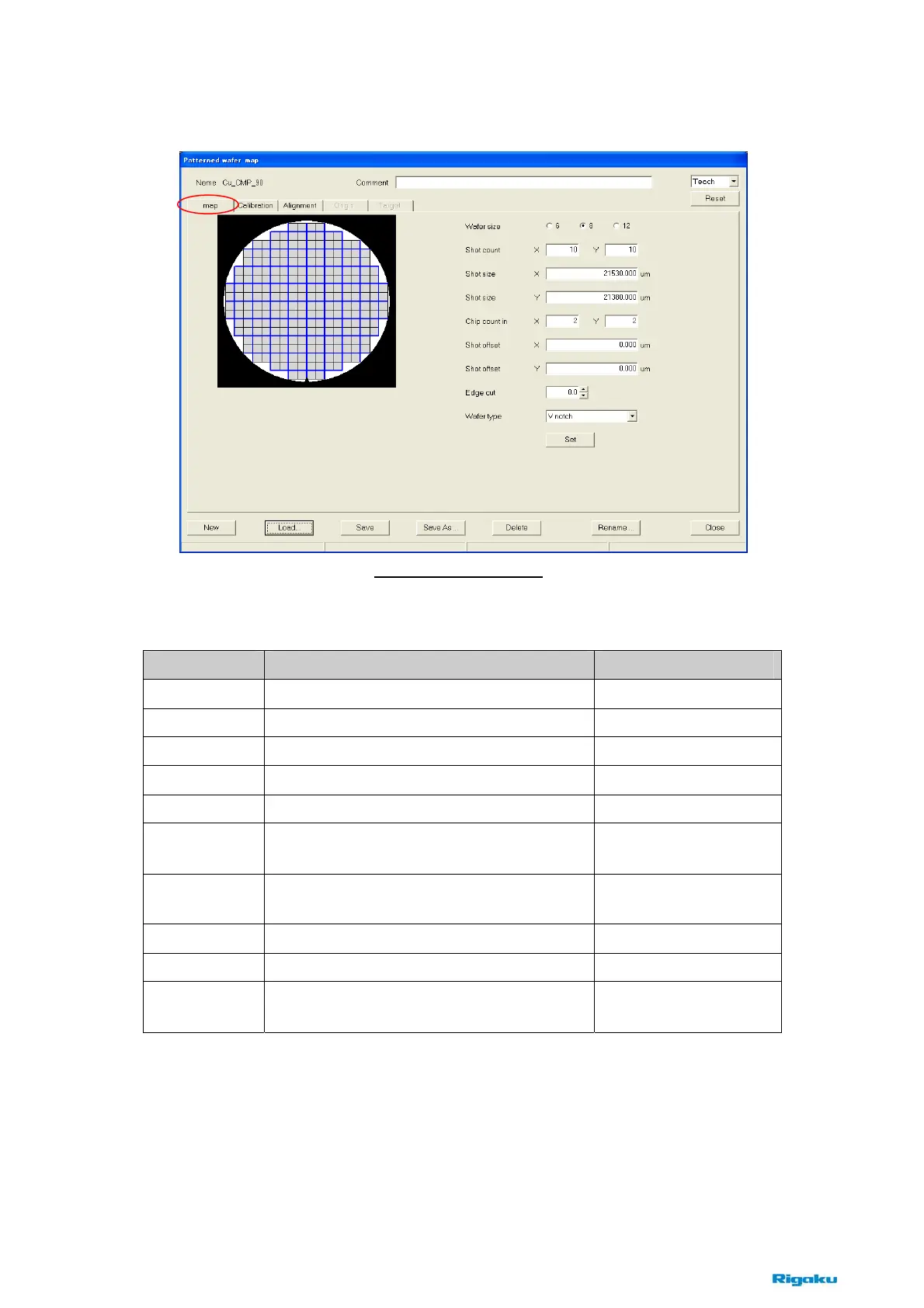
(2) [Map] tab
This tab is available to set the pattern information of wafer.
Items Contents Notes
Wafer size
Chooses wafer size in inches. 6 inches is not used.
Shot count
Enters the number of maximum shot counts. Each direction, X and Y.
Shot size X
Enters the shot size of X direction.
Shot size Y
Enters the shot size of Y direction.
Chip count in
Enters the number of chips in a shot. X × Y
Shot offset X
Enters the offset distance at X direction from
the wafer center.
Shot offset Y
Enters the offset distance at Y direction from
the wafer center.
Edge cut
Enters the edge cut.
Wafer type
Chooses wafer type, notch or orientation flat.
Set
Clicks this button to set conditions after
specifying above items
Fig. 8-2-11 [Map] tab



 To Next Page