PACK 5040M/6050M
PACK 5040A/6050A
9. Insert the product to be packaged between the two layers of film and place it on top of the sealing
conve
or.
he two sides of the weldin
arm should be
ositioned on the sides of the film outside the
roduct.
- In "manual" mode, control the descent of the welding arm via the (D) button or activate the foot
control command (o
tional).
- In "automatic" mode the lowerin
of the arm is automatic and at
ro
rammed intervals.
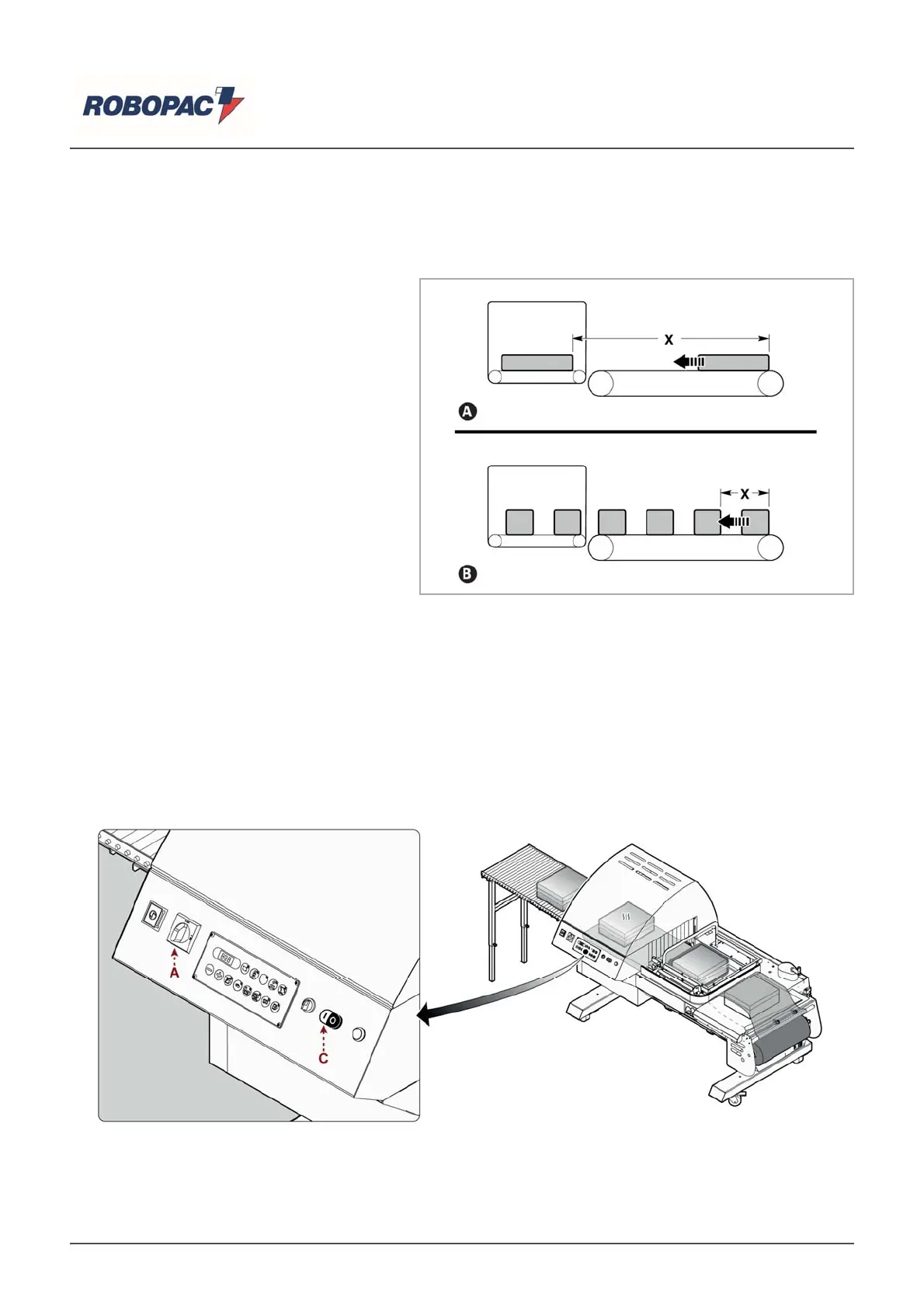
10. Adjust the sealing conveyor time
according to the length of the product.
A) Expulsion complete.
B) Partial expulsion with a higher
fre
uenc
.
11. At the end of the weldin
the arm is raised automaticall
.
he
roduct is conve
ed into the tunnel, where it under
oes a shrinka
e of the film.
12. At the end of the c
cle, the
roduct exits the tunnel.
| Important
As soon as the welding of a product has ended and the welding mat has finished the run, the machine is ready
for a new cycle even if the previously welded product has not yet come out of the tunnel or even if it has not
et reached the tunnel carrier.
6.7. WORK CYCLE STOP
Proceed as indicated.
1. Press the (C) (black) switch.
he machine
erforms a c
cle and sto
s automaticall
.
English



 To Next Page