PACK 5040M/6050M
PACK 5040A/6050A
White switch: turns on the tunnel heatin
and
ets the machine read
for weldin
.
Black button: stops the working cycle; if the tunnel temperature is higher than 100°C the cooling
rocedure is started.
D) (PACK 5040A - PACK 6050A)
acka
in
c
cle "Start" button: Starts the
roduct
acka
in
c
cle.
- onl
once in “manual” c
cle.
- at
ro
rammed intervals in "automatic" c
cle.
E) "Scra
recover
enabler" selector: to activate and deactivate the scra
recover
coil (O
tional).
-
osition "0":
Function deactivated.
-
osition "1":
Function activated.
F) "Blow film release enabler" selector: to activate and deactivate the air blow to o
en the film (O
tional).
-
osition "0":
Function deactivated.
-
osition "1":
Function activated.
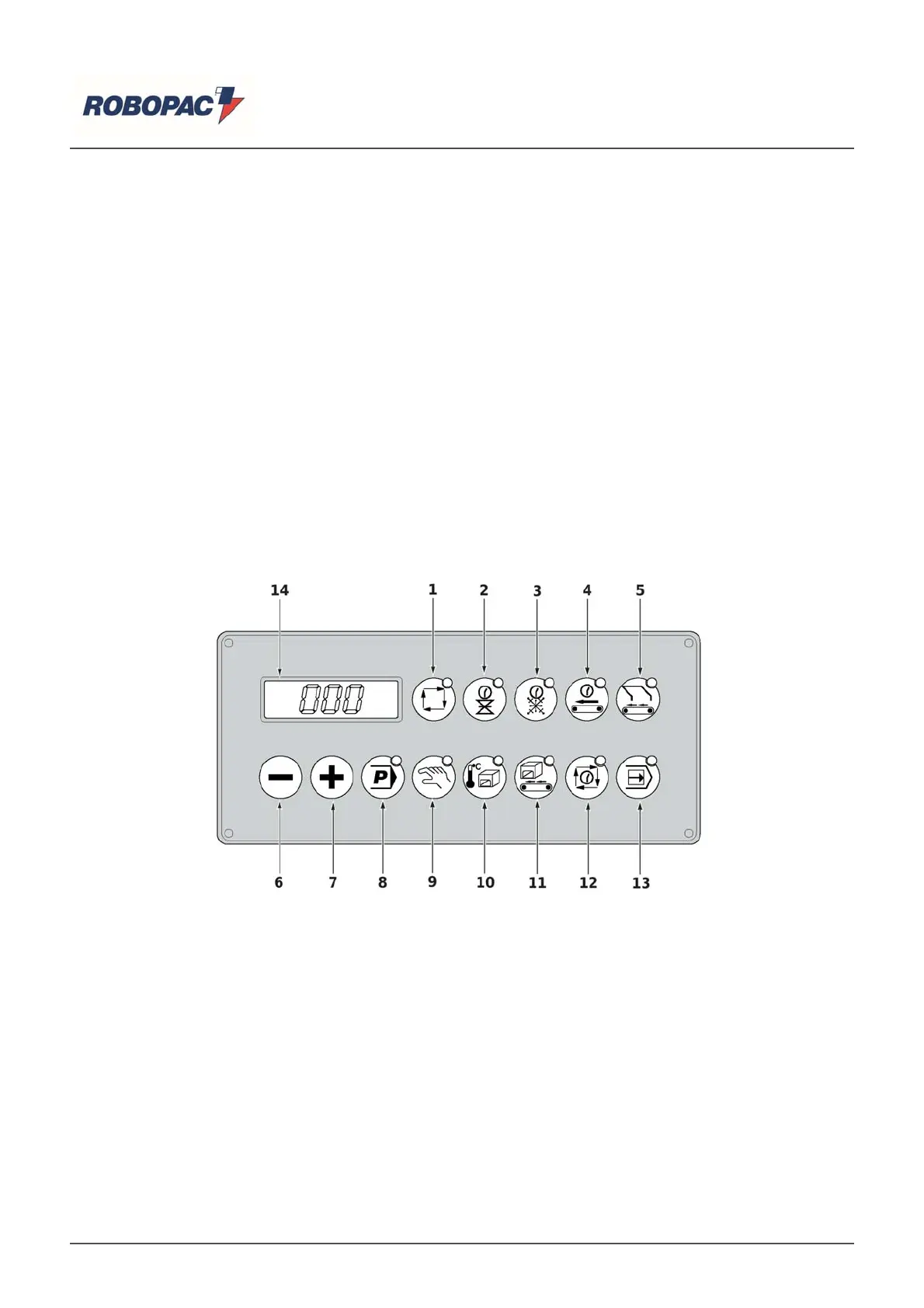
6.3. KEYBOARD COMMAND DESCRIPTION
he illustration shows the main controls of the machine and the list shows their descri
tion and function.
1) " (PACK 5040A - PACK 6050A) " automatic c
cle ke
: to activate the automatic machine c
cle.
the dis
la
shows the writin
“AUT”.
2) "Sealin
time" button: to set the necessar
time to
erform film sealin
o
eration.
- Press to dis
la
the set time.
- In order to increase or decrease the value, press the (6) or (7) keys respectively until the desired
value is reached.
Values from 0.0÷ 1.5 sec. with 0.1 sec. increments can be set.
3) "Coolin
time" ke
:
ro
rams the coolin
time.
Values from 0.0÷ 2.0 sec. with 0.1 sec. increments can be set.
- Press the key to activate the function; the relative LED lights up and the display shows the current
value.
4) "Sealin
conve
or time" ke
:
ro
rams the weldin
ta
e functionin
time.
Values from 0.0÷ 25.5 sec. with 0.5 sec. increments can be set.
- Press the key to activate the function; the relative LED lights up and the display shows the current
value.
English



 To Next Page