EasyManua.ls Logo

Robustel GoRugged R3000 Lite - Page 74

Robustel GoRugged R3000 Lite
136 pages
Print Icon
To Next Page IconTo Next Page
To Previous Page IconTo Previous Page
Loading...
Robustel GoRugged R3000 Lite User Guide
RT_UG_R3000 Lite_v.1.4.1 15.11.2016 73 / 135
Confidential
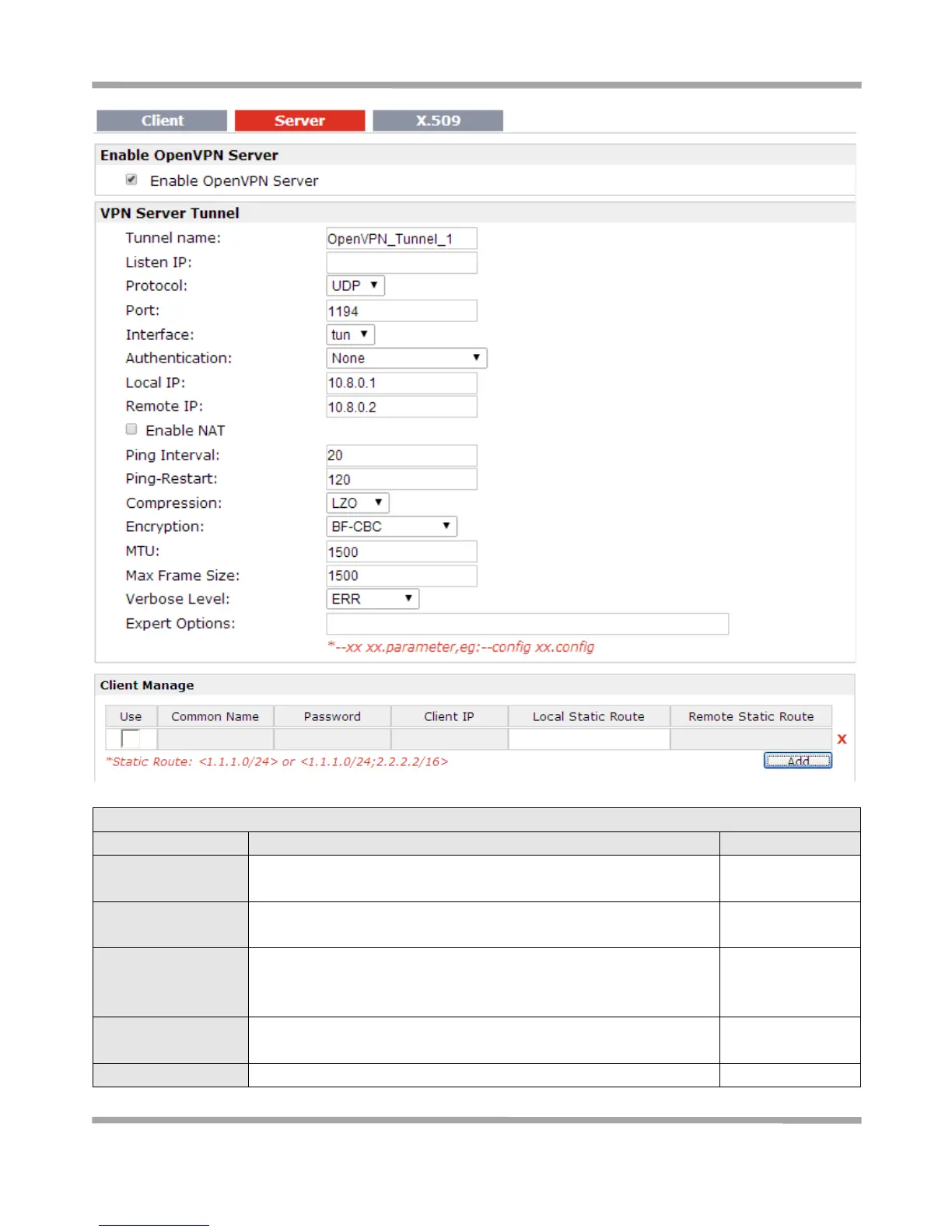
Server @ Open VPN
Item
Description
Default
Enable OpenVPN
Server
Tick to enable OpenVPN server tunnel.
Disable
Tunnel name
Name the OpenVPN server tunnel.
Tunnel_OpenVPN_
0
Listen IP
You can enter the IP address of cellular WAN, Ethernet WAN or
Ethernet LAN. Null or 0.0.0.0 stands for using the active WAN link
currently-cellular WAN or Ethernet WAN.
0.0.0.0
Protocol
Select from “UDP” and “TCP Client” which depends on the
application.
UDP
Port
Set the local listening port
1194

Table of Contents

Other manuals for Robustel GoRugged R3000 Lite

Related product manuals