Robustel GoRugged R3000 Lite User Guide
RT_UG_R3000 Lite_v.1.4.1 15.11.2016 87 / 135
Confidential
the channel, for the alarm and upload platform.
Used to indicate a dot in the read into the position of the channel. For
example: read the channel value is 1234, and a Decimal Place is equal
to 2, then the actual value of 12.34.
A value used to identify the channel for unsigned.
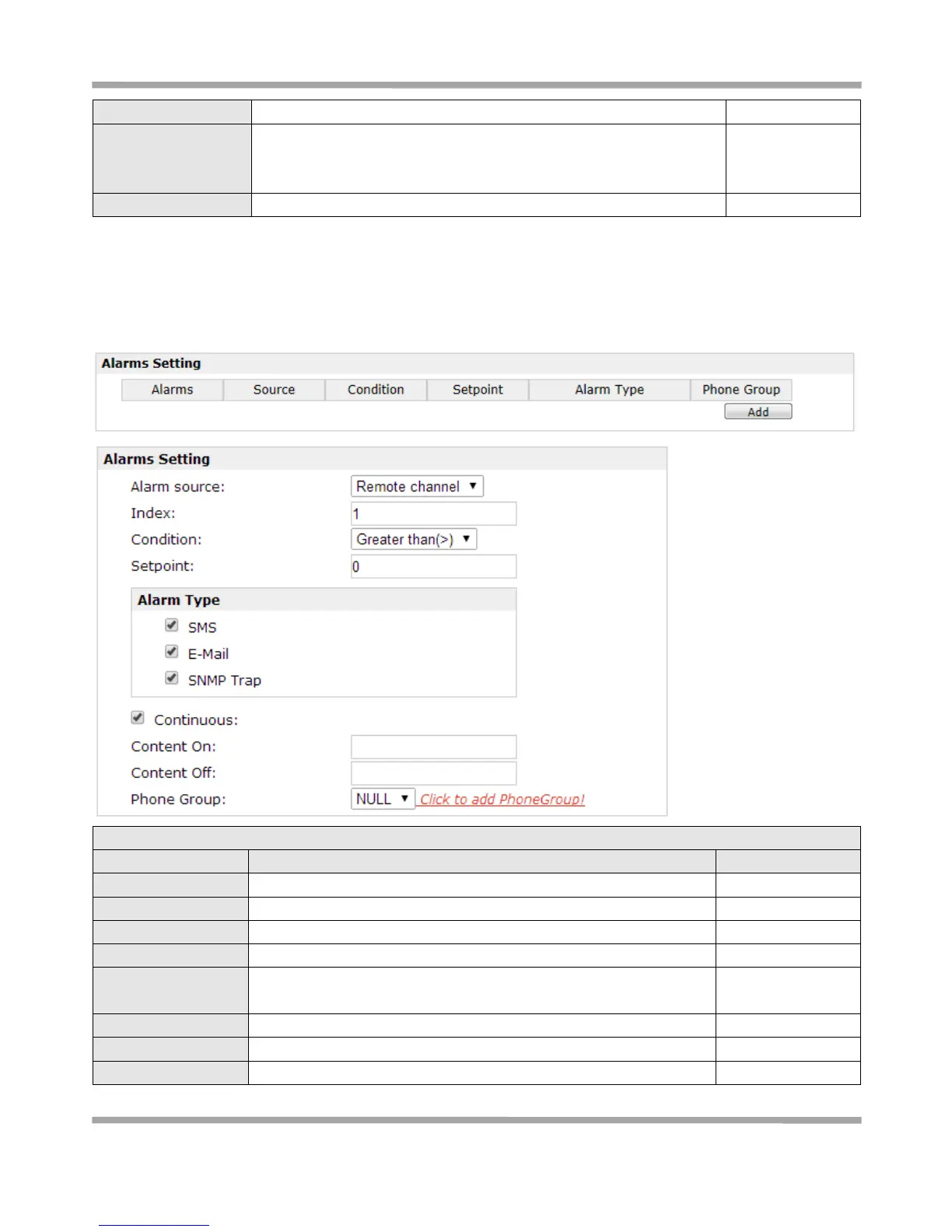
3.30 Configuration > Alarms
This section allows users to configure the alarms.
Select from “Remote channel”, “CSQ” and “Cellular Status”.
Used to identify the way of Remote Channel.
The conditions of trigger the alarm.
The alarm types, you can choose more.
Select from “SMS”, “Email”, “SNMP Trap”.
The content when the alarm on.(for email)
The content when the alarm off.(for email)
You should add Phone Group at Phonebook firstly.








 To Next Page