Reference Manual
00809-0100-4130, Rev AA
May 2009
Rosemount 2130
2-4
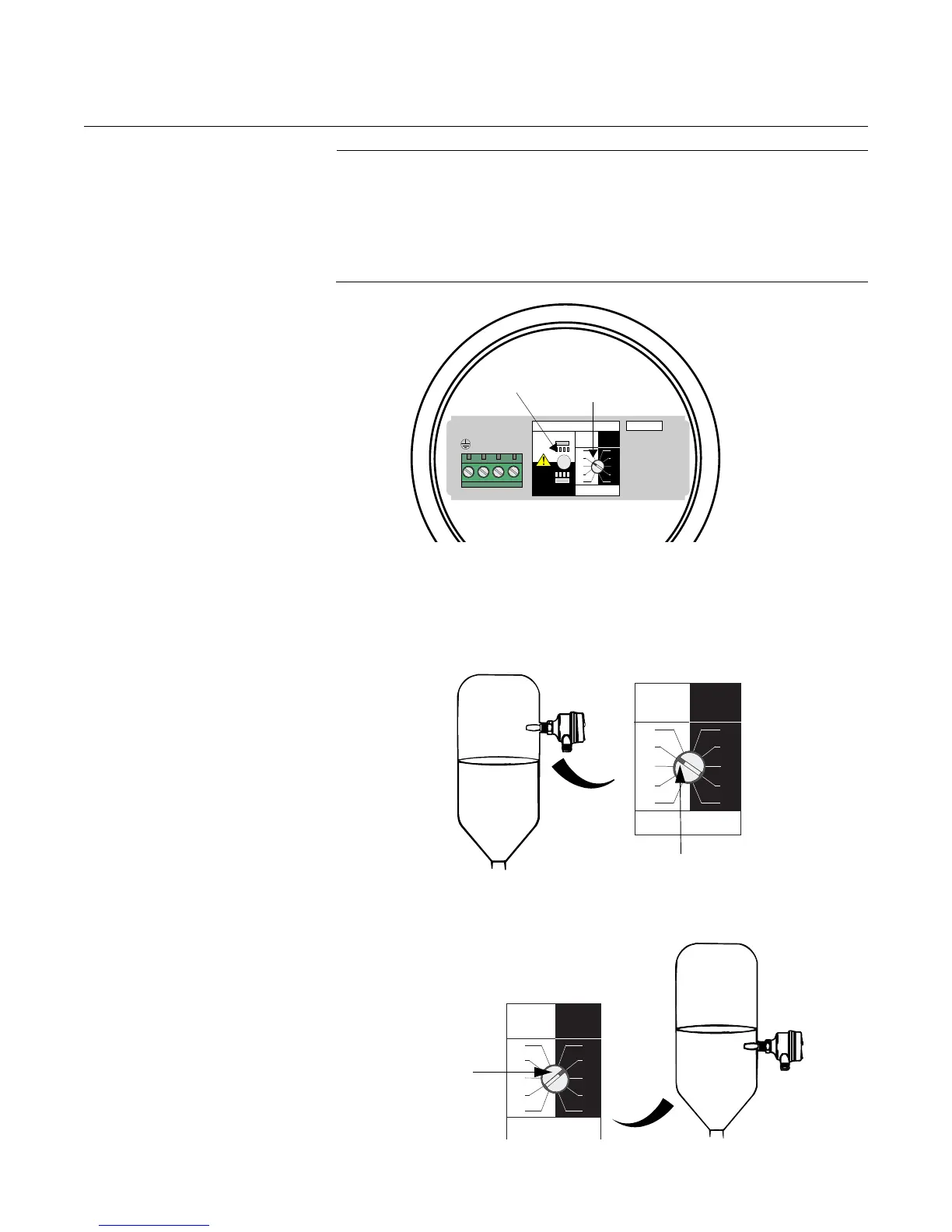
SET MODE SWITCH /
SWITCHING TIME DELAY
NOTE:
• There is a five second delay when changing mode or time delay
• The notch on the rotating switch indicates the selected mode and
time delay
• Recommended installation for high level is “Dry on” and for low level it
is “Wet on”. Do not install in the normally ‘off’ state
1. Mode switch: Select “Dry on” or “Wet on” mode.
2. Switching time delay: Select 0.3, 1, 3, 10, or 30 seconds for the
delay before switching output state.
Figure 2-3. “Dry On” Mode
A one second time delay (typical for high level applications) is illustrated.
Figure 2-4. “Wet On” Mode A one second time delay (typical for low level applications) is illustrated.
OPERATION MODE
Dry On Mode
Dry
Wet
Wet On Mode
Dry
Wet
Dry On Wet On
Seconds Delay
0.3 0.3
3
30
10
1
3
30
10
1
12
3
OUT
+
-
4
PLC/PNP
2130/FIG11.EPS
Mode
Switch/Time
Delay
LED
Dry On Wet On
Seconds Delay
0.3 0.3
3
30
10
1
3
30
10
1
Mode Dry ON
2130/FIG11A, FIG13B.EPS
Dry On Wet On
Seconds Delay
0.3 0.3
30
10
3
30
10
1
3
1
2130/FIG11B, FIG13C.EPS
Mode Wet On











 To Next Page