Reference Manual
00809-0100-4130, Rev AA
May 2009
Rosemount 2130
2-6
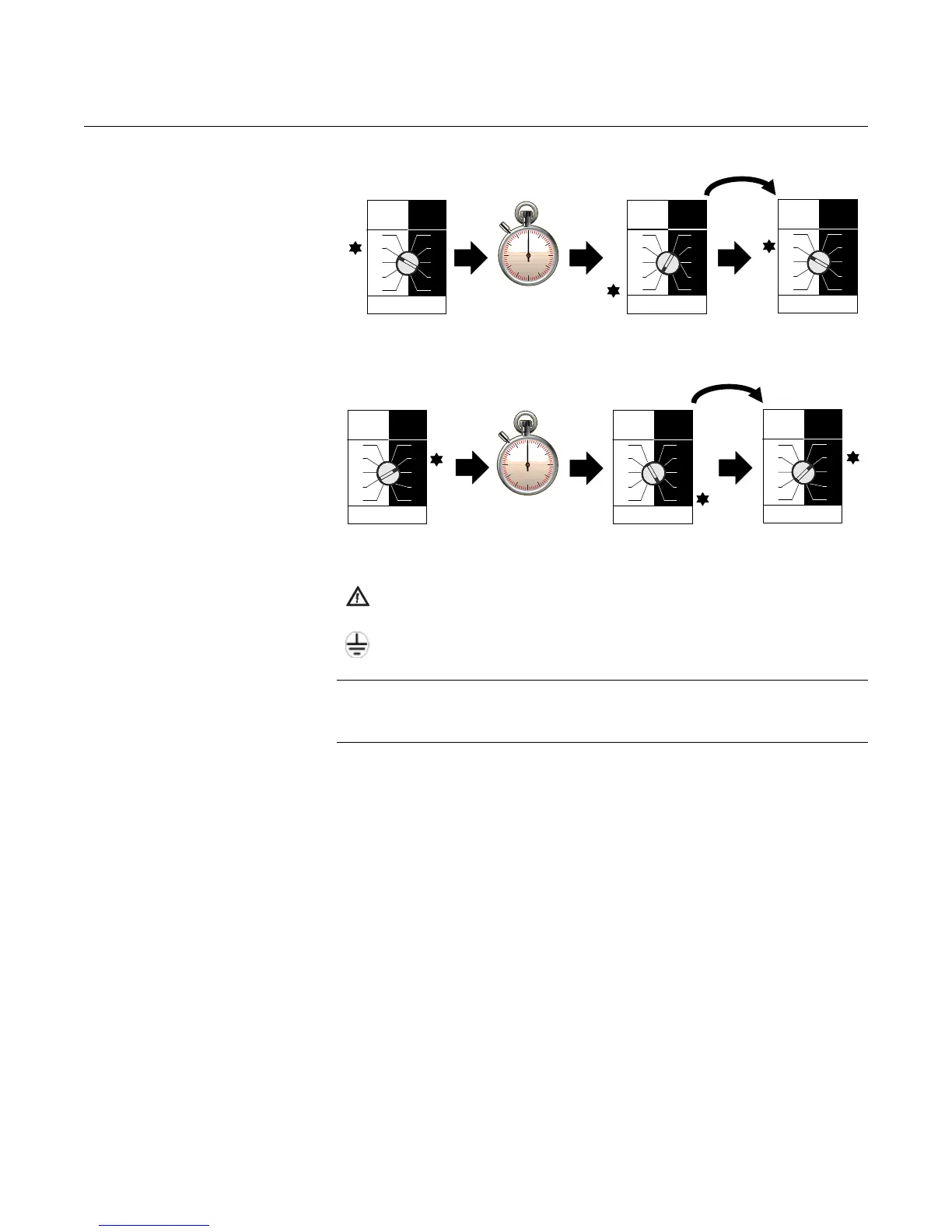
Operating Mode Selecting Self-Check Operating Mode
When the self-check mode is operating, the ‘heartbeat’ LED color is yellow.
Selecting Normal Operating Mode
When the normal mode is operating, the ‘heartbeat’ LED color is red.
ELECTRICAL
INSTALLATION
Isolate the power supply before connecting the switch or removing the
electronics.
The functional ground (earth) terminal must be connected to an
external grounding (earthing) system.
NOTE:
When replacing a cassette, it is important to re-calibrate. Refer to
“Replacement and Calibration of Electronic Cassettes” on page 3-4.
Dry On Wet On
Seconds Delay
0.3 0.3
3
30
10
1
3
30
10
1
Dry On Wet On
Seconds Delay
0.3 0.3
3
30
10
1
3
30
10
1
Dry On Wet On
Seconds Delay
0.3 0.3
3
30
10
1
3
30
10
1
Dry On Wet On
Seconds Delay
0.3 0.3
3
30
10
1
3
30
10
1
Dry On Wet On
Seconds Delay
0.3 0.3
3
30
10
1
3
30
10
1
Dry On Wet On
Seconds Delay
0.3 0.3
3
30
10
1
3
30
10
1











 To Next Page