43
Configuring the Access Point
Configuring Network Settings
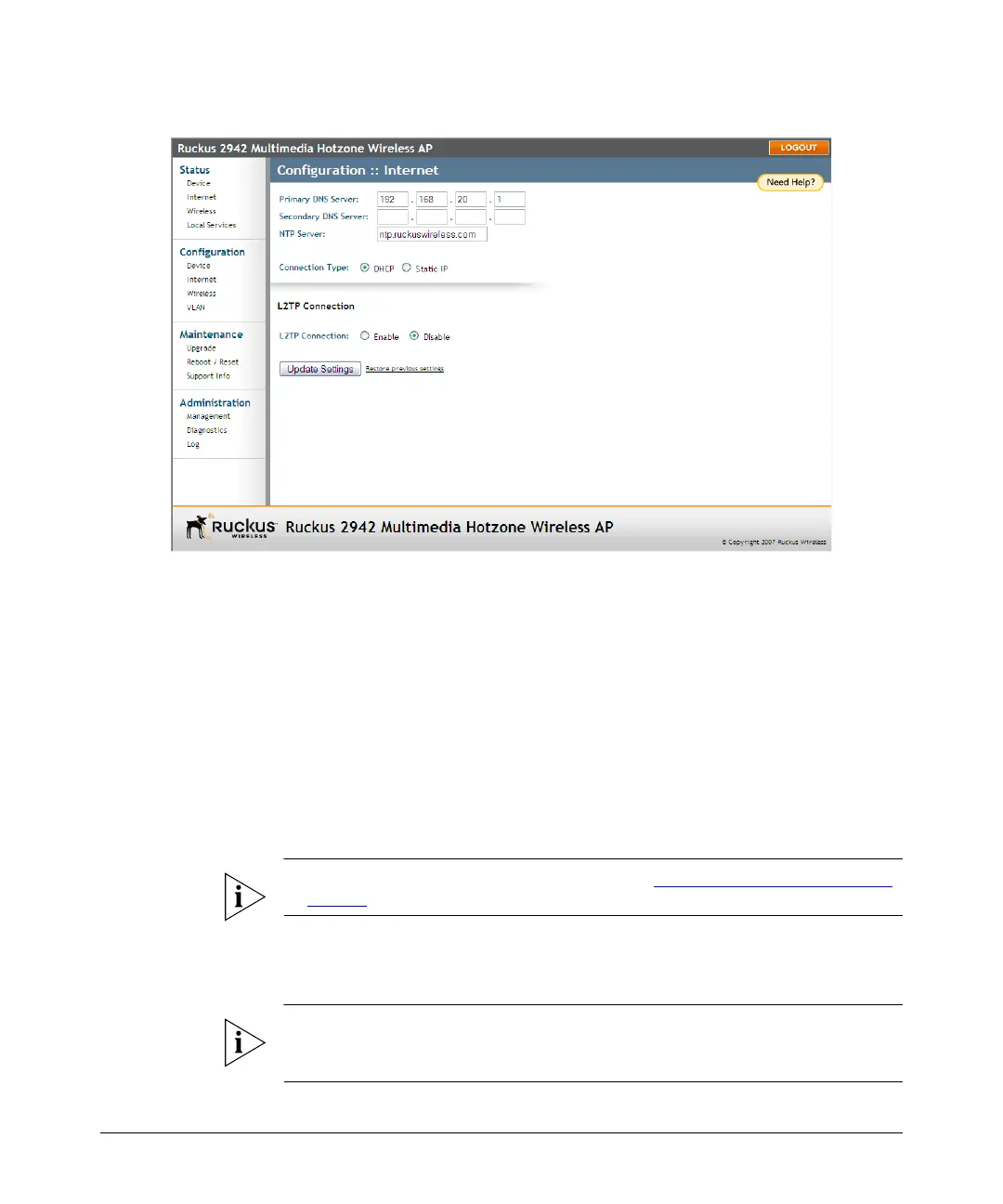
Figure 20. The Configuration > Internet page
To review and modify the network configuration
1. Go to Configuration > Internet. The Internet page appears.
2. Verify that Connection Type is set to Static IP.
3. When the Static IP options appear, you can changes to the following settings:
• Gateway: This is the gateway IP address of the Internet interface.
• Primary DNS Server: The IP address of the primary Domain Name System
(DNS) server.
• Secondary DNS Server: The IP address of the secondary Domain Name
System (DNS) server.
• NTP Server: Hostname of the Network Time Protocol (NTP) server.
4. Click Update Settings to save your changes.
NOTE: For information on L2TP settings, refer to “Configuring the L2TP Settings”
on page 44.
Changing the Network Connection Type
NOTE: Perform this task only with guidance from your ISP. The required entries for
static IP address or PPPoE should be available, if your AP connection type is changed
to either of those types.






 To Next Page