80
Managing the Access Point
Rebooting the Access Point
• Click Save parameters only. The clock starts right away, and the actual
upgrade will occur at the first effective interval.
After you click one of these two options, a status bar appears during the upgrade
process.
When the upgrade is complete, the AP will reboot automatically.
Rebooting the Access Point
You can use the Web User interface to prompt the AP to reboot, which simply restarts
the AP without changing any of the current settings. Please note that rebooting the
AP will disrupt network communications in any currently active WLANs.
To reboot the Access Point
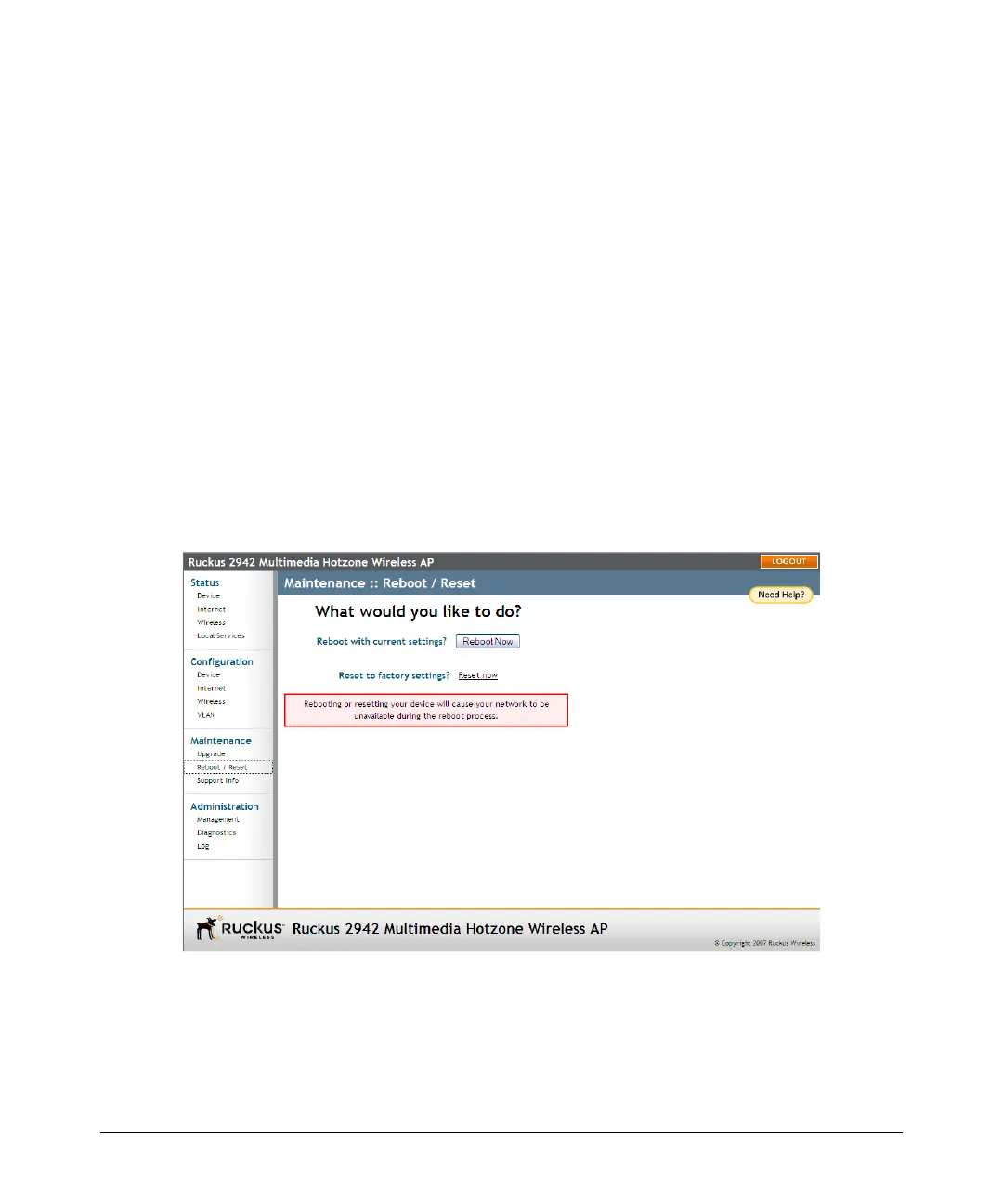
1. Go to Maintenance > Reboot/Reset. The Maintenance :: Reboot/Reset page
appears.
2. Click Reboot Now. After a brief pause, you will be automatically logged out of
the AP.
Figure 40. The Maintenance :: Reboot/Reset page
After a minute or so, you should be able to log back into the AP, which verifies that
the reboot was successful. You can also check the LEDs on the AP’s front panel to
verify the status of the device.



 To Next Page