8
Introducing the ZoneFlex Wireless Bridge
Get to Know the Hardware Features
Aiming Mode
In Aiming Mode, LED 1 indicates that the Wireless Bridge is in Aiming Mode. LED
indicators 2 - 6 are used together to indicate signal strength, and should be read from
bottom to top (the higher the LEDs go, the stronger the signal).
In Aiming Mode, each LED has three states to represent different values. Solid yellow
indicates the highest value, flashing yellow indicates medium value and off indicates the
lowest value. If all six LEDs are solid yellow, the Wireless Bridge has the strongest signal
possible. If some LEDs are flashing yellow or off, reposition the Wireless Bridge to achieve
a better signal. For more detailed information on signal strength levels, see “RSSI values
of LED indicators” on page 48.
Push Buttons
The ZoneFlex 7731 includes two push buttons:
■ A recessed factory default reset button (located inside the bottom panel)
■ A large blue Aiming button that sets the bridge to Aiming Mode (located on the
outside of the unit)
To reset the unit to its factory defaults, press and hold the Reset button for six (6) seconds.
Press and hold the blue Aiming button for four (4) seconds to initiate aiming between the
Root and Non-Root Bridges.
CAUTION: Resetting the ZoneFlex 7731 to its factory defaults will result in loss of all
configuration settings, including the provisioning (pairing of the Root and Non-Root
Bridge) settings. If you do need to reset to defaults, you will need to re-provision the
bridge.
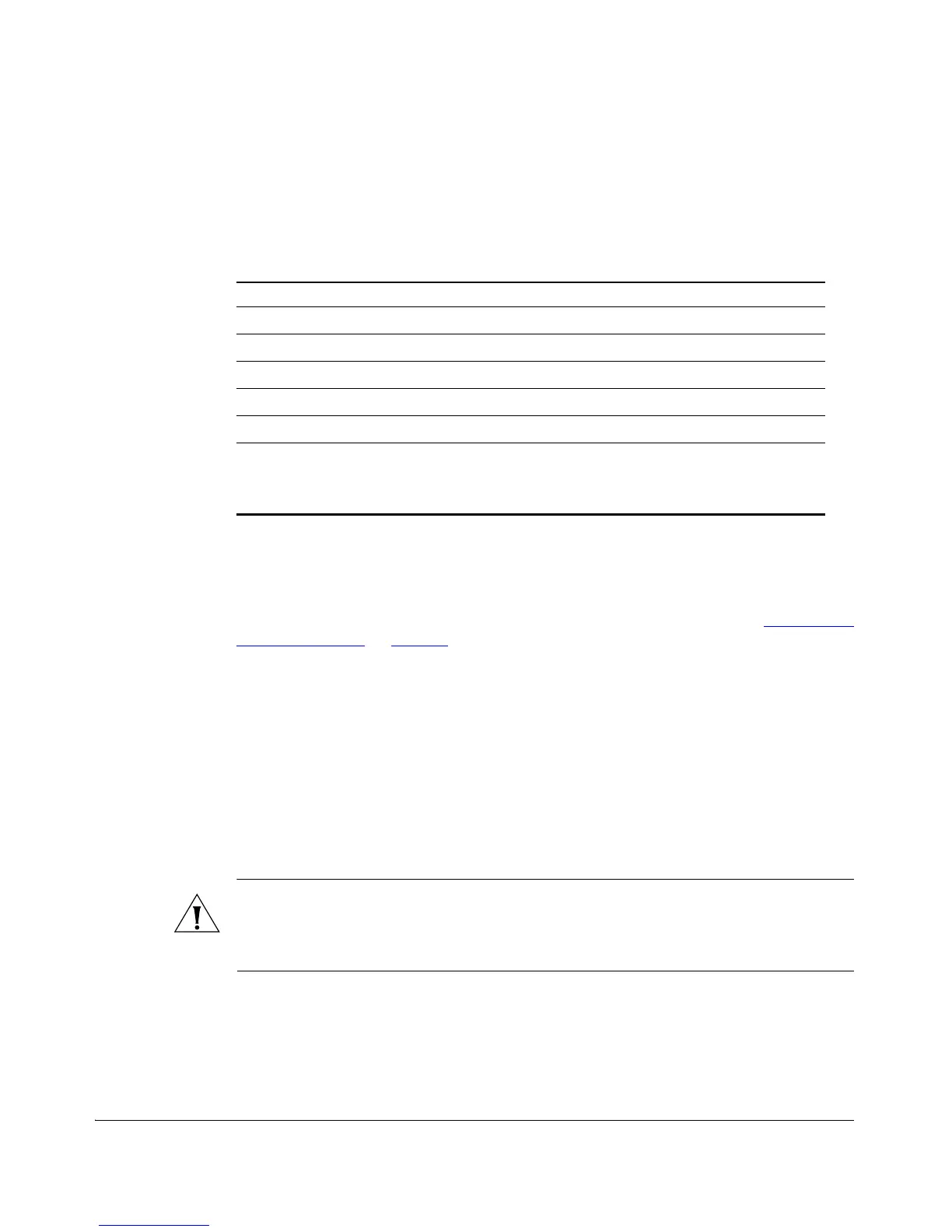
Table 3. Aiming Mode LED indicators
LED Meaning
LED 6 Signal strength 5
LED 5 Signal strength 4
LED 4 Signal strength 3
LED 3 Signal strength 2
LED 2 Signal strength 1
LED 1 (AIM/PWR) Solid Yellow = Aiming Mode (RSSI >= 5)
Solid Green = Normal Operation Mode
Off = Off



 To Next Page