28
Installing the Wireless Bridge
Physical Installation
WARNING: Only trained and qualified personnel should be allowed to install,
replace, or service this equipment.
WARNING: Installation of this equipment must comply with local and national
electrical codes.
CAUTION: Make sure that you form a 3”-5” drip loop in any cable that will be placed
outdoors. This will prevent water from running along the cable and entering the
Wireless Bridge, the surge protector or the building where the cable terminates.
CAUTION: Be sure that grounding is available and that it meets local and national
electrical codes. For additional lightning protection, use lightning rods and lightning
arrestors.
.
WARNING: The Ruckus Wireless PoE injector (if supplied with your Wireless Bridge)
is for indoor use only. Never mount the PoE injector outdoors with the Wireless Bridge.
Using Power over Ethernet
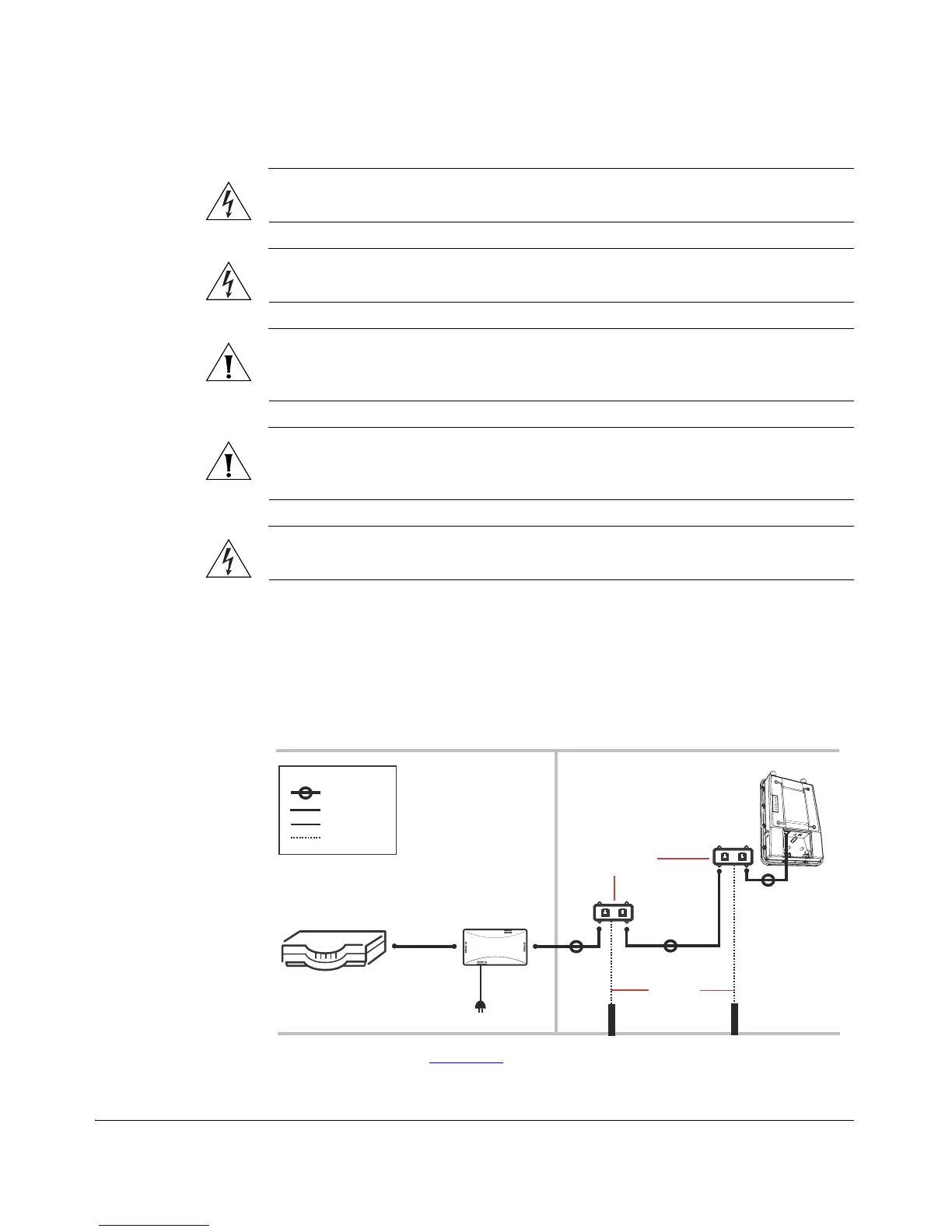
Refer to the following diagram for installation components when using PoE to power
the Wireless Bridge.
Figure 22. Installation components for a PoE installation
*Note: see note about Drip loops
below.
Router or switch
PoE injector
Cat5 Ethernet
cable
PoE power
adapter
ZoneFlex 7731
Wireless Bridge
INDOORS
OUTDOORS
Ground rod
Ethernet surge
protectors
18 AWG min
green-and-
yellow
wire used
Ground rod
Outdoor-rated
Cat5e FTP cable
Drip loop*
Legend
Ethernet cable
Power cable
Ground wire



 To Next Page